26
Solomon
short.bk Rev. C
A5 size KAUD.FM
10/30/98 Pass 2
L
Proof Sign-off:
Y.Yano _______
N.Nomoto _______
K.Norum _______
3. Click the
Background Printing
radio buttons to turn
background printing on or off.
4. When background printing is on, you can use your Macintosh
while it is preparing a document for printing. You must turn
on background printing to use the EPSON Monitor3 utility to
manage print jobs.
5. Close the Chooser.
For information on opening and using the software, see “Printing
Your First Page for Macintosh” on page 30. See also “Using the
Printer Software for Macintosh” in the online Reference Guide.
Loading Paper
Follow these steps to load plain paper in the printer.
You can also print on ink jet paper, photo-quality glossy film or
paper, photo paper, transparencies, envelopes, index cards, and
adhesive sheets. For details on using such media, see “Printing
on Special Paper” in the online Reference Guide.
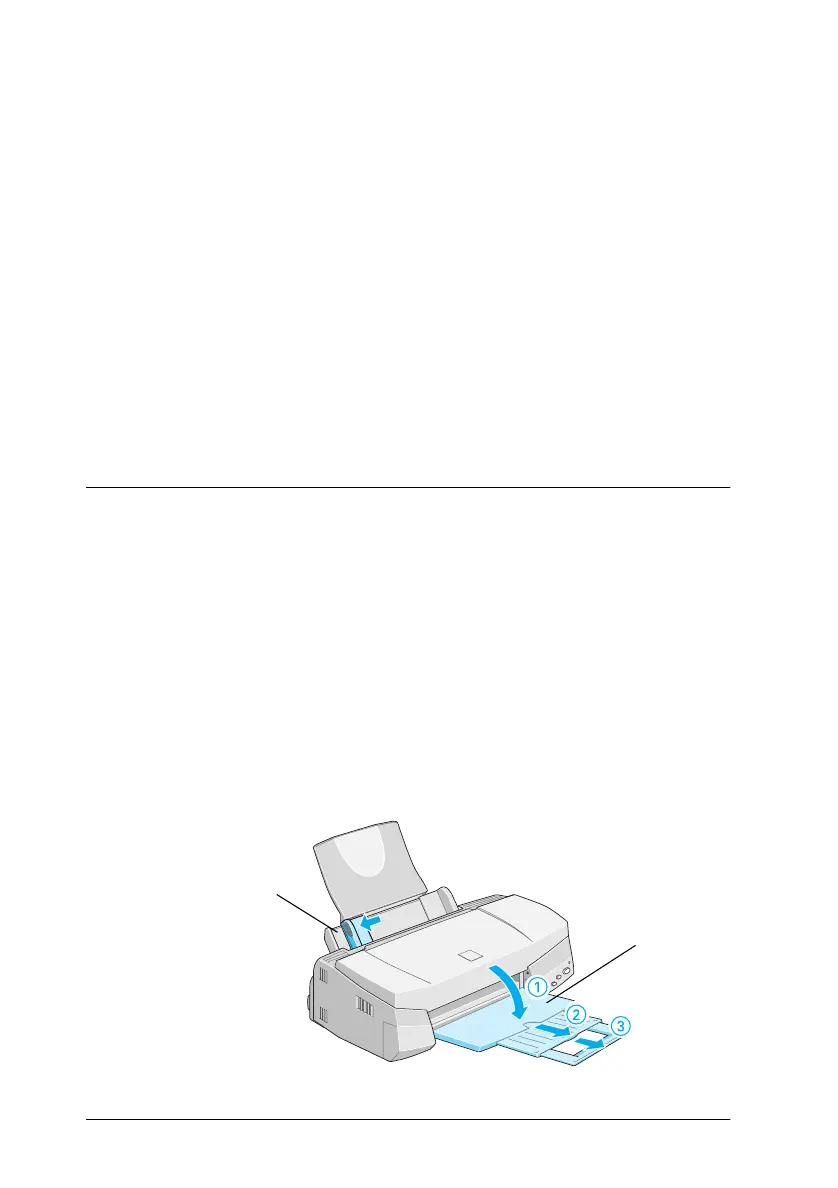
1. Lower the output tray and slide out the extension. Next, slide
the left edge guide so that the distance between the edge
guides is slightly wider than the width of your paper.
output tray
edge guide



 To Next Page