3-9
Installing EPSON Stylus RIP for Windows
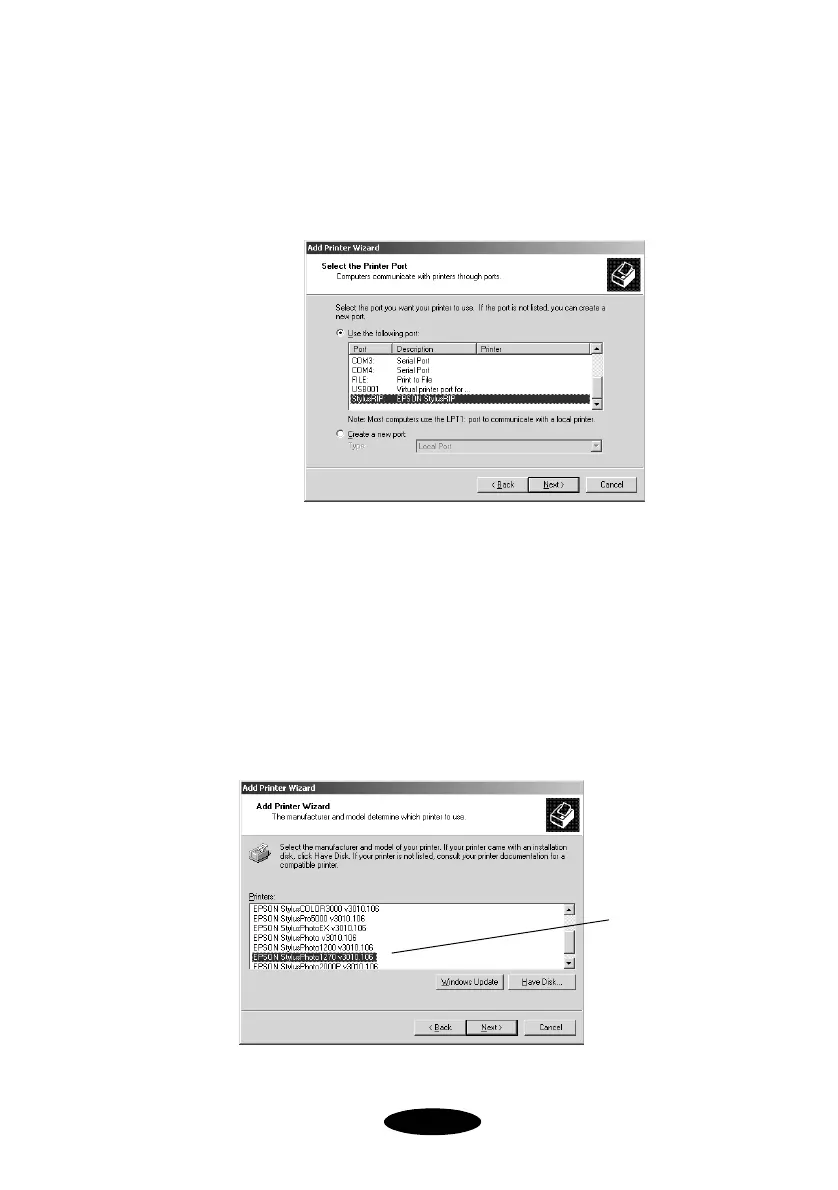
5. At the Select the Printer Port dialog box, make sure the
Use the following port option is selected, then choose
StylusRIP: EPSON StylusRIP
from the port list, and click
Next
.
6. At the Add Printer Wizard dialog box, click
Have Disk
.
7. At the Install from Disk dialog box, click
Browse
and
select
(CD-ROM drive):\PPD2000\USA\OEMSETUP.EXE
.
Then
click
Open
and click
OK
.
8. At the Add Printer Wizard PPD List dialog box, highlight
the PPD file that corresponds to your printer model and
click
Next
.
Click here to
select your
printer
Nflight.bk Page 9 Friday, September 1, 2000 8:32 AM













 To Next Page