3-10
Installing EPSON Stylus RIP for Windows
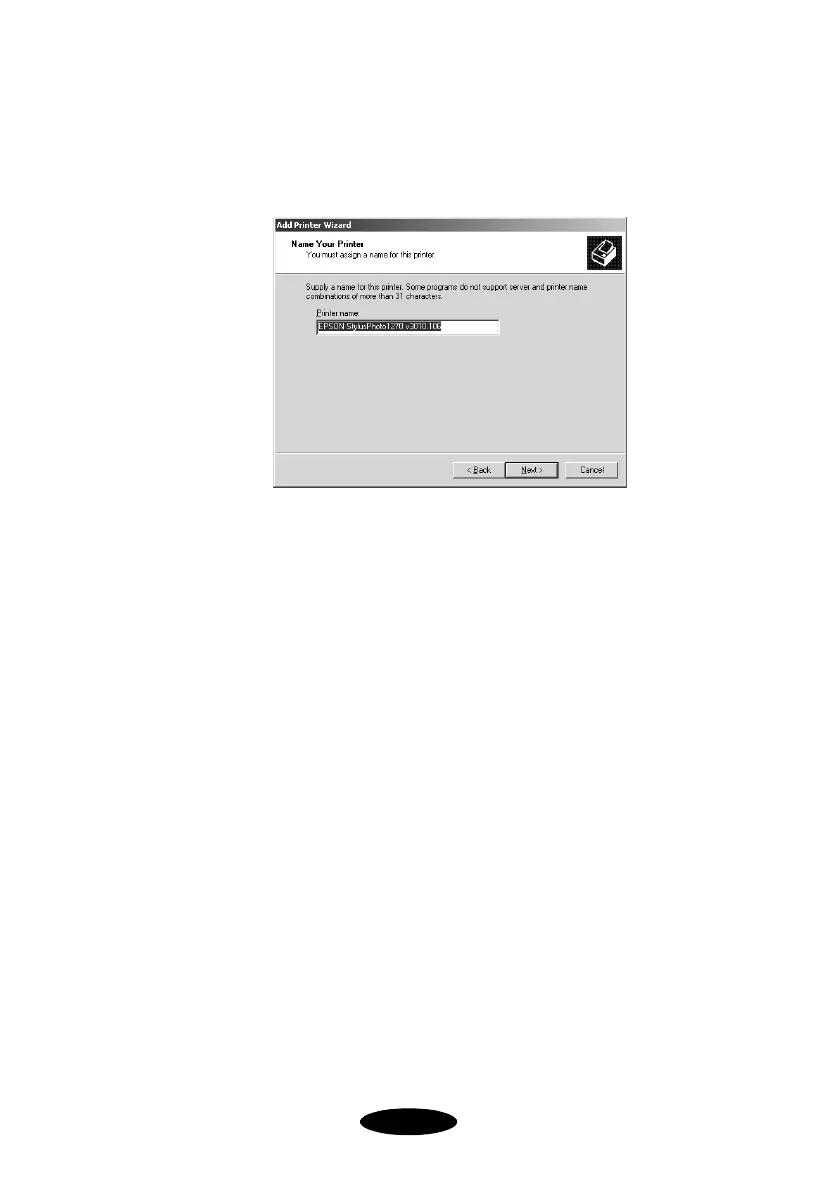
9. At the Name Your Printer dialog box, give the Stylus RIP
printer a descriptive name to differentiate it from the
standard driver. Then click
Next
.
10. At the Printer Sharing dialog box, make sure the
Do not
share this printer
option is selected, then click
Next
.
11. At the Print Test Page dialog box, click
No
, then click
Next
.
12. Once the PostScript driver has been installed on your
system, you see a dialog box telling you that setup was
successful. Click
Finish
to complete the installation.
13. At the Digital Signature Not Found dialog box, click
Yes
.
The selected printer is installed and added to the Printer
window. If you aren’t printing in a networked environment,
you can jump ahead to Chapter 4 to begin printing with the
RIP.
Nflight.bk Page 10 Friday, September 1, 2000 8:32 AM













 To Next Page