12
❏
In a location where a dedicated power outlet is available.
❏
In a location where you can set and remove paper without difficulty.
❏
In a location with sufficient space around the product to allow for installation of accessories, replacement
of consumable products, and daily cleaning.
❏
In a location meeting the following conditions:
Connecting the Power Cable
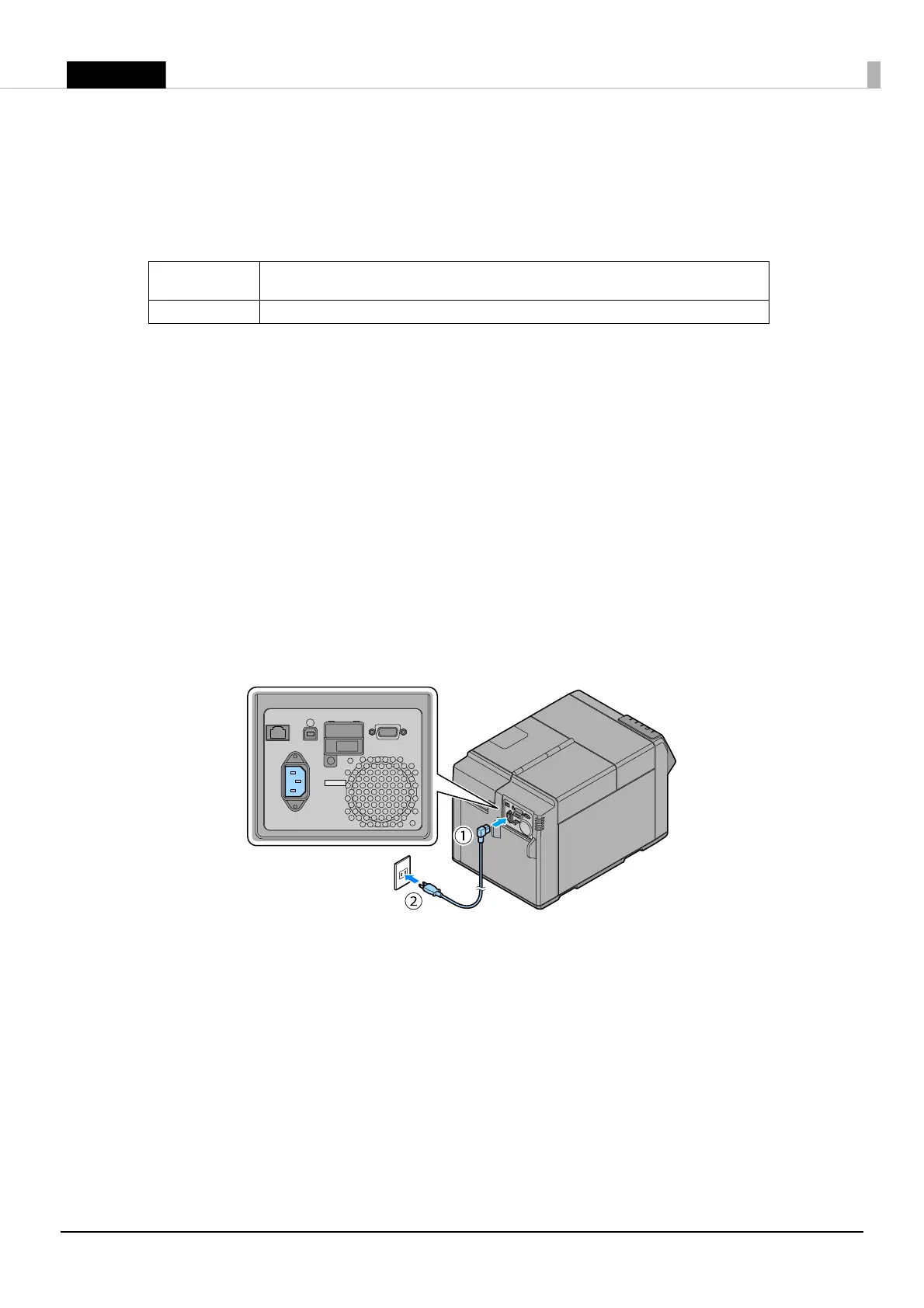
Connect the power cable by following the steps below.
!WARNING:
❏
Use only AC 100 V for the power supply. Using other type of power supply may cause electric shock
or fire.
❏
Be sure to install this product in the vicinity of a power outlet so that you can immediately unplug
the product if some fault or other problem occurs.
1. Make sure that the printer is powered off. (U
"Turning Off" on page 10)
2. Insert the power cable connector into the AC inlet on the product securely to the bottom.
3. Fully insert the power plug securely into the outlet.
Temperature
Operating: 5 to 35°C {41 to 95°F} Storage: -20 to 40°C {-4 to 104°F} (At 40°C {104°F}: up
to 1 month)
Humidity
Operating: 20 to 80% RH Storage: 5 to 85%RH (No condensation)



 To Next Page
 Loading...