EasyManua.ls Logo

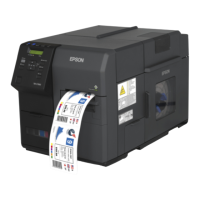
Epson ColorWorks C7500 - User Manual

Epson ColorWorks C7500
33 pages
Print Icon
To Next Page IconTo Next Page
Loading...
Setup Guide
Before use. . . . . . . . . . . . . . . . . . . . . . . . . . . . . . . . . . . . . . . . . . . 2
Part Names and Functions . . . . . . . . . . . . . . . . . . . . . . . . . . . 6
Basic Operation . . . . . . . . . . . . . . . . . . . . . . . . . . . . . . . . . . . . 10
Setup . . . . . . . . . . . . . . . . . . . . . . . . . . . . . . . . . . . . . . . . . . . . . . 11
Setting the Printer . . . . . . . . . . . . . . . . . . . . . . . . . . . . . . . . . . 23
Troubleshooting. . . . . . . . . . . . . . . . . . . . . . . . . . . . . . . . . . . . 25
Specification . . . . . . . . . . . . . . . . . . . . . . . . . . . . . . . . . . . . . . . 29
Consumable Products and Options . . . . . . . . . . . . . . . . . 30
Appendix . . . . . . . . . . . . . . . . . . . . . . . . . . . . . . . . . . . . . . . . . . 32
M00079300EN
BSR idware GmbH
Jakob-Haringer-Str.3
A-5020 Salzburg
Web: www.bsr.at

Questions and Answers

  • A
    Austin NelsonJul 29, 2025
    What to do if the Status/Pause LED is on or flashing amber on my Epson ColorWorks C7500?
    • K
      Kathleen SandersJul 30, 2025
      To address the Epson Printer's Status/Pause LED flashing amber, ensure all covers are securely closed. Also, verify the paper is properly set and sufficient roll paper is available. Check for and remove any jammed paper. Confirm the ink cartridge and maintenance box are correctly installed and not in need of replacement. If the printer is paused, press the Pause button. If none of these resolve the issue, power off the printer, wait at least 10 seconds, and then power it back on.
  • A
    Amy SmithAug 13, 2025
    How to fix paper jam in Epson ColorWorks C7500?
    • S
      Stephen WangAug 14, 2025
      If paper is jammed in your Epson Printer, do not forcibly pull it out. Ensure the printer is powered off. Open the paper set cover. Pull the front cover open lever at the paper feed slot. Open the front cover. Cut the jammed paper and remove it. Pull out the paper from the paper feed slot. Close the front cover. Set the paper again.

Summary

Before use

Basic Operation

Turning On;Off

Instructions for powering the printer on and off using the power button.

Setup

Installing the Printer

Procedures and precautions for safely installing the printer unit.

Connecting the Power Cable

Step-by-step guide to connect the printer's power cable.

Connecting the Interface Cable

Instructions for connecting the printer's interface cable (e.g., USB, LAN).

Installing the Ink Cartridge

Detailed steps for installing ink cartridges into the printer.

Setting the Roll Paper

Procedures for loading and setting roll paper into the printer.

Setting the Printer

Troubleshooting

Epson ColorWorks C7500 Specifications

General IconGeneral
ColorYes
Print technologyInkjet
Maximum resolution600 x 1200 DPI
Minimum print length112 mm
Maximum printing width50 mm
Wi-FiNo
Connectivity technologyWired
InterfaceEthernet, USB 2.0 Type A
Page description languagesZPL II
AC input voltage100-240 V
AC input frequency50 - 60 Hz
Power consumption (standby)4 W
Power consumption (printing)86 W
Storage temperature (T-T)-20 - 60 °C
Operating temperature (T-T)5 - 35 °C
Storage relative humidity (H-H)5 - 85 %
Operating relative humidity (H-H)20 - 80 %
Label memory9 label(s)
Country of originChina
DisplayLCD
Product colorBlack
Pallet width800 mm
Pallet height1605 mm
Pallet length1200 mm
Pallet weight0 g
Quantity per pallet6 pc(s)
Quantity per pallet layer2 pc(s)
Harmonized System (HS) code84433210
Package depth790 mm
Package width570 mm
Package height535 mm
Package weight43520 g
Quantity per pack1 pc(s)
Maximum roll diameter203.2 mm
Weight and Dimensions IconWeight and Dimensions
Depth598 mm
Width392 mm
Height397 mm
Weight36700 g

Related product manuals