Introduction
8
Name Function
l
Control panel
Operates the projector. s p.8
Control panel
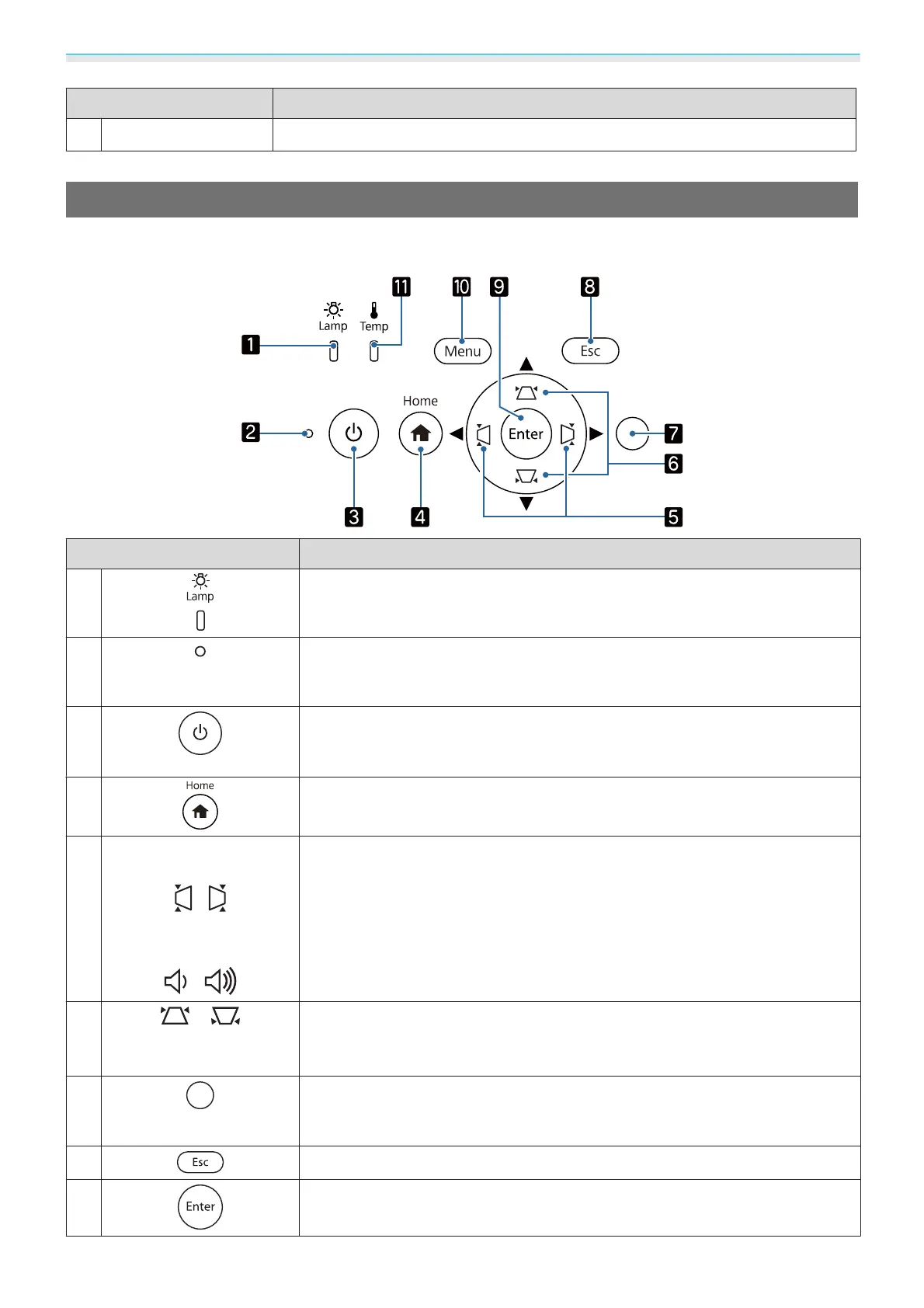
The control panel varies depending on the projector model you are using. The examples in this section are
for the control panel for the EH-TW6800.
Buttons/Indicators Function
a
Flashes orange when it is time to replace the lamp. Shows the projector's errors
through a combination of other indicators lit and flashing.
s p.101
b
Operation indicator
Flashes to indicate the projector is warming up or cooling down. Shows the
projector's status through a combination of other indicators lit and flashing.
s p.101
c
Turns the projector on or off. s p.28
Lit when the projector is on. Shows the projector's status through a combina-
tion of other indicators lit and flashing.
s p.102
d
Displays and closes the Home screen. s p.29
e
EH-TW6800/EH-
TW6300
:
EH-TW6700W/EH-
TW6700
:
•
Adjusts the volume. (EH-TW6700W/EH-TW6700 only)
You cannot control the volume for Bluetooth audio devices.
s p.35
•
Selects menu items or adjustment values while displaying the projector's menu.
s p.85
•
When the Keystone screen is displayed, you can adjust horizontal distortion in
the projected image.
s p.33
f
•
Selects menu items or adjustment values while displaying the projector's menu.
s p.85
•
Adjusts keystone distortion in projected images. s p.33
g
Brightness sensor
Detects the brightness of the room. When Color Mode is set to Auto, the op-
timum image quality is set according to the brightness detected by the sensor.
s p.37
h
Returns to the previous menu level when a menu is displayed. s p.85
i
Selects functions and settings when a menu is displayed. s p.85
Downloaded from www.vandenborre.be



 To Next Page