EasyManua.ls Logo

Epson EMP-82 - Page 27

Epson EMP-82
28 pages
Print Icon
To Next Page IconTo Next Page
To Previous Page IconTo Previous Page
Loading...
27
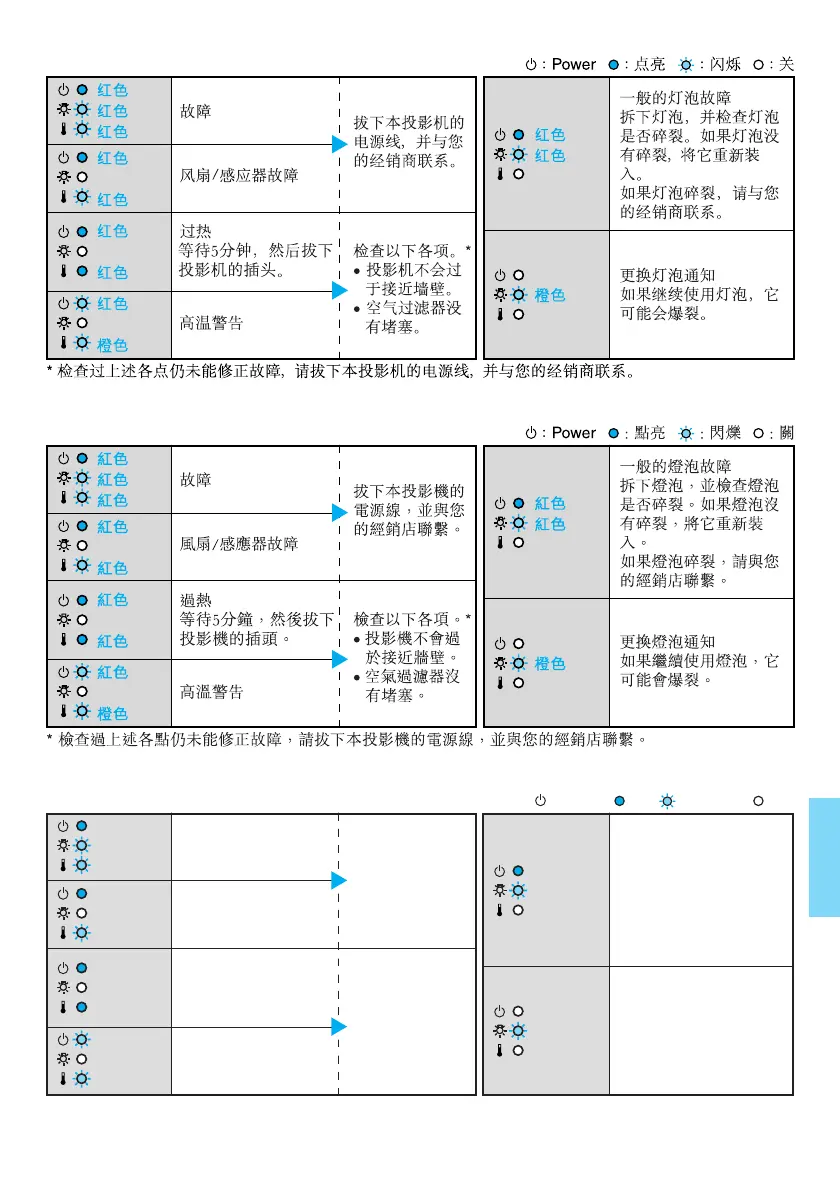
* If the problem is not corrected after checking the points above, unplug the projector and contact your
dealer.
: Power : lit : flashing : off
High temperature
warning
Check the following. *
the projector is
not too close to
the wall.
the air filters
are not blocked.
Lamp replacement
notification
Change the lamp. If
you continue to use the
lamp, it may explode.
Problem
Fan/Sensor problem
Overheating
Wait for 5 minutes
then unplug this
projector.
Unplug the
projector and
contact your
dealer.
General Lamp Problem
Remove the lamp and
check if it is broken. If it
is not broken, reinsert
it.
If it is broken, contact
your dealer.
Red
Red
Red
Red
Red
Red
Red
Red
Orange
Red
Red
Orange

Related product manuals