Quick Setup
Before using the projector, make sure you read these instructions and the safety
instructions in the online User’s Guide.
Note: Some product features may not be available in all regions.
Contents
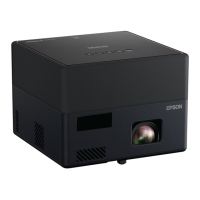
Make sure your projector box includes all of these parts:
You can place the projector on almost any flat surface or attach it to a tripod or
other hardware with an optional mount. See the online User’s Guide for more
information.
Connect the projector
Android TV
™
Your projector includes built-in Android TV with apps that can be launched
when the remote control is paired to the projector. To stream content, make
sure you have a wireless Internet connection and an active streaming account,
and enter your login information as necessary for each app.
Chromecast
™
built-in
You can stream content from devices using Chromecast-compatible apps. See
the online User’s Guide for details.
Google
®
Search
You can send voice commands to the projector using the remote control or a
Google Home
TM
speaker. See the online User’s Guide for details.
Note: This feature may not be available in all regions.
Video device or computer
You can connect video equipment or a computer. Connect one end of an HDMI
cable to one of the projector’s HDMI ports and the other end to an HDMI port
on your video device or computer. See the online User’s Guide for details.
Caution: Do not turn on the video source before connecting it to the projector;
you may damage the projector.
HDMI cable
Connect audio
Built-in speakers
The projector has built-in speakers that can play audio from the video source
you are viewing.
You can also use the projector’s speakers to play sound from a device connected
via Bluetooth
®
. Press the button on the remote control or projector, then
select the projector from your device. See the online User’s Guide for details.
Headphones
You can connect the projector to headphones through the audio out port.
Note: Connecting headphones disables the projector’s internal speaker. If you
do not hear sound from an HDMI source, set the connected device to PCM
output.
Turn on your projector
Note: If you are projecting from an external video device or computer, make
sure it is connected to the projector first.
1
Plug in the projector.
2
Press the power button on the projector or remote control. The status
light flashes blue and then stays on.
3
Follow the on-screen instructions to pair the remote control and projector,
select your language, connect to your wireless network, and sign in to
your Google account.
Note: To shut down the projector, press the power button.
Adjust the image
1
To reduce or enlarge the image, move the projector closer to or farther
away from the screen.
2
To adjust the image height, press and hold the foot release lever on the
bottom of the projector to extend the front adjustable foot. Release the
lever to lock the foot in the desired position.
3
Your projector automatically focuses the image, but if necessary you
can press the button on the remote control to improve the
appearance.
4
Your projector automatically adjusts an image that looks like , ,
,or , but if necessary you can press the button on the
remote control to correct it.
Note: For more adjustment methods, see the online User’s Guide.
Using the remote control
Install two AAA batteries as shown below.
Go back to previous
function
Access projector menus
Microphone
Start YouTube
™
application
Use Bluetooth
Speaker Mode
Enter a selection
Adjust image shape
and focus
Choose which source to
display
Search with your voice
Turn projector on
or off
Display Android TV
application list
Display Android TV
home screen
Navigate menus
Turn off video
temporarily
Turn volume up
or down
Note: You must pair the remote control to the projector to use Android TV and
video-on-demand features. See the online User’s Guide for more information.
Troubleshooting
•
If you see a blank screen, check the following:
•
Make sure your computer or video device is properly connected.
•
Make sure the status light on the projector is blue and not flashing.
•
Press the power button or the button on the projector or
remote control to wake the projector from standby or sleep mode,
if necessary.
•
If you see a blank screen when a computer is connected, check the
following:
•
On some Windows
®
laptops, you may need to hold down the Fn key
and press F7 or the function key that lets you display on an external
monitor. It may be labeled CRT/LCD or have an icon such as .
On Windows 7 or later, hold down the Windows key and press P at
the same time, then click Duplicate.
•
If you’re using a Mac laptop, open System Preferences and
select Displays. Click the Arrangement tab and select the Mirror
Displays checkbox.
•
If the projector does not respond to remote control commands, make sure
the batteries in the remote control are installed correctly. Replace the
batteries, if necessary.
Registration
Register today to get product updates and exclusive offers. You can register
online at www.epson.com/webreg.
Where to get help
Manual
For more information about using the projector, you can view or download the
online manual from the Epson website, as described below.
Internet support
Visit www.epson.com/support (U.S.) or www.epson.ca/support (Canada)
and search for your product to download software and utilities, view the
manual, get FAQs and troubleshooting advice, or contact Epson.
Telephone support services
To use the Epson
®
PrivateLine
®
Support service, call (800) 637-7661. This service
is available for the duration of your warranty period. You may also speak with a
support specialist by calling (562) 276-4394 (U.S.) or (905) 709-3839 (Canada).
Support hours are 6 am to 8 pm, Pacific Time, Monday through Friday,
and 7 am to 4 pm, Pacific Time, Saturday. Days and hours of support are
subject to change without notice. Toll or long distance charges may apply.
Optional accessories
For a list of optional accessories, see the online User’s Guide.
You can purchase screens or other accessories from an Epson authorized reseller.
To find the nearest reseller, call 800-GO-EPSON (800-463-7766). Or you can
purchase online at www.epsonstore.com (U.S. sales) or www.epsonstore.ca
(Canadian sales).
EF12

 Need help?




 To Next Page
 General