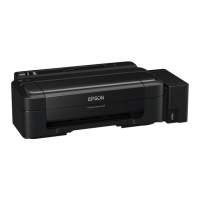
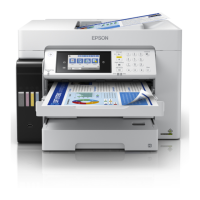
The Epson L1300/L1800 is a versatile printer designed for users who require high-quality printing for documents and photos, with a focus on efficiency and cost-effectiveness through its integrated ink tank system. This user guide provides comprehensive instructions for setting up, operating, and maintaining the printer to ensure optimal performance and longevity.
Function Description
The Epson L1300/L1800 serves as a dedicated printer, capable of producing both black-and-white and color prints. Its primary function is to transfer digital content from a computer onto various paper types and sizes, including standard documents, envelopes, and high-quality photo paper. The printer utilizes an ink tank system, which allows users to refill ink directly from bottles, offering a more economical and environmentally friendly alternative to traditional ink cartridges. The L1300 model is designed for 5-color printing, while the L1800 supports 6-color printing, making it particularly suitable for professional-grade photo output with enhanced color accuracy and vibrancy. Both models are capable of handling a range of paper sizes, including larger formats like A3, catering to diverse printing needs from everyday documents to large-format graphics and photographs.
Usage Features
The Epson L1300/L1800 offers a straightforward and user-friendly experience for various printing tasks.
Loading Paper:
The printer supports a variety of paper types and sizes. To load paper, first open the paper support and pull up its extensions, then open the output tray and pull out its extensions. Slide the edge guide to the left. Insert paper, glossy or printable side up and short edge first, against the right side and behind the tab. If loading a stack, fan the sheets and tap them on a flat surface to even the edges. Finally, slide the edge guide against the paper, but not too tightly. Always adhere to the recommended number of sheets and ensure paper is loaded short edge first. For letterhead or pre-printed paper, load it top edge first. Avoid loading paper above the arrow mark inside the edge guide and check the paper package for additional instructions.
Loading Envelopes:
The printer can print on plain paper envelopes, specifically No. 10 (4.1 × 9.5 inches [105 × 241 mm]). The process is similar to loading paper: open the paper support and pull up the extensions, then open the output tray and pull out its extensions. Slide the edge guide to the left. Load up to 10 envelopes against the right side and behind the tab, with the printable side up and the flap edge to the left. Slide the edge guide against the envelopes, ensuring it's not too tight. If you encounter difficulty loading a stack, press each envelope flat or load them one at a time. Do not load curled, folded, or too thin envelopes, and ensure they are not loaded above the arrow mark.
Printing from a Computer (Windows):
To print with Windows, access the printer settings through your application's print dialog. You can select basic print settings, including paper size, orientation, and number of copies. Print quality options allow you to choose between standard, high, or draft quality, depending on your needs. Multi-page printing options enable you to print multiple pages on a single sheet or create poster prints. For double-sided printing, the printer supports manual duplexing, where you print one side, then flip the paper to print the other. Additional layout and print options include watermarks, headers/footers, and custom paper sizes. Color correction options allow for fine-tuning color output, and image options provide adjustments for brightness, contrast, and sharpness. Extended settings offer advanced controls for specific printing scenarios. You can also save your preferred settings as a printing preset for quick access. Before printing, it's advisable to check the print status to monitor the printing process.
Printing from a Computer (OS X):
For OS X users, printing involves similar steps. Access print settings from your application. Select basic print settings such as paper size, orientation, and scaling. Print quality options let you choose the desired resolution and speed. Page setup settings allow for custom paper sizes and margins. Print layout options include N-up printing (multiple pages per sheet) and booklet printing. You can also size printed images to fit specific dimensions. Color management features, including Color Matching and Color Options, help ensure accurate color reproduction. After initiating a print job, you can check the print status to monitor its progress. If necessary, printing can be canceled using a product button on the printer.
Power Off and Sleep Timers:
The printer is equipped with power management features to conserve energy. It can enter sleep mode or turn off automatically after a period of inactivity. These timers can be adjusted through the printer software. In Windows, access the printer settings, go to the Maintenance tab, and click "Printer and Option Information." Here, you can select the desired time periods for both the Power Off Timer and Sleep Timer, then click "Send" to apply the changes. In OS X, navigate to System Preferences (Print & Fax, Print & Scan, or Printers & Scanners), select your product, and open the Printer Utility. Choose "Printer Settings" to adjust the Power Off Timer and Sleep Timer, then click "Apply." While increasing these time periods may reduce energy efficiency, it offers flexibility for users who require longer periods of standby readiness.
Maintenance Features
Regular maintenance is crucial for the Epson L1300/L1800 to ensure consistent print quality and extend the life of the device.
Refilling Ink:
The printer's ink tank system requires refilling when ink levels are low. It's important to follow ink safety precautions, such as wearing gloves and avoiding contact with skin and eyes. You can check ink levels using the printer software (Epson Status Monitor) or visually inspect the ink tanks. To purchase genuine Epson ink, refer to the ink bottle part numbers provided in the manual and visit an authorized Epson reseller or the global Epson website. The refilling process involves opening the ink tank unit, carefully uncapping the ink bottle, and pouring the ink into the corresponding color tank until it reaches the upper line. Ensure the correct color ink is poured into each tank to avoid damage.
Adjusting Print Quality:
Maintaining optimal print quality involves several procedures.
-
Print Head Maintenance: The print head is a critical component for print quality.
- Print Head Nozzle Check: If prints show banding, missing colors, or incorrect colors, perform a nozzle check. This can be done using the product buttons (refer to the control panel section for button functions) or through a computer utility. The nozzle check prints a pattern that reveals clogged nozzles.
- Print Head Cleaning: If the nozzle check pattern indicates clogs, perform a print head cleaning. This process flushes ink through the nozzles to clear obstructions. Cleaning can be initiated using the product buttons or through the printer utility on your computer. Multiple cleaning cycles may be necessary for severe clogs.
- Ink Tube Flushing: In some cases, especially after initial setup or prolonged inactivity, the ink tubes may need flushing to ensure proper ink flow. This is typically performed using a computer utility and helps to remove air bubbles or old ink from the system.
- Print Head Alignment: If prints appear blurry, grainy, or misaligned, the print head may need alignment. This process adjusts the position of the print head to ensure precise dot placement. Alignment can be performed using a computer utility, which prints test patterns that guide you through the adjustment process.
-
Cleaning the Paper Path: Dust and paper fibers can accumulate in the paper path, leading to paper feeding problems or smudges on prints. Regularly cleaning the paper path can prevent these issues.
-
Checking the Sheet Counter: The sheet counter tracks the number of sheets fed into the printer. This information can be useful for monitoring usage and identifying potential maintenance needs. The sheet counter can be checked through the Epson Status Monitor in Windows or the Printer Utility in OS X.
Cleaning and Transporting the Product:
Periodically clean the exterior of the printer with a soft, damp cloth to remove dust and grime. When transporting the printer, it's crucial to prepare it properly to prevent ink leaks and damage. This typically involves engaging the transportation lock (if available) and ensuring all covers and trays are securely closed. Refer to the manual for specific instructions on preparing the product for transport.
Solving Problems:
The user guide also provides troubleshooting steps for common issues.
- Software Updates: Regularly check for software updates to ensure compatibility and optimal performance.
- Product Light Status: Understand the meaning of different light patterns on the control panel to diagnose issues.
- Running a Product Check: Perform a product check to isolate whether a problem is hardware-related or software-related.
- Setup Problems: Solutions for issues encountered during initial setup.
- Noise After Filling Ink: Guidance on unusual noises after ink refilling.
- Software Installation Problems: Troubleshooting steps for software installation failures.
- Product Lights Turn On and Then Turn Off: Solutions for power-related issues.
- Paper Problems: Addressing paper feeding, paper jam, and paper ejection problems.
- Printing from a Computer Problems: Solutions for issues like nothing printing, the product icon not appearing, or slow printing.
- Page Layout and Content Problems: Troubleshooting for inverted images, too many copies printing, blank pages, or incorrect margins.
- Print Quality Problems: Solutions for borders on borderless prints, incorrect characters, incorrect image size/position, slanted printouts, white/dark lines, blurry/smeared prints, faint prints, grainy prints, or incorrect colors.
- Uninstalling Product Software: Instructions for uninstalling printer software in Windows and OS X.
- Where to Get Help: Information on where to find additional support.
By following these detailed instructions for usage and maintenance, users can maximize the performance and lifespan of their Epson L1300/L1800 printer, ensuring high-quality prints for all their needs.



 To Next Page


 General
 Weight and Dimensions