TM-U295 Installation Manual 5
English
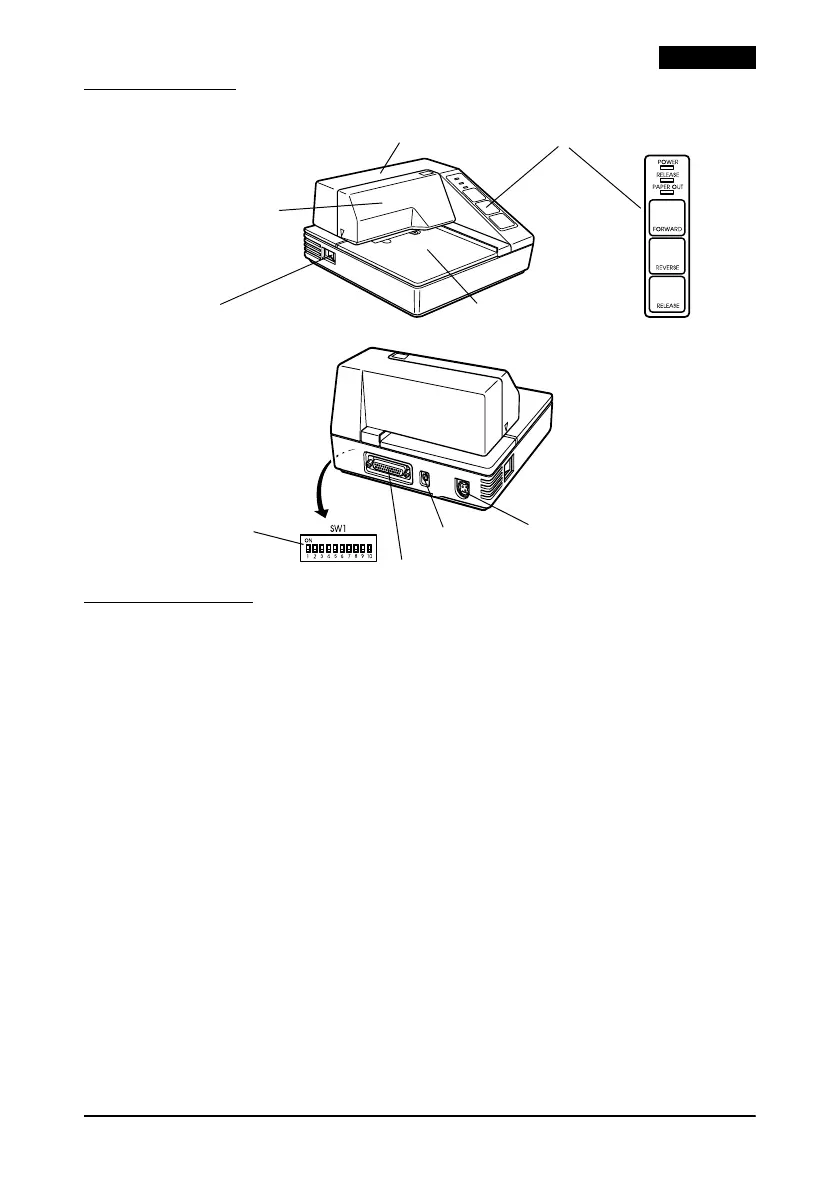
Printer Parts
Control Panel
The control panel has three buttons and three indicators (LEDs).
Buttons
All three of these buttons can be disabled or enabled by the ESC c 5
command.
FORWARD
Feeds the paper forward based on the line feed amount set by ESC
2 and ESC 3.
REVERSE
Feeds the paper backward based on the line feed amount set by
ESC 2 and ESC 3.
RELEASE
Pressing this button moves the rollers so that paper can be inserted
or removed. (This state is called the “paper release mode.”)
Note:
Pressing the POWER switch while holding down the RELEASE button runs a
self test. See “Running a Self Test.”
upper case
printer cover
document table
POWER switch
control panel
DIP switch
interface connector
FG
power connector













 To Next Page