& “List of Paper Type” on page 48
Paper Jams
Load paper in the correct direction, and slide the edge guides against the edges of the paper.
Related Information
& “Removing Jammed Paper” on page 183
& “Loading Paper in the Paper Cassette” on page 45
Paper Feeds at a Slant
Load paper in the correct direction, and slide the edge guides against the edges of the paper.
Related Information
& “Loading Paper in the Paper Cassette” on page 45
Several Sheets of Paper are Fed at a Time
When several sheets of paper are fed at a time during manual 2-sided printing, remove any paper which is loaded
in the printer before you reload the paper.
Paper is Ejected During Printing
When you load letterhead paper (paper on which information such as the sender's name or corporation name are
pre-printed in the header), select Letterhead as the paper type setting.
Original Does Not Feed in the ADF
❏ Use originals supported by the ADF.
❏ Load originals in the correct direction, and slide the ADF edge guides against the edges of the originals.
❏ Clean the inside of the ADF.
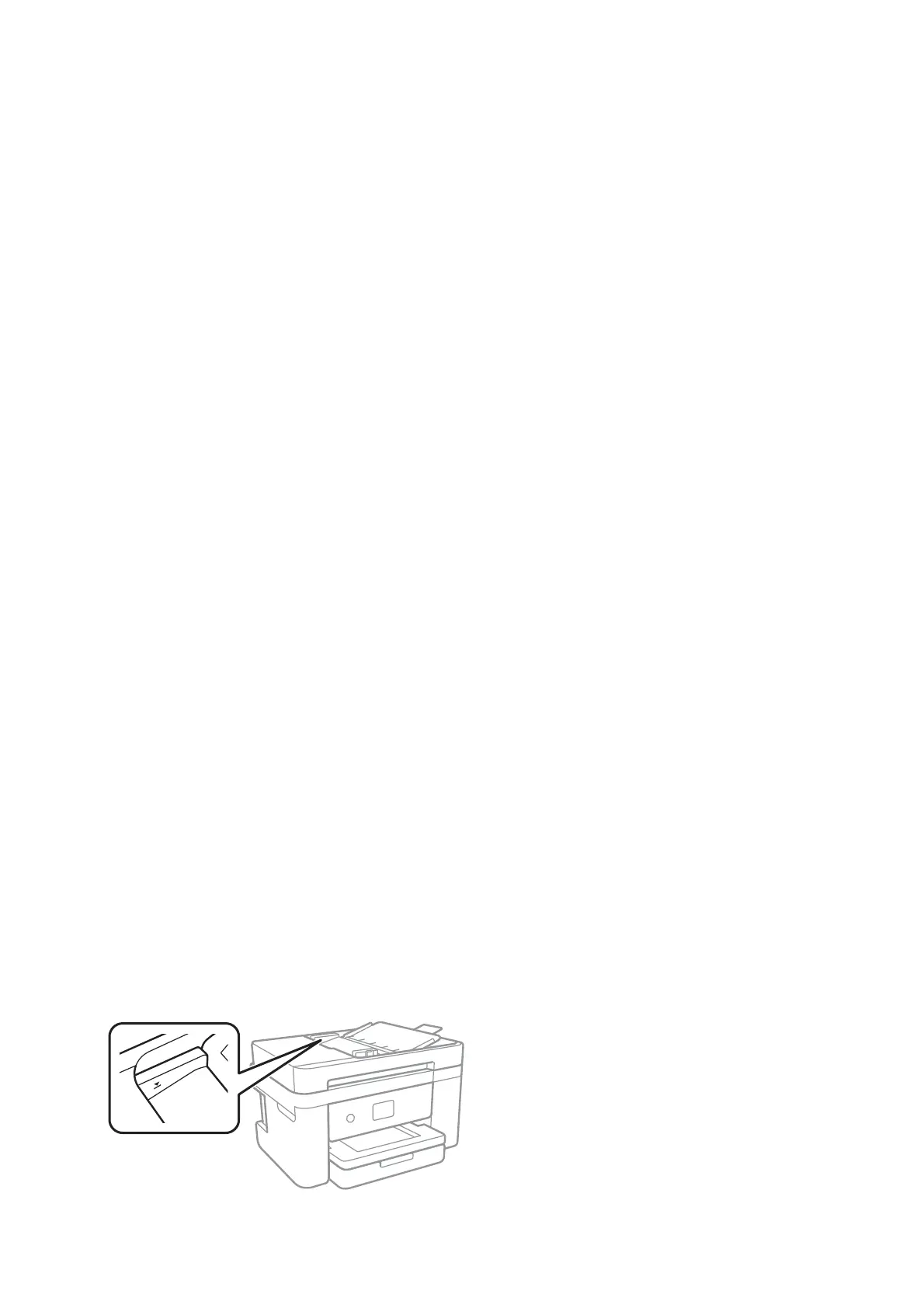
❏ Do not load originals above the line indicated by the triangle symbol on the ADF.
User's Guide
Solving Problems
184








 To Next Page