Hidden Pages for QX Advanced Configuration
14.
tos
Allows specifying the value for the Type of Service
setting (ToS) for SIP and RTP packets.
Table 1: List of hidden pages
3 Accessing Hidden Pages
To access a hidden page, log into the system as an administrator and type the CGI name into the
address field of the browser:
http://QX_hostname_or_IP/hidden_page
For example: http://192.168.74.12/fxocfg.cgi
3.1 Advanced
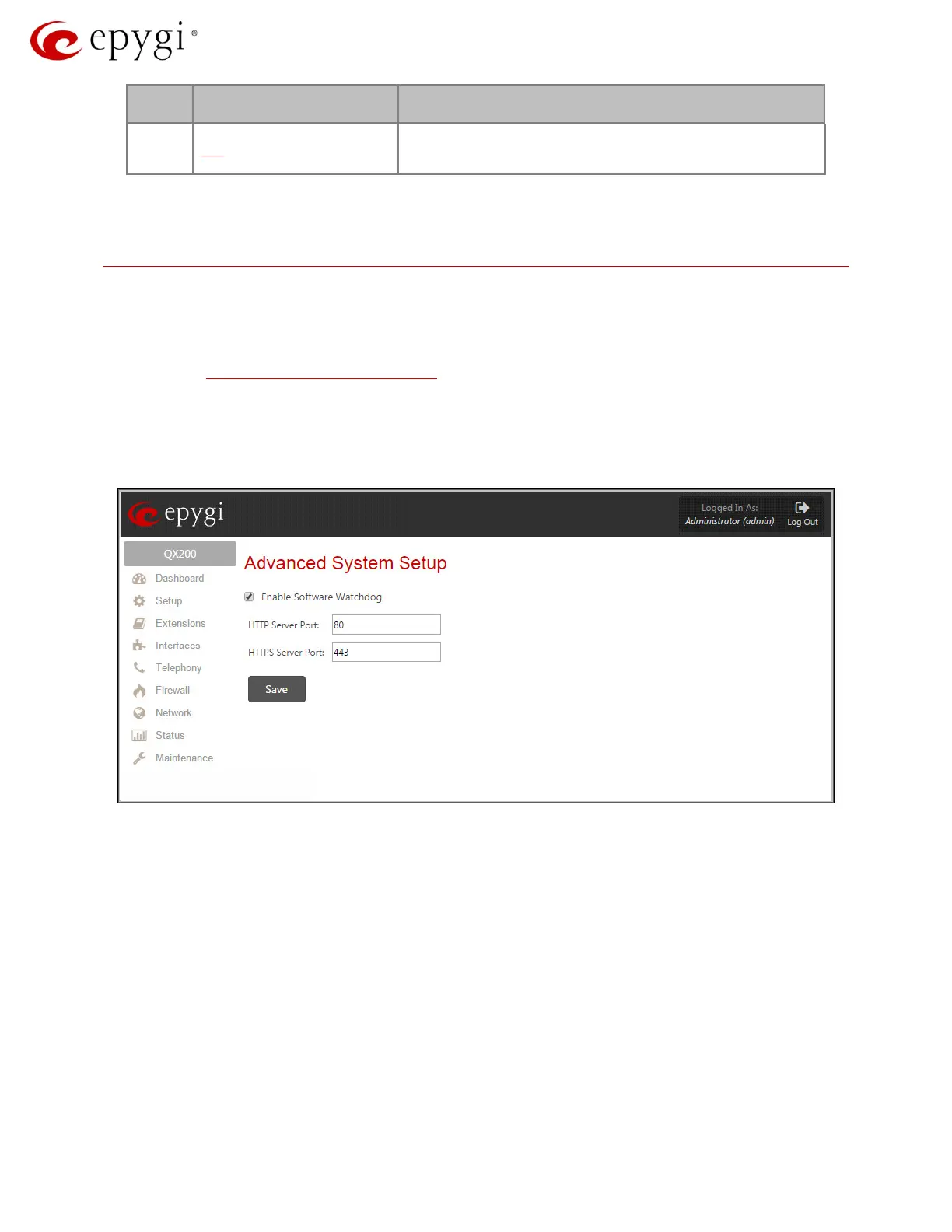
The Advanced System Setup page allows switching off the software watchdog and specifying
custom listening ports for HTTP and HTTPS.
Figure 1: Advanced System Setup page
• Enables Software Watchdog: The QX software watchdog is an application that checks the
activity of sub-systems that are vital for the proper operation of the whole system and restarts
the voice system or reboots the whole system if a sub-system has failed. The activity checking
is executed every five minutes. The following sub-systems are monitored by the watchdog:
voice, vpnd, ipsecd, stats, tftpd, dhclient, dhcpd, named, ntpd, ntp, httpd.
o HTTP Server Port: Listening port for HTTP.
o HTTPS Server Port: Listening port for HTTPS.
3.2 Callcontrol
The callcontrol.cgi page allows activating a call from a WEB, connecting two parties together via
auto-generated call (see Figure 2). This feature is useful for remote diagnostic purposes.
Revision 1.0 5 20-Feb-15



 To Next Page
 Loading...

