FR
ES
PT
IT
EL
PL
UA
RO
EN
72
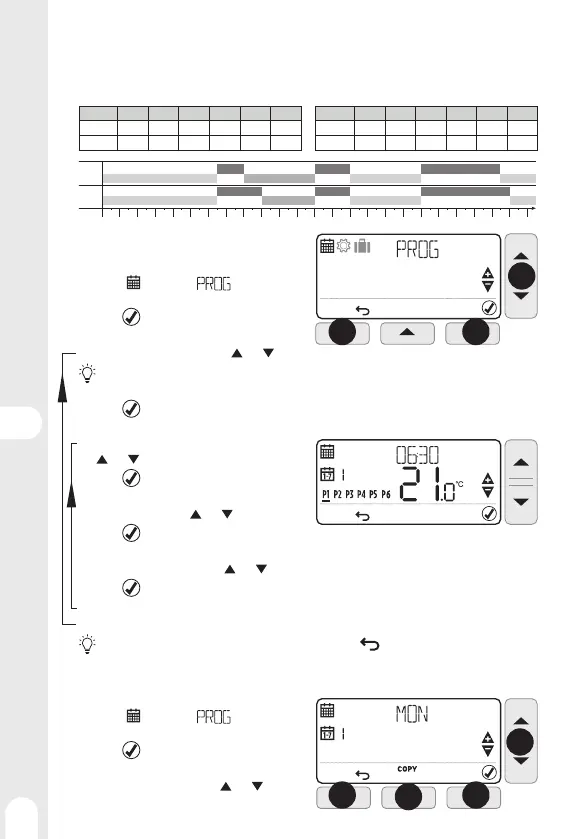
AUTO mode programs
The AUTO mode allows 6 temperature level changes that can be programmed for each day between
12:00 am and 11:50 p.m. Each temperature level can be set between 5 ° C and 35°C by steps of 0.5°C. The
default programs are :
Monday to Friday (days 1 to 5) Saturday and Sunday (days 6 and 7)
Range
P1 P2 P3 P4 P5 P6
Range
P1 P2 P3 P4 P5 P6
Time
6:30 8:00 12:00 14:00 18:00 22:30
Time
6:30 9:00 12:00 14:00 18:00 23:00
Temp.
21°C 16°C 21°C 16°C 21°C 16°C
Temp.
21°C 18°C 21°C 18°C 21°C 16°C
3:00 6:00 8:00
12:00 14:00 18:00
23:00
P3-21°C
16°C P2-16°C P4-16°C
P5-21°C
P6-16°C
P1-21°C
P3-21°C
16°C P2-18°C P4-18°C
P5-21°C
P6-16°C
P1-21°C
Customize programs
1 - Press MENU (left key) to enter programmation
menu, symbol and indication
are fl ashing
2 - Press
(right key) to validate, the fi rst day
is displayed and its number is fl ashing.
3 - Choose the day to change using
and keys
If the "5-2" programming type has been chosen when fi rst start up, only "MO:FR" and "SA:SU" options can be
changed.
4 - Press to validate, the fi rst time range is fl ashing, the trigger time and the set temperature are
dsiplayed.
5 - Choose the fi rst time range to change using the
and keys
6 - Press
to validate, the trigger time is
fl ashing
7 - Set the time using the
and keys
8 - Press
to validate, the temperature is
fl ashing
9 - Set the temperature using the
and keys
10 - Press
to validate.
11 - Go back to point 5 for each of the other time ranges
12 - Go back to point 3 for each of the other days or copy the day (see below)
At each time, it is possible to go back to previous step by pressing (Left key)
Copying time ranges from one day to another
1 - Press MENU (left key) to enter programmation
menu,
symbol and indication
are fl ashing
2 - Press
(right key) to validate, the fi rst day
is displayed and its number is fl ashing.
3 - Choose the day to copy using
and keys
4 - Press COPY (central key)
MO
FRI
SAT
SUN
1
1
2
2
3
3
4


 To Next Page