FR
ES
PT
IT
EL
PL
UA
RO
EN
73
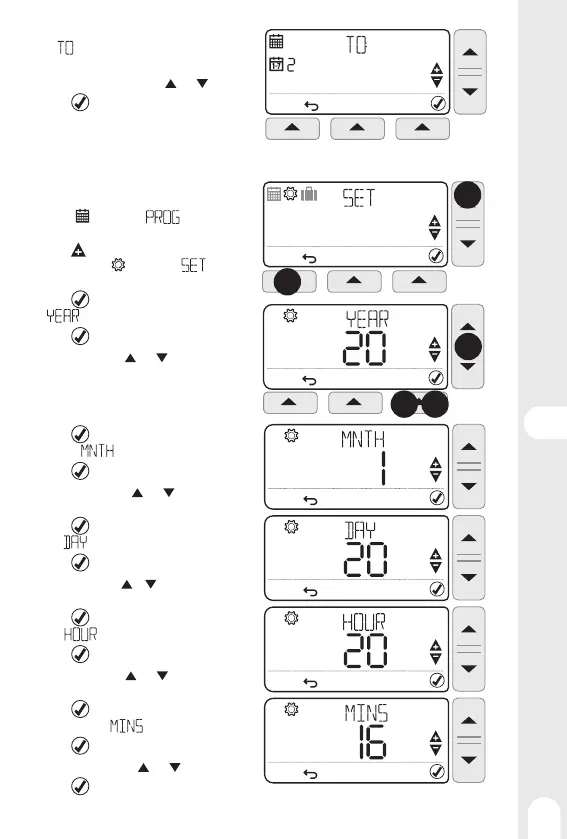
5 - The name of the day to copy (source) is replaced
by
indication, and the day on which to copy
(target) is fl ashing.
6 - Choose the target day using
and keys
7 - Press
to validate,
8 - Go back to point 6 for each of the other days
to copy on.
Setting Date and Time
1 - Press MENU (left key) to enter programmation
menu,
symbol and indication
are fl ashing
2 - Press (setting temperature key) to enter
settings menu,
symbol and indica-
tion are fl ashing
3 - Press
to validate, the year is displayed and
indication is fl ashing
4 - Press
to validate, the year is fl ashing
5 - Set the year using
and keys
6 - Press
to validate , the month is dispplayed
and the
indication is fl ashing
7 - Press
to validate , the month is fl ashing
8 - Set the month using
and keys
9 - Press
to validate , the day is displayed and
the indication is fl ashing
10 - Press
to validate , the day is fl ashing
11 - Set the day using
et keys
12 - Press
to validate , the hour is displayed and
the indication is fl ashing
13 - Press
to validate , the hour is fl ashing
14 - Set the hour using
and keys
15 - Press
to validate , the minutes are dis-
played and the
indication is fl ashing
16 - Press
to validate , the minutes are fl asing
17 - Set the minutes using
and keys
18 - Press
to validate
1
2
3 4
5


 To Next Page