FR
ES
PT
IT
EL
PL
UA
RO
EN
71
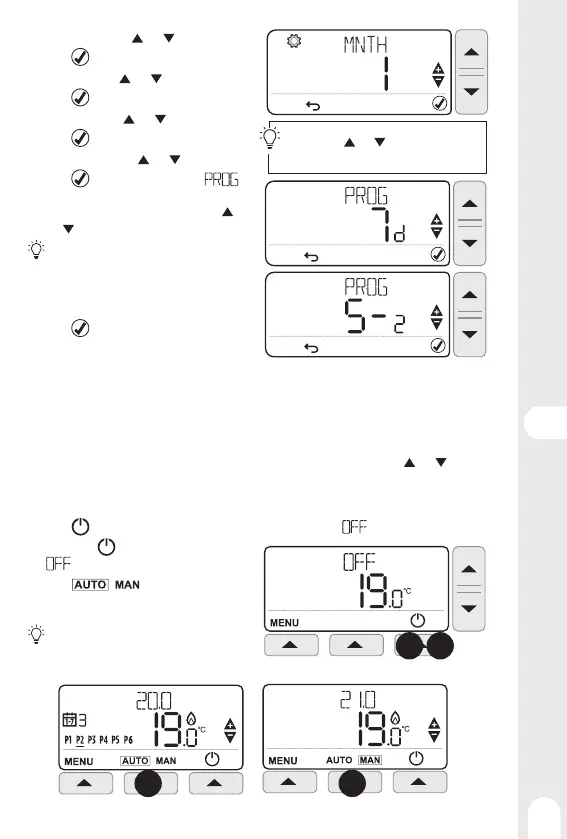
6 - Set the month using and keys
7 - Press
to validate.
8 - Set the day using
and keys
9 - Press
to validate.
10 - Set the hour using
and keys
11 - Press
to validate.
12 - Set the minutes using
and keys
13 - Press
to validate, the indication
is displayed and the type of programming is
fl ashing. Set the programming type using
and
keys
The
programming type
"7d" allows to set di erent
time ranges for each day of the week.
The
programming type
"5-2" propose a setting
from week days (from Monday to Friday) and ano-
ther one for week-end (Saturday and Sunday).
14 - Press to validate.
Operating modes
Several operating modes are available:
• AUTO : The thermostat follows the pre-recorded internal programs for each day of the week. These
programs defi ne which temperature to set for each of the 6 time ranges of the day. It is possible to
customize these programs.
• MAN (Manual) : The thermostat constantly monitors the set temperature using the and keys.
• OFF (Frost Protection Mode): The thermostat maintains a temperature above 5°C to protect against freezing.
Change Operating mode
1 - Press (right key) to put the thermostat in Frost Protection Mode, is displayed
2 - Press again
to activate the thermostat,
disappears
3 - Press
(central key) to switch
between AUTO and MANUAL modes
It is not possible to activate AUTO or MANUAL
mode when the thermostat is in OFF
Mode
1 2
3 3
A long press on and keys scrolls the values
quickly. s


 To Next Page