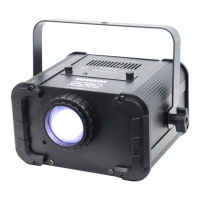
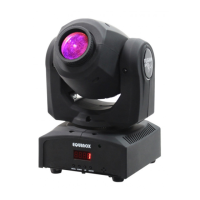
The Equinox Fusion Spot Max MKII is a compact and lightweight moving head fixture designed for professional lighting applications. It offers a variety of control modes and features, making it suitable for a range of events and installations.
Function Description:
The Fusion Spot Max MKII operates in multiple control modes: Sound active, Auto, Master/slave, and DMX-512. This versatility allows for flexible integration into various lighting setups. In DMX-512 mode, it supports 1-channel, 8-channel, or 10-channel configurations, providing different levels of control over its functions.
The fixture includes a gobo wheel with 7 gobos plus an open slot, allowing for diverse pattern projections. A color wheel offers 7 colors plus an open slot, enabling a spectrum of color effects. Electronic dimming from 0-100% provides smooth intensity control.
For standalone operation or synchronized shows, the Master/slave built-in preprogram function is available. When linked in a master/slave connection, the first unit controls the others, creating automatic, sound-activated, and synchronized light shows. This is particularly useful for quick setups without a DMX controller. The "2-light show" feature in slave mode (Slave 2) allows for contrasting movements between units, enhancing the visual impact even with only two fixtures.
The unit features a control panel with MENU, DOWN, UP, and ENTER buttons for navigating and selecting programming functions. A display shows the various menus and selected functions.
Important Technical Specifications:
- Voltage: 100V~240V, 50/60Hz
- Fuse: T2.5A 250V
- Power consumption: 60W
- Light source: 1 x 30W white LED
- Dimensions: 159 x 147 x 265mm
- Weight: 2.6 kg
- Pan/Tilt: 540°/270°
- Power sockets: IEC power input
- XLR sockets: 3-Pin XLR input/output
- DMX Channels: 1CH/8CH/10CH
- Gobos: 7 Gobos + open
- Colors: 7 Colors + Open
- Electronic dimming: 0-100%
- Maximum ambient temperature: 40°C
- Warranty: One year from date of purchase.
Usage Features:
- Control Panel Navigation: The MENU button selects programming functions. DOWN and UP buttons navigate backward and forward within selected functions. The ENTER button confirms selections. Pressing and holding MENU for one second or waiting one minute returns to the main menu.
- DMX Address Setting (ADDR): Allows setting a DMX address from 1 to 512 for control via a universal DMX controller. The display blinks when setting the address, and the DOWN/UP buttons change the value.
- Channel Mode (CHND): Selects between 1-channel, 8-channel, or 10-channel DMX modes.
- Master/Slave Mode (SLMD): Configures the unit as a Master (MAST), Slave 1 (SL1 - normal operation), or Slave 2 (SL2 - 2-light show for contrasting movements).
- Show Mode (SHND): Selects from four built-in shows (SH1, SH2, SH3, SH4) for automatic operation.
- Sound Mode (SOUN): Activates sound-active mode, which can be turned ON or OFF.
- Sound Sensitivity (SENS): Adjusts the sensitivity of the sound-active mode from 0 to 100.
- LED Display (LED): Toggles the LED display ON or OFF.
- Display Inversion (dISP INVERT): Inverts the display for hanging installations (d5IP) or sets it to normal for floor standing (d51P).
- Pan Inversion (PAN INVERT): Inverts the Pan movement (YES) or sets it to normal (NO).
- Tilt Inversion (TILT INVERT): Inverts the Tilt movement (YES) or sets it to normal (NO).
- Self-Test (TEST): Runs a built-in self-test program (Self-Test).
- Software Version (VER): Displays the current software version.
- Reset (RSET): Resets all channels to their standard position.
- Installation: The unit should be mounted via its screw holes onto the bracket, ensuring it is firmly fixed to prevent vibration and slipping. A safety cable, capable of holding 12 times the unit's weight, must always be used. The installation location must be well-ventilated, at least 50cm from adjacent surfaces, and out of reach of people.
Maintenance Features:
- General Safety: Always read instructions carefully. Keep the user guide for future consultation. Ensure power supply voltage and frequency match unit requirements. Ground the yellow/green conductor to earth. For indoor use only, in a dry location. Disconnect mains power before servicing. Keep flammable materials away from the unit. Do not operate above 40°C ambient temperature. In case of serious problems, stop using immediately and contact an authorized technical assistance center; do not attempt repairs yourself. Use only same-type spare parts. Do not touch power cables during operation.
- Housing and Lenses: Must be replaced if visibly damaged.
- Cleaning: External optical lenses must be cleaned periodically to optimize light output. Cleaning frequency depends on the environment (damp, smoky, or dirty surroundings require more frequent cleaning). Clean with a soft cloth using normal glass cleaning fluid or mild soapy water. Always dry parts carefully. Clean external optics at least every 20 days.
- Troubleshooting:
- Unit not working (no light, no fan): Check power connection and main fuse.
- Not responding to DMX controller: Check if DMX LED is on, DMX cable connections, address settings, and DMX polarity. Try another DMX controller.
- No response to sound: Ensure the unit is not receiving a DMX signal. Check the microphone by tapping it (microphone is on the bottom plate).
This lighting fixture is designed for professional use and must be installed by a qualified technician in accordance with local regulations. It is not suitable for household use.

 Need help?
 General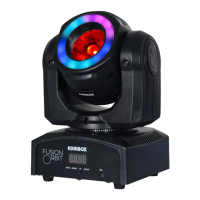



 To Next Page