EasyManua.ls Logo

eRapta AWT7 - User Manual

eRapta AWT7
15 pages
Print Icon
To Next Page IconTo Next Page
Loading...
If you have any issues or needs, please contact us at:
(Model:
eRapta Wireless 7 Inch
Backup Camera System
Installation&Operation Guide
AWT7)
sales2@erapta.com
Question and Answer IconNeed help?

Do you have a question about the eRapta AWT7 and is the answer not in the manual?

Summary

Whats in the Package

Specifications

Safety Precautions

Important Safety Guidelines

Key safety instructions and warnings for product usage and installation.

System Installation

Installation Diagram

Visual guide illustrating the system's wiring and component placement.

Camera Installation

Steps and considerations for mounting and connecting the backup camera.

Monitor Installation

Instructions for mounting the monitor, including antenna and power connection.

System Operation

Monitoring Operation

How to view the camera feed and use monitor controls for basic operation.

Settings Operation

Guide to adjusting system settings like pairing, picture, and display.

Pairing the Camera and Monitor

Instructions for wirelessly connecting the camera to the monitor.

Picture Settings Adjustment

How to adjust brightness, contrast, and hue for optimal image quality.

Mirror and Flip Settings

Options to mirror or flip the camera image for different mounting positions.

System Language and Line Settings

Configuring system language and parking guideline display options.

Troubleshooting

Monitor Black Screen Issues

Troubleshooting steps for a blank or black monitor screen.

No Signal or Blue Screen

Resolving issues where the monitor displays no signal or a blue screen.

Blurry or Foggy Camera Image

Diagnosing and fixing problems with blurry or fogged camera lenses.

Defective or Missing Parts

What to do if parts are damaged or missing upon receiving the product.

Camera Flooding Issues

Addressing problems caused by water ingress into the camera.

Image Distortion and Flickering

Troubleshooting distorted images or flickering due to voltage or connection issues.

Warranty and Support

Overview

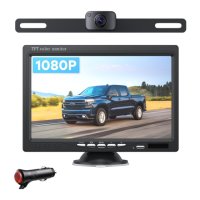
This document describes the eRapta Wireless 7 Inch Backup Camera System, model AWT7, an automotive accessory designed to enhance driving safety by providing a clear rear view.

Function Description:

The eRapta Wireless 7 Inch Backup Camera System is a comprehensive solution for drivers seeking improved visibility and safety when reversing or parking. It consists of a wireless camera and a 7-inch TFT color monitor, which communicate wirelessly to display a live feed of the area behind the vehicle. The system is designed for easy installation and operation, providing a 1080P resolution image for clear viewing. The camera is typically mounted near the license plate, and its power is often connected to the vehicle's reversing light, allowing the monitor to automatically activate when the vehicle is put into reverse. The monitor can be powered either via a car charger or by hardwiring it to the vehicle's power system. The system includes features like adjustable parking guidelines, image settings (brightness, contrast, hue), and image mirroring/flipping options to suit various user preferences and vehicle configurations. It is particularly useful for large vehicles, trailers, or situations where rear visibility is limited.

Important Technical Specifications:

Monitor:

  • Monitor Size: 7 inch
  • Monitor Cable Length: 4.92 ft
  • Connector Type: Power Cable
  • Item Weight: 7.3 pounds
  • Power Supply: DC 12V
  • Monitor Working Current: 300 mA
  • Bracket: Suction Cup Bracket
  • Operating Temperature: -4°F to 149°F (-20°C to 65°C)

Camera:

  • Image Sensor: AHD CMOS
  • Camera Working Current: 300 mA
  • Effective Pixels: 1080P
  • Waterproof Rating: IP69K
  • Material: Metal

Usage Features:

The system offers straightforward operation with a user-friendly interface.

  • Wireless Connectivity: The camera and monitor communicate wirelessly, simplifying installation by reducing the need for extensive cabling between the front and rear of the vehicle.
  • Automatic Activation: When the camera is powered by the reversing light, the monitor automatically turns on and displays the rear view when the vehicle is in reverse. When not reversing, the screen enters standby mode.
  • 1080P Resolution: Provides a high-definition, clear image of the rear view, enhancing detail and visibility.
  • Adjustable Parking Guidelines: Users can customize parking guidelines on the monitor to assist with precise parking maneuvers.
  • Image Customization: The monitor allows adjustment of brightness, contrast, and hue to optimize image quality based on lighting conditions and personal preference.
  • Image Mirroring/Flipping: Offers options for normal, mirror, flip, and MIR-flip views, accommodating different camera mounting orientations and user needs.
  • Multiple Power Options: The monitor can be powered via a car cigarette lighter adapter or hardwired into the vehicle's electrical system, offering flexibility during installation.
  • Durable Design: The camera boasts an IP69K waterproof rating and a metal construction, ensuring durability and resistance to harsh weather conditions and environmental factors.
  • Easy Mounting: The monitor comes with a suction cup bracket for flexible placement within the vehicle's cabin. The camera is designed to fit standard US license plate holes, with provisions for drilling a small hole to route the cable into the trunk.
  • System Settings: Includes language selection (English) and P-Line (parking guideline) on/off options for personalized setup.

Maintenance Features:

Maintaining the eRapta backup camera system is relatively simple, focusing on ensuring clear visibility and secure connections.

  • Regular Inspection: Periodically inspect all components, including the camera, monitor, cables, and brackets, for any signs of damage or loose connections. This helps prevent potential malfunctions and ensures optimal performance.
  • Lens Cleaning: The camera lens should be kept clean to ensure a clear image. If the image appears blurry or foggy, first check and wipe the external lenses.
  • Moisture Management: In cases of internal moisture causing fogging, the issue often resolves itself within a few hours as the moisture dissipates. If the problem persists, it may indicate a more significant issue requiring support.
  • Connection Integrity: Ensure all power connections are secure and insulated. Loose connections can lead to excessive heat, short circuits, or intermittent operation.
  • Voltage Stability: If the image shows distortion or flickering stripes, check the vehicle's voltage supply to the monitor. Unstable voltage can affect performance. Using the car charger for power is recommended for testing voltage stability.
  • Troubleshooting Support: The manufacturer provides comprehensive troubleshooting guidance for common issues such as a black screen, no signal, or blurry images. Users are encouraged to contact customer service (sales2@erapta.com) for technical support, especially for defective parts, installation help, or any after-sales problems. Providing order details and photos/videos can expedite the support process.
  • Warranty: The product comes with a 24-month warranty and a replacement policy, along with lifetime technical support, ensuring long-term usability and customer satisfaction.

eRapta AWT7 Specifications

General IconGeneral
BrandeRapta
ModelAWT7
CategoryAutomobile Accessories
LanguageEnglish

Related product manuals