Montage
Assembly
48
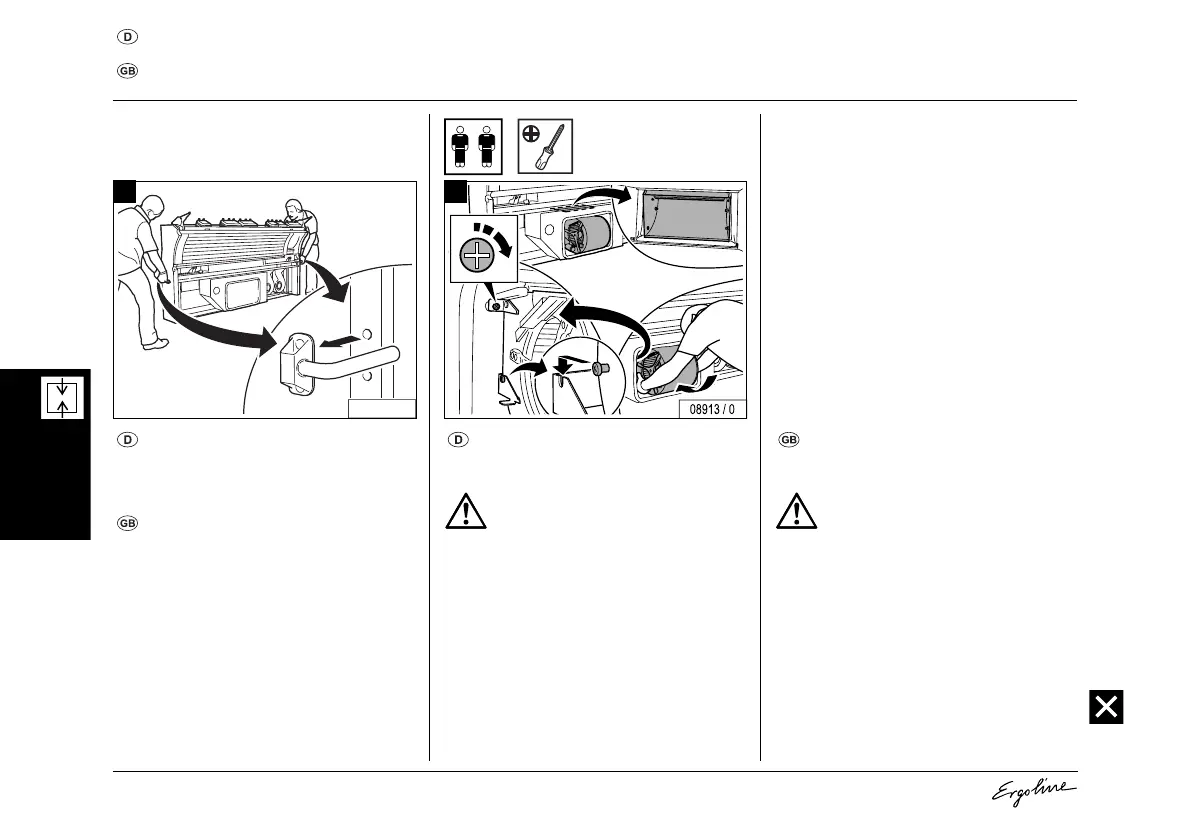
Rückwand aufstellen, Gerätelüfter wieder einbauen
Setting up the rear panel, refitting the device fan
– Rückwand positionieren und Tragehilfen
entfernen.
– Position the rear panel and remove the sup-
port aids.
– Gerätelüfter in das Gehäuse einsetzen.
– Schraube festdrehen.
– Insert the device fan in the housing.
– Tighten the screw.
08910 / 1
1
Achtung! Überhitzungsgefahr!
Wenn der Gerätelüfter nicht richtig in
der Dichtung sitzt, wird Falschluft ge-
zogen.
– Darauf achten, dass die Gummi-
dichtung dicht am Gehäuse des
Lüfters anliegt.
– Sichtkontrolle von oben durch die
Abluftöffnung!
2
Caution! Overheating possible!
If the device fan does not sit correctly
in the seal, false air will be drawn in.
– Ensure that the rubber seal sits
tightly against the fan housing.
– Check visually from above through
the exhaust air opening!



 To Next Page