34
9. Replacement Installation
Replacing an existing Ehubo includes:
• Disconnect the power cable from the
existing Ehubo
• Connect it to the replacement Ehubo.
Perform the following steps:
Remove the existing Ehubo from its
mount and carefully place it screen down
on a clean, flat surface.
Make sure to not scratch or damage the
screen!
1
Unpack the replacement Ehubo and also place it
screen down on a clean, flat surface.
Make sure to not scratch or damage the screen!
2
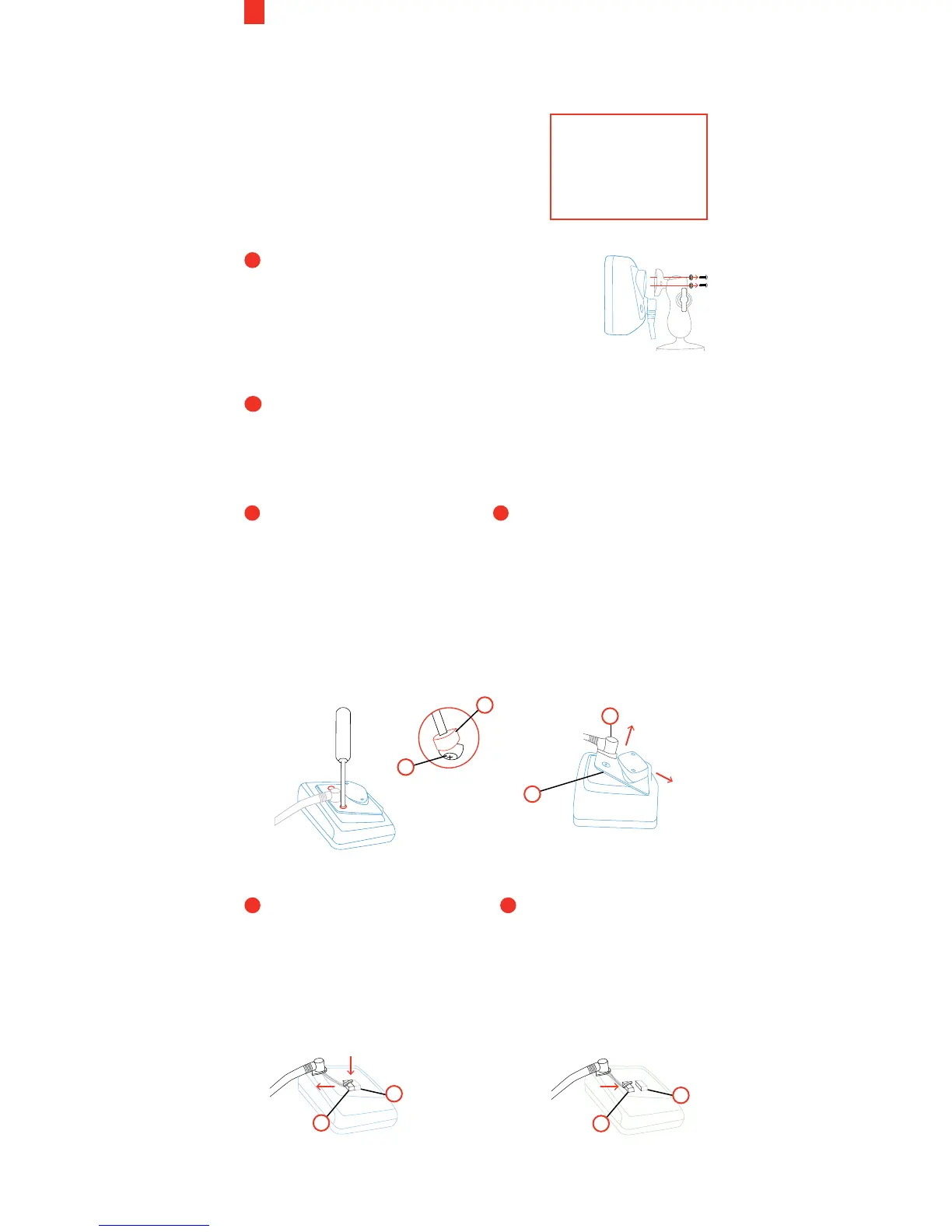
RAM
Remove the rear hatch
security plugs (K) of
both, the existing and
the replacement Ehubo,
if applicable. This is
easily done by inserting
a flat head screwdriver
and scooping out the
plug. Unwind the screw
underneath (S).
Lift the rear hatch (T)
o the existing Ehubo
and slide it o the cable
grommet (U). Lift the rear
hatch o the replacement
Ehubo.
3 4
EXISTING EHUBO:
Push down the cable plug
latch to release the cable
plug (V) and carefully
slide the cable plug o the
internal connector (W).
REPLACEMENT EHUBO:
Carefully insert the cable
plug (V) into the internal
connector (W).
Ensure the cable plug
latch clicks into place to
safely secure the plug.
5
6
V
W
V
W
U
T
K
S
NOTE: Turn OFF
the engine prior
to replacing the
Ehubo



 To Next Page