12
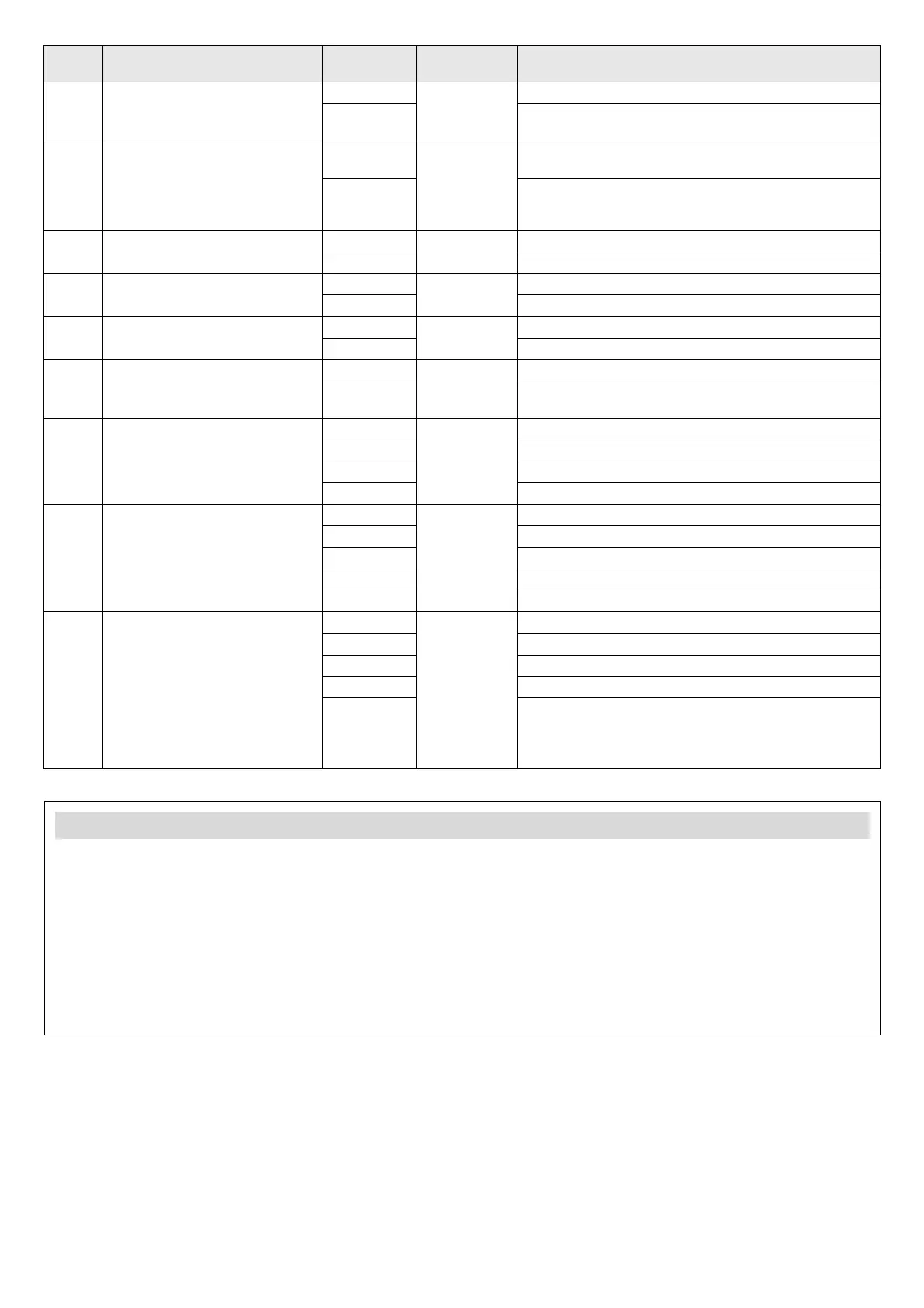
Menu Description Options
Preset
option
Options or values
FA Selecting pedestrian opening FA0 FA0 FA0: pedestrian opening is not carried out
FA1 FA 1: open the single leaf with the transmitter's B
button
FB Flashing light pre-warning FB0 FB0 FB0: no pre-warning; the light comes on and the gate
starts to move at the same time
FB1 FB1: 3 seconds’ notice; the light comes on and the
gate does not start to move until 3 seconds have
elapsed
FC FT1 photocells (exterior) FC0 FC0 FC0: OFF (disabled)
FC1 FC1: ON (enabled)
FD FT2 photocells (interior) FD0 FD0 FD0: OFF (disabled)
FD1 FD1: ON (enabled)
FE Buzzer FE0 FE0 FE0: OFF (disabled)
FE1 FE1: ON (enabled)
FF Reverse impulse for electric lock FF0 FF1 FF0: OFF (disabled)
FF1 FF1: ON (enabled); the gate reverses slightly to help
release the electric lock
FG Transmitter button for
complete run (open - stop -
close - stop)
FG1 FG1 FG1: transmitter button A
FG2 FG2: transmitter button B
FG3 FG3: transmitter button C
FG4 FG4: transmitter button D
FH Transmitter button for
pedestrian mode
FH0 FH2 FH0: OFF (pedestrian opening is not carried out)
FH1 FH1: transmitter button A
FH2 FH2: transmitter button B
FH3 FH3: transmitter button C
FH4 FH4: transmitter button D
FI Transmitter button to enable/
disable automatic closing mode
When the flashing light and
buzzer are active, the
transmitter's button to enable/
disable automatic closing does
not work until the flashing light
or buzzer stop working
FI0 FI0 FI0: no button
FI1 FI1: transmitter button A
FI2 FI2: transmitter button B
FI3 FI3: transmitter button C
FI4 FI4: transmitter button D
Leaf operation
During opening:
The leaves stop if the transmitter button, pushbutton or key
switch are operated during opening. The leaves close if re-
enabled.
During closing:
The leaves stop if the transmitter button, pushbutton or key
switch are operated during closing. The leaves open if re-
enabled.
During opening and closing:
For safety reasons, the leaves stop if they come across any
obstacle during opening or closing.


 To Previous Page
 Loading...