D
32
Primary Glass
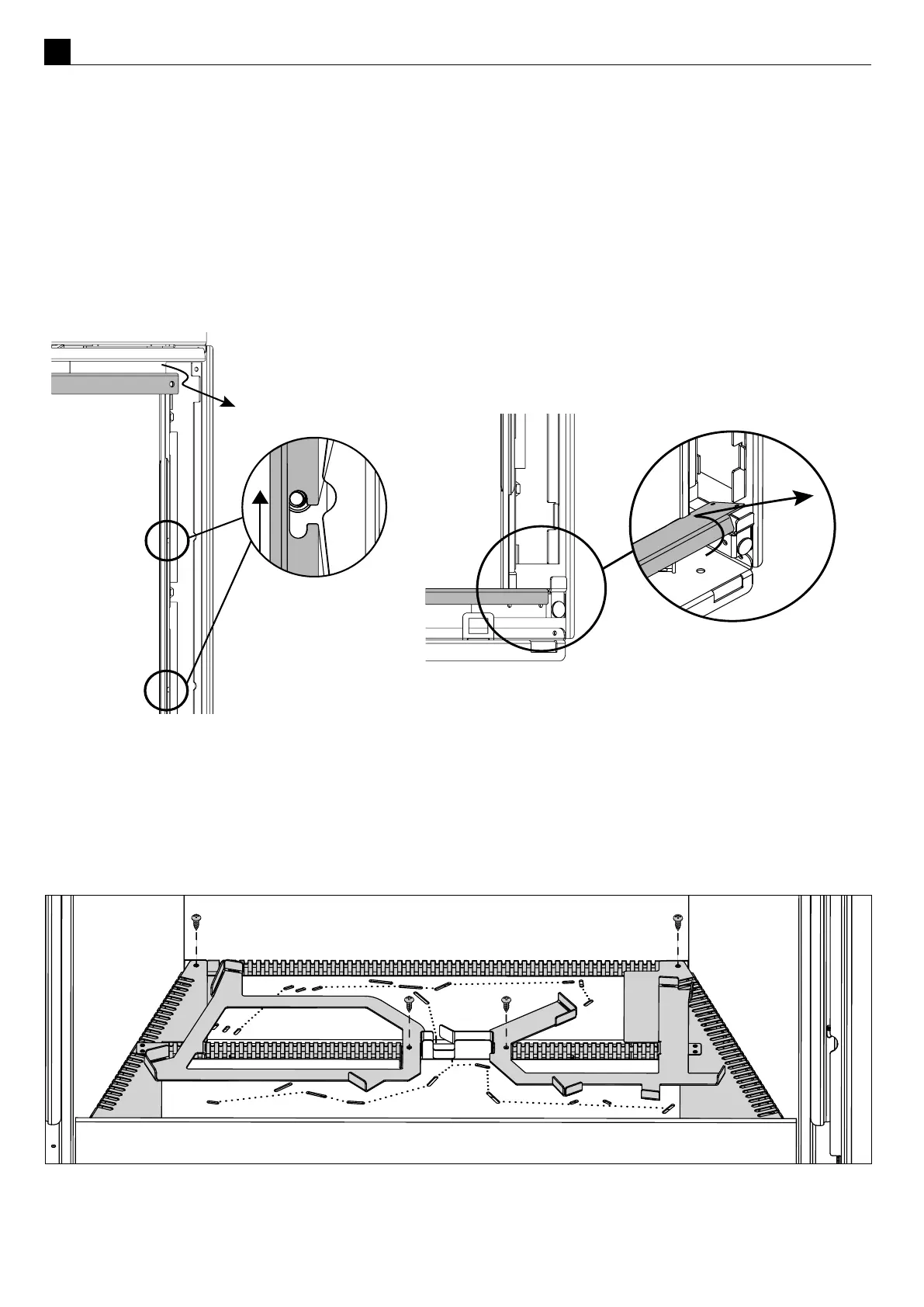
Remove the two screws holding in the top of the primary glass, then pull forward, lt down and then slide out the
glass retainer through the gap in the side anges.
NOTE: Please slide the top trim ramp forward with cauon to avoid scratches to the nish as the front of the
part is visible.
Parally undo the four screws holding in the side retainers, then slid up and twist out leaving the screws behind.
Remove the boom trim by lng back and pulling out the gaps in the chassis. Pull the top of the glass toward you
slightly, li the glass out of the boom glass retainer and carefully set glass aside. Note that the berglass tape
around the glass can mark carpet and furnishings - use a drop cloth to protect furniture.
D3 Removing the Burners
Remove the 2 screws in the rear corners of the inll assembly and the 2 screws either side of the pilot guard
(shown in diagram below). Li the inll assembly up and out of the rebox; place it carefully aside.
NOTE: Image shows log retainers present, in some installs these will not be installed.
The burner can now be carefully moved le to detach the burner tube from the burner jets and lied out of the
rebox.



 To Next Page