12
K ESCEA SMARTHEAT APP
K1 Download the Escea Smartheat APP
The Escea Smartheat APP can be found on Google Play or the App Store.
K2 Pairing a Mobile Device with an Escea Fire (Bluetooth Pairing)
In order for a mobile device to be able to manage the re (smartheat), it must rst be paired against the re
(Bluetooth pairing).
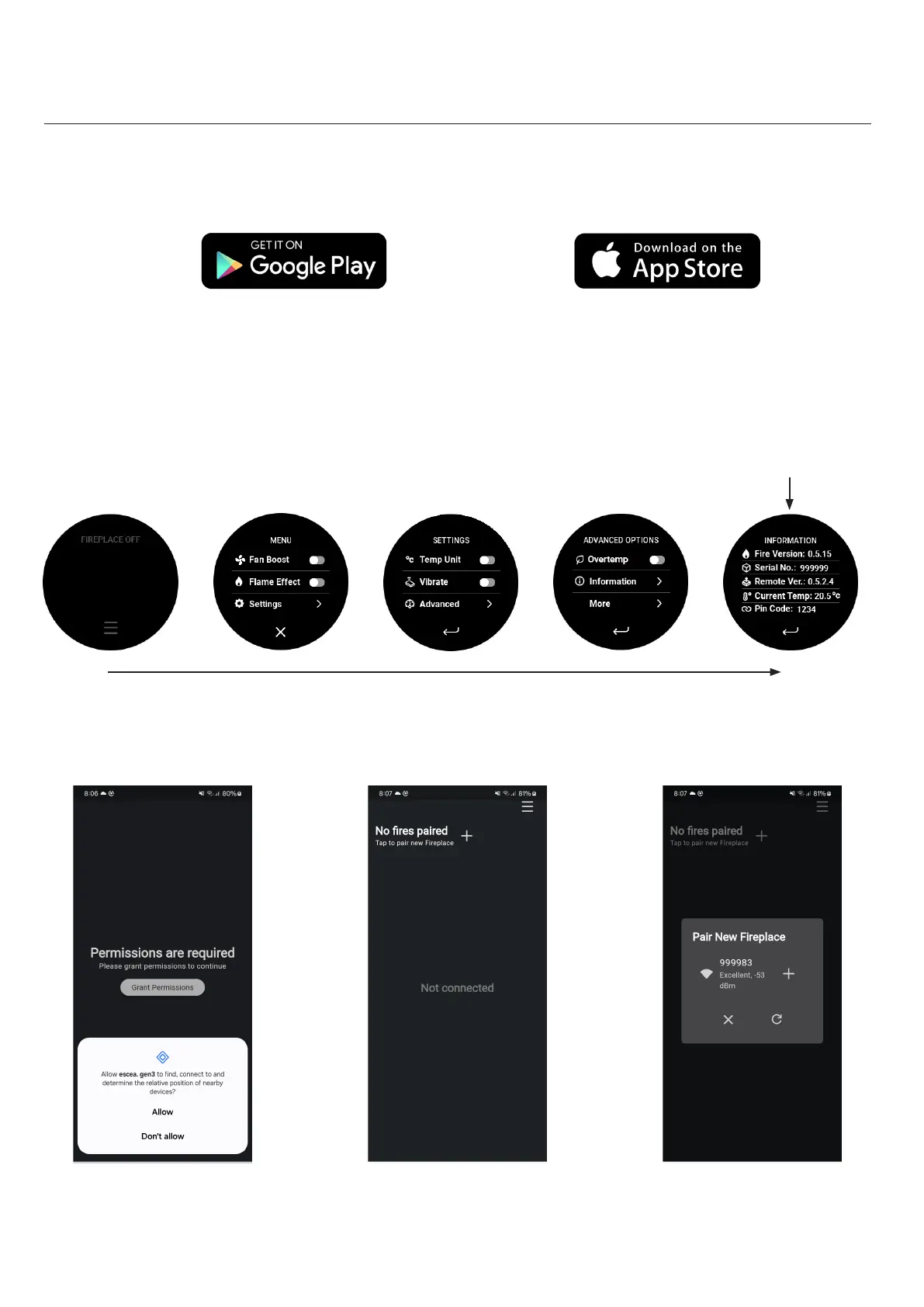
ͳ To do so requires a Bluetooth connecon and a knowledge of the replaces PIN and serial number.
ͳ These numbers can be accessed on the informaon screen of the remote control. It is also available on the
remote instrucon card (scker on the rear).
NOTE : Ensure the remote is acve, if not please charge using a USB-C charging cable to wake the remote.
ͳ To start the pairing process use the mobile APP and follow the on screen instrucons.
NOTE : For most installaons only one re will be available for pairing, but if mulple res exist then the others
can be turned o. Also if for any chance the re is unable to be located, contact Escea with the serial number of
the re.




 To Next Page