13
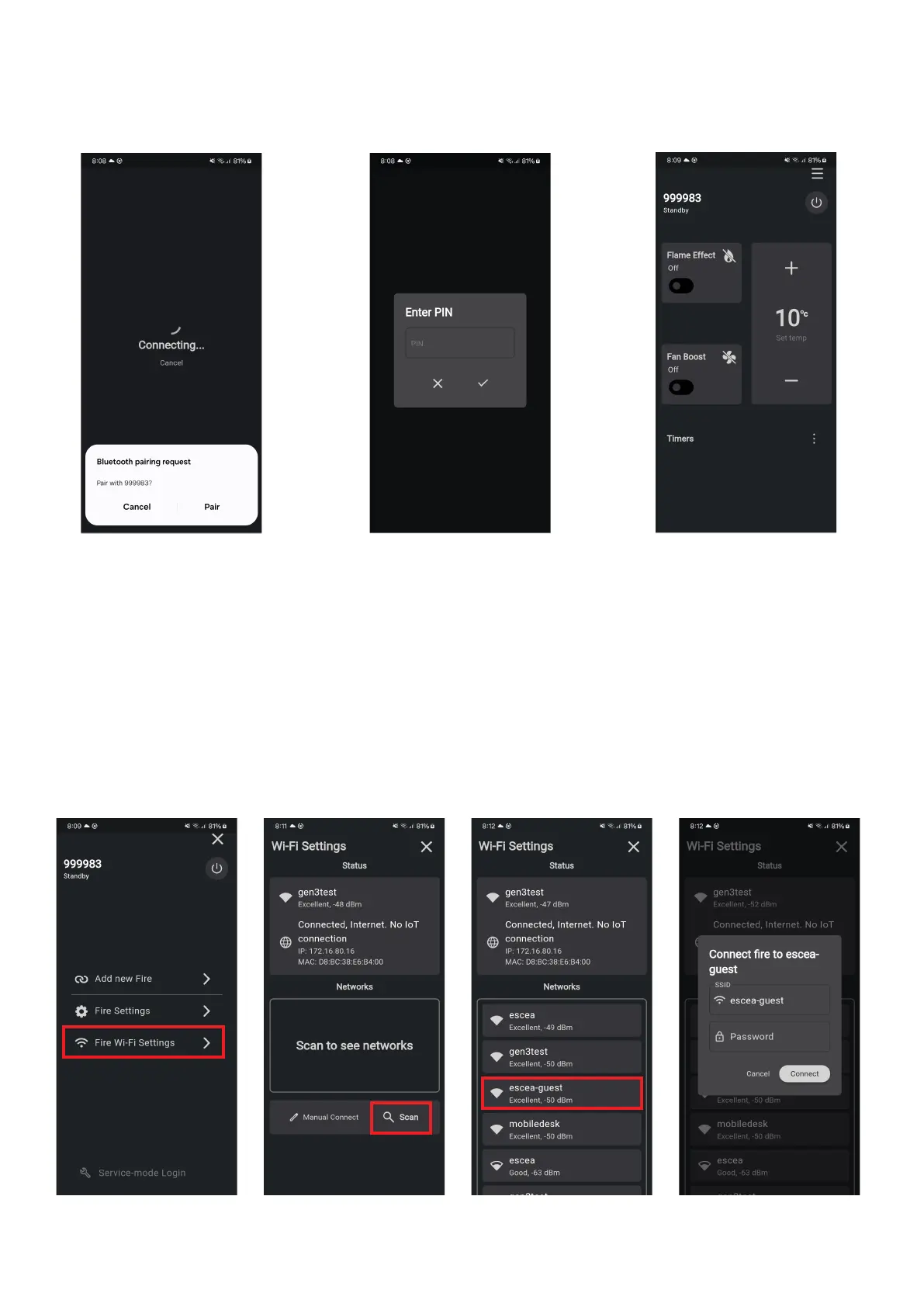
ͳ Once the replace has been found, you can pair this to your device by entering the PIN found within the
sengs menu on the remote control or the informaon card supplied within the remote packaging.
ͳ Aer a re is paired against the mobile device, that mobile device automacally becomes a smartheat
enabled controller via the app. As a SmartHeat controller, the mobile device will communicate with the re
via Bluetooth while it is in range (typically within the house).
Note : In order to disconnect a mobile device from being a SmartHeat controller, it can be disconnected by
holding the AUX buon on the re connuously for a minimum of 10 seconds. This will disconnect ALL other
mobile devices as well.
K3
Connecng the replace to Wi-Fi is done by pairing a mobile device with the replace using the SmartHeat app
(step 2 above) and then accessing the Wi-Fi menu sengs on the app.
For the mobile device to funcon as a SmartHeat controller when outside of the house (via 4G/5G data), the
replace must be aached to the Internet via the customers Wi-Fi router.





 To Next Page