14
K4
K5
What if my Bluetooth won't connect?
ͳ If your Bluetooth devices won't connect, it's likely because the devices are out of range, or aren't in pairing
mode. If you're having persistent Bluetooth connecon problems, try reseng your devices, or having your
phone or tablet "forget" the connecon.
Where do I nd my serial and pin number?
ͳ See secon K2 Pairing a Mobile Device with an Escea Fire (Bluetooth Pairing).
Do I need a password to use the APP?
ͳ The APP does not need or use any passwords.
How do I remove a paired device from my replace?
ͳ In order to disconnect a mobile device from being a SmartHeat controller, it can (along with ALL other mobile
devices) be disconnected by holding the AUX buon on the re connuously for a minimum of 10 seconds
ͳ You will have to re-pair any device lost in this process by follow the steps above in secon K2.
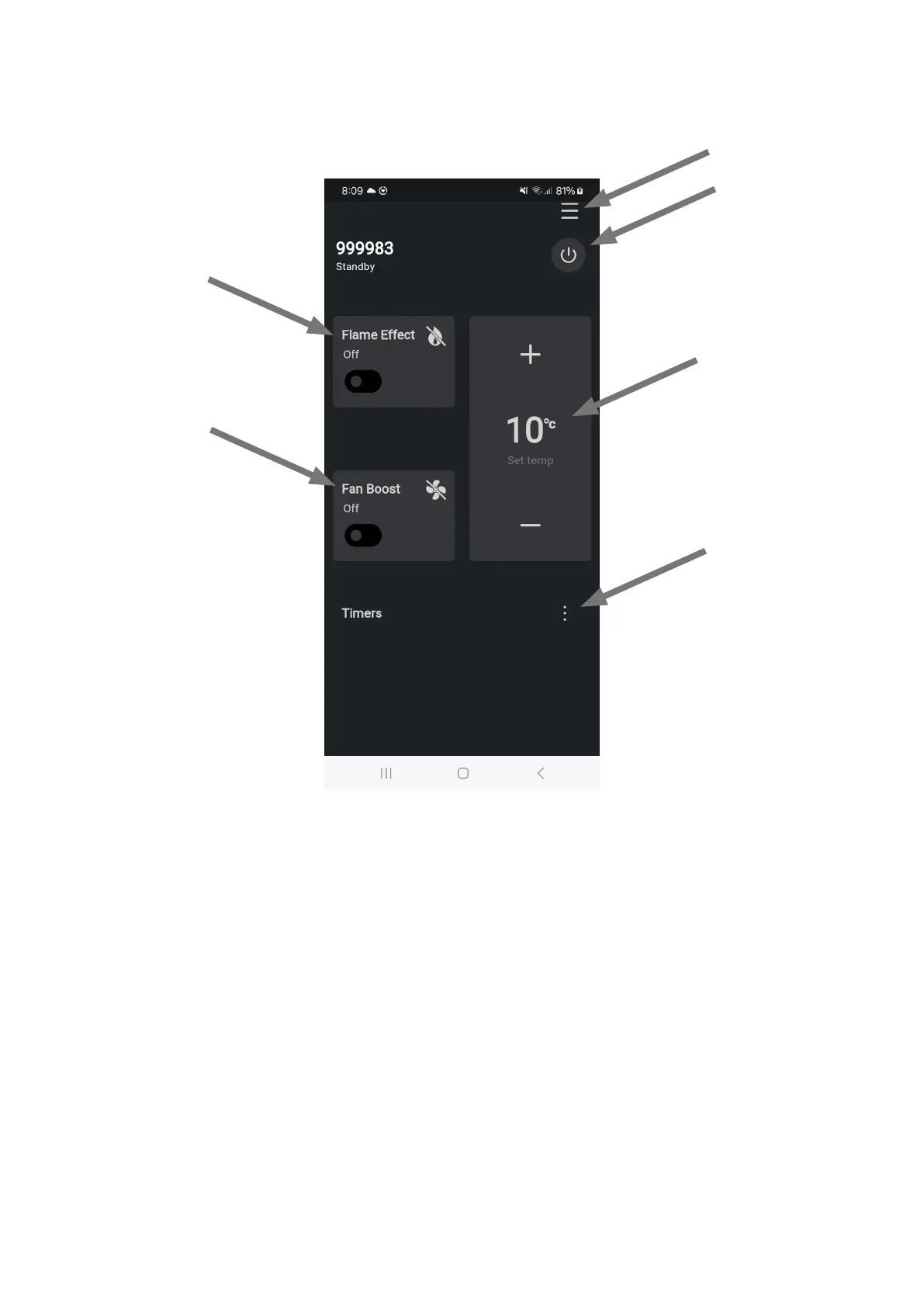
Power Buon
Set Temp Controls
Flame Eect Buon
Fan Boost Buon
Timer Menu
Menu





 To Previous Page