6. Auxiliary On/O Button
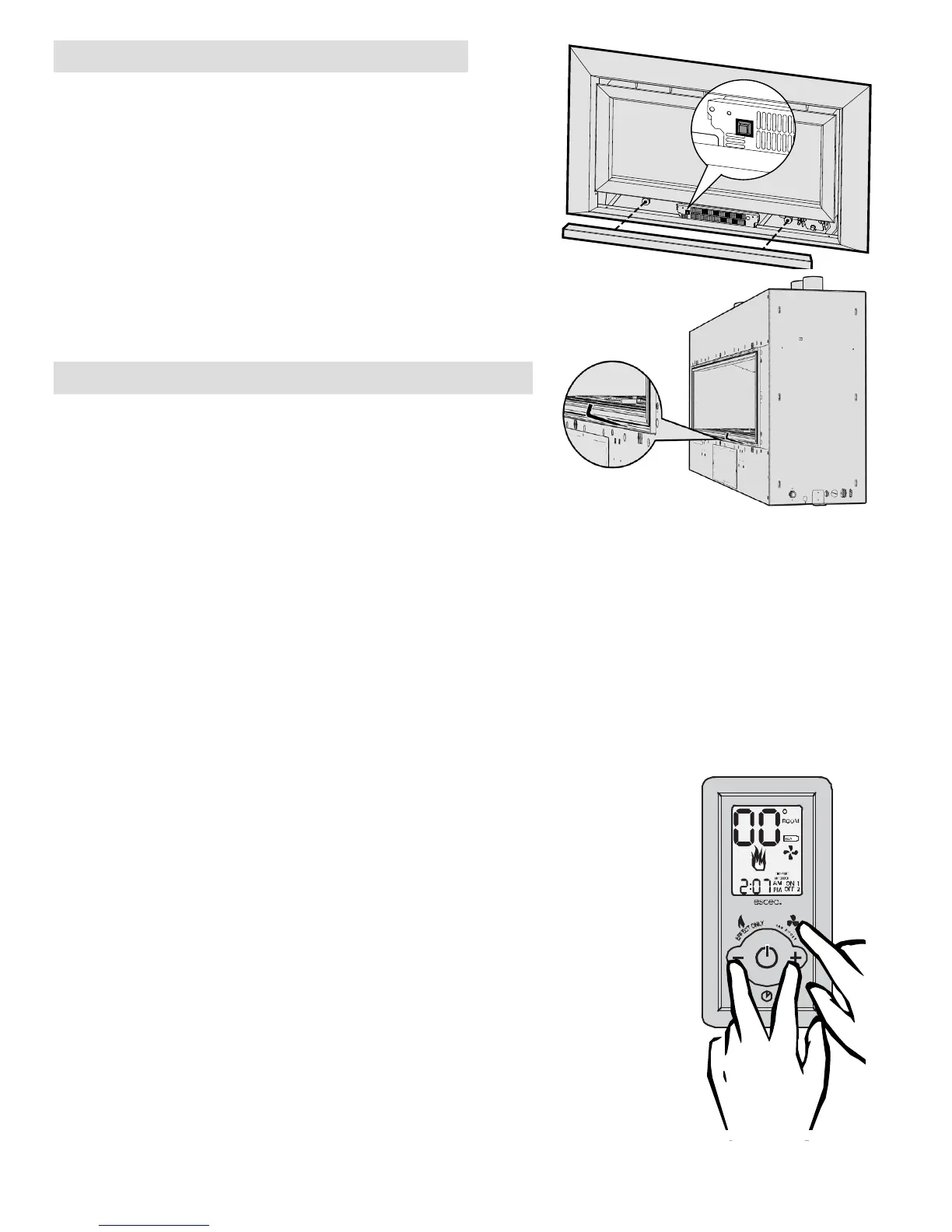
The DL850 has a manual On/O button located under the bot-
tom fascia panel as shown.
The DX1500 has a manual On/O button located inside the re.
To access this you will need a long thin tool (such as as allen key)
and insert this through the opening on an angle as shown.
This button should be used if the wireless control becomes lost,
damaged, or its batteries are at. Pushing the “AUX On/O” but-
ton once will start the heater and it will run at a medium heat
output setting until the “AUX On/O” is pushed again to shut
the heater down.
7. Over Temp Shuto Operation
By default Escea gas res continue running at their lowest
setting when the “Room” temperature has reached the “Set”
temperature. However, in some cases the output of the re, at
its lowest setting, may exceed that which is needed to keep the
room at a steady temperature and the “Room” temperature may
continue climbing above the “Set” temperature.
Your Escea gas re has a setting where it will turn o all the burners once the “Room” temperature exceeds
the “Set” temperature and will re-light the burners when the “Room” temperature falls back below the
“Set” temperature. This is referred to as the “Overtemp Shut O Mode”.
To enable “Overtemp Shut O Mode”, so the re will turn o all burners when the “Room” temperature
climbs above the “Set” temperature, you need to follow the steps below to make the adjustment to your
Escea remote.
Step1: While the remote is in its “OFF” mode with only the time showing on the display (as shown in the
picture to the left), press the MINUS (4), PLUS (8) and FAN BOOST (7) buttons simultaneously (as
shown below right) until all the characters on the display light up.
This will put the remote into test mode and the two big temperature
digits should begin counting from 0 to 99 repeatedly.
Step 2: Press the “TIMER SELECT” Button (5) and you will see that the
temperature digits stop counting and will momentarily display “ON” to
conrm the setting has been made.
Step 3: To exit the test mode press the ON/OFF button (2).
To turn OFF the “Over Temp Shut O Mode”, so the burners remain lit
when the “Room” temp reaches and goes above the “Set” temp, repeat
step 1.
Step 2: Press the “ACTIVATE TIMER” (9) Button and you will see that the
temperature digits stop counting and will momentarily display “OF” to
conrm the setting has been made.
Step 3: To exit the test mode press the ON/OFF button (2).
C
SET
FAN
BOOST
T
I
M
E
R
S
E
L
E
C
T
A
C
T
I
V
A
T
E
T
I
M
E
R
SET TIME
F LAME
EFFECT
ON LY
DL850
DX1500



 To Next Page