630101_2_Manual_Propane_Conversion_US.doc
ST900 US
Edition
R
C US
Sticker
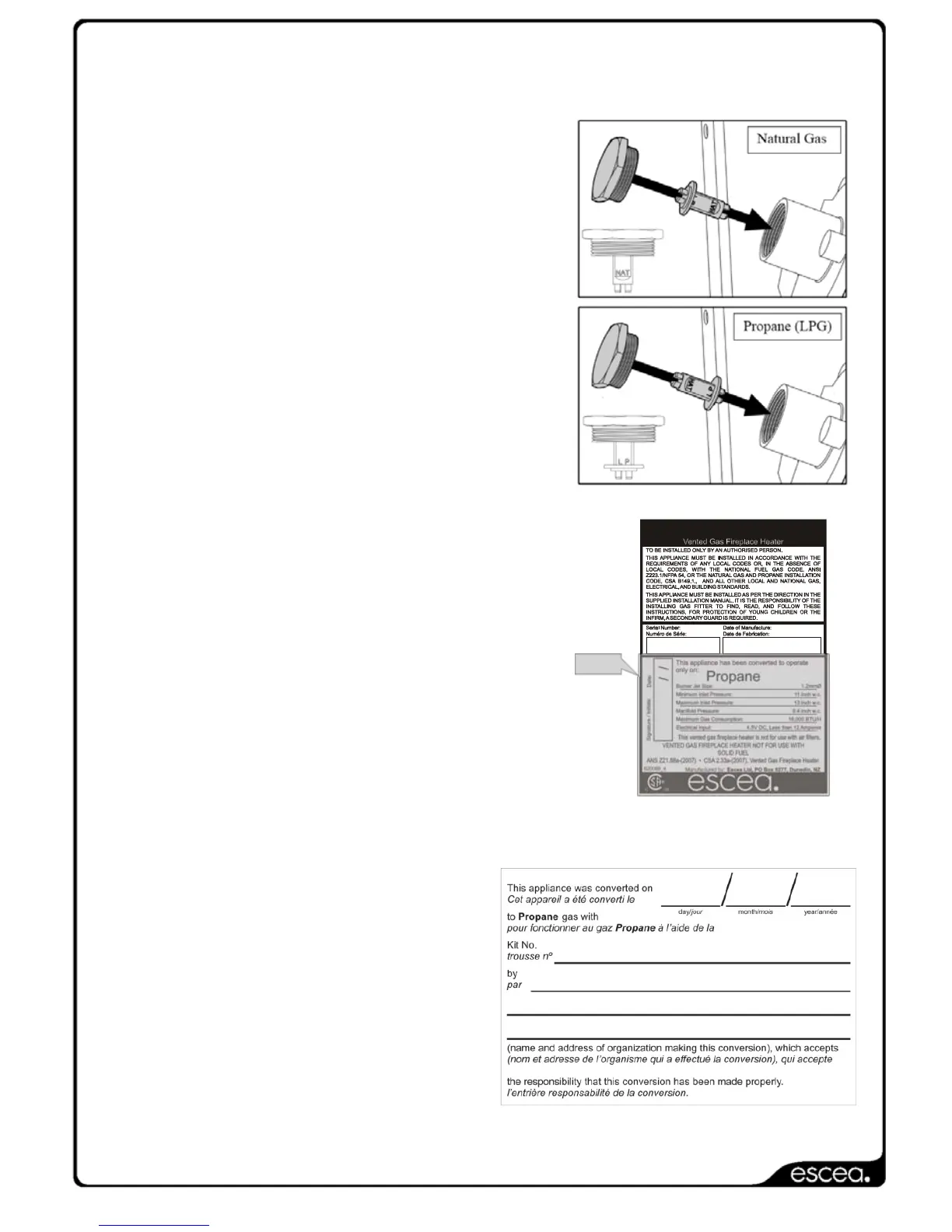
The gas regulator needs to be converted from the Natural Gas setting to
the Propane setting.
The regulator is located on the left hand
side of the control tray, at the base of the
fire. To change the regulator between
Natural Gas and Propane, unscrew the
top cap off the regulator and pull the
plunger from it. Re-insert the plunger on
the opposite side (as shown in the
diagram to the right) and screw the
assembly back in the stack
Now, put the gas data (Propane sticker shown)
sticker supplied in the conversion kit in onto the
dataplate of the ST900 in the position shown.
Note: This will need to be completed on the
English language as well as the French
language dataplates. (English
language dataplate shown)
The sticker must be signed and dated by the
tradesperson who has completed the gas type
conversion.
The conversion is only complete
once the conversion label has
been adhered to the available
label plate and filled out by the
tradesperson who has
completed the gas type
conversion.


 To Next Page