4. FRONT PANEL DEFINITIONS
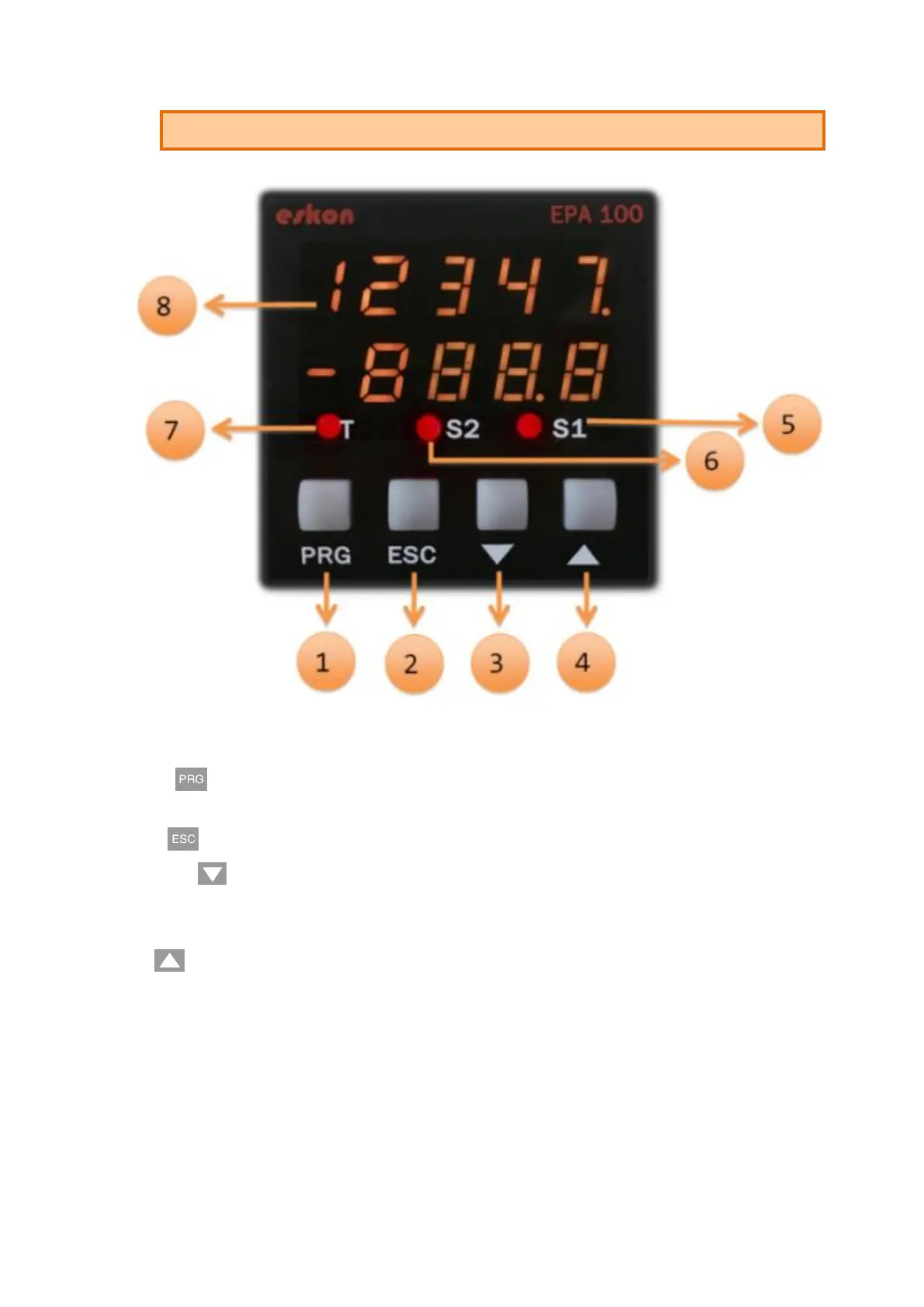
1) PRG ( ): Programming button. It is used to enter the menus or confirm the entered
values.
2) ESC ( ): Escape, exit and backspace key. Used to go back or exit a parent menu.
3) DOWN ( ): Down key. Navigating between menus; Used to decrease the value when
entering a value or to switch to a lower digit. It also allows you to see the readings
(minimum and maximum) on the display while the device is in operating mode.
4) UP( ): Up key. Navigating between menus; Is used to increment the value or move to
a higher digit when entering a value. It also activates the Tare function while in run mode.
Please refer to "Setting" 7.1.2.
5) S1 Status LED: 1. Display when the relay output is active.
6) S2 Status LED: 2. Indicator light when relay output is active.
7) T Status Led: Indicator that is lit when the key function is active.
8) Display Screen: Display screen consisting of 5 lines in 2 lines.


 To Next Page