10
A
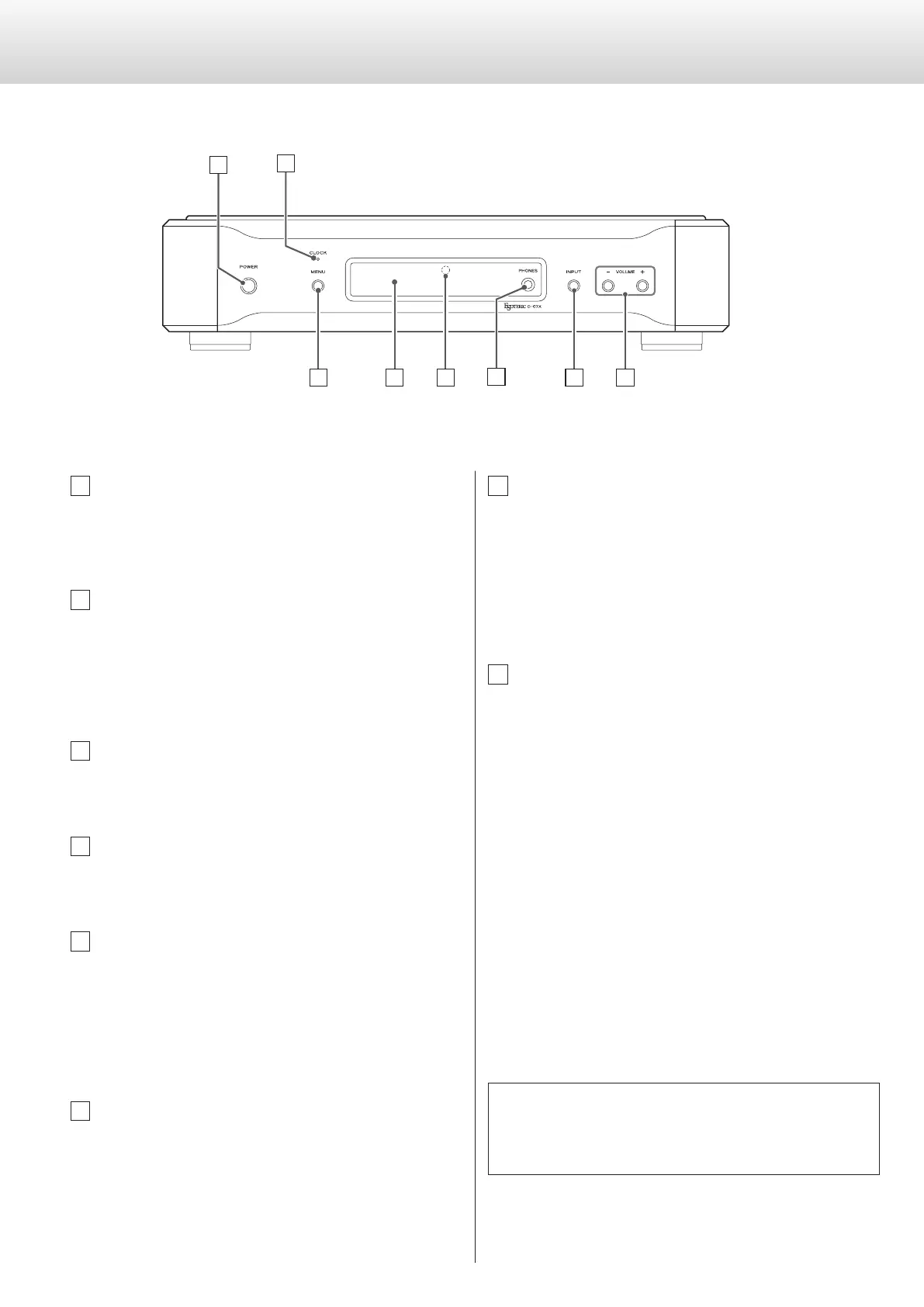
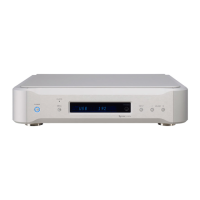
POWER button
Press to turn the power on and off.
When the power is on, the ring around the button lights blue.
B
CLOCK indicator
Shows the clock sync or master clock status.
This indicator blinks when a signal is being input through the
clock sync connector.
When the signal is locked, the indicator stays lit without blinking.
C
MENU button
Press to engage the setting mode (see page 12).
D
Display
Displays the current input, sampling frequency, etc.
E
Remote control sensor
Receives signals from the remote control unit.
Point the remote control unit at this sensor when using the
remote control.
You can use a remote control included with another Esoteric
product.
F
PHONES jack
Connect headphones with a stereo 6.3 mm (1/4") plug here.
o Audio is output through either the analog output (LINE OUT) jack
or the headphones (PHONES) jack.
o Regardless of the input setting, audio will not be output from the
LINE OUT jacks if headphones are connected to the PHONES jack.
C
D
E
G
H
B
A
F
G
INPUT button
Switches the digital input source.
Select the connector to which a digital device is connected.
The display flashes when no digital signal is being input.
o The INPUT buttons on a remote control included with another
Esoteric product can also be used.
H
VOLUME (−/+) buttons
The volume level can be adjusted from −∞ (MUTE), −99.5 to
0.0 dB. Use these buttons to adjust the volume when connected
directly to a power amplifier.
When a preamplifier is connected, set the volume to 0.0.
When in setting mode, these buttons are used to select options
within the menu item.
o When headphones are connected to the PHONES jack, this
adjusts the headphones volume. When headphones are not con-
nected, this adjusts the analog audio output volume.
o The VOLUME (−/+) buttons on a remote control included with
another Esoteric product can also be used.
o If the input signal is a DSD signal or is a PCM signal that is con-
verted to DSD format (page 14), the volume will be set to −48
dB and muted (−∞). If the analog output setting is XLR2 or XLR3
and the XLR output gain is set to +6dB, it will be set to −54 dB and
muted (−∞) (page 17).
You can use a remote control included with a P-05, K-05 or other
Esoteric products with this unit (see page 7).
When using a remote control included with another Esoteric product
to operate this unit, set “RC” (Remote control) to “Enable” (see page 18).
Names and functions of parts


 To Next Page