- 13 -
SUBMENU USED TO RESET METERS (password
SUBMENU USED TO RESET METERS (password SUBMENU USED TO RESET METERS (password
SUBMENU USED TO RESET METERS (password ◄◄◄)
))
)
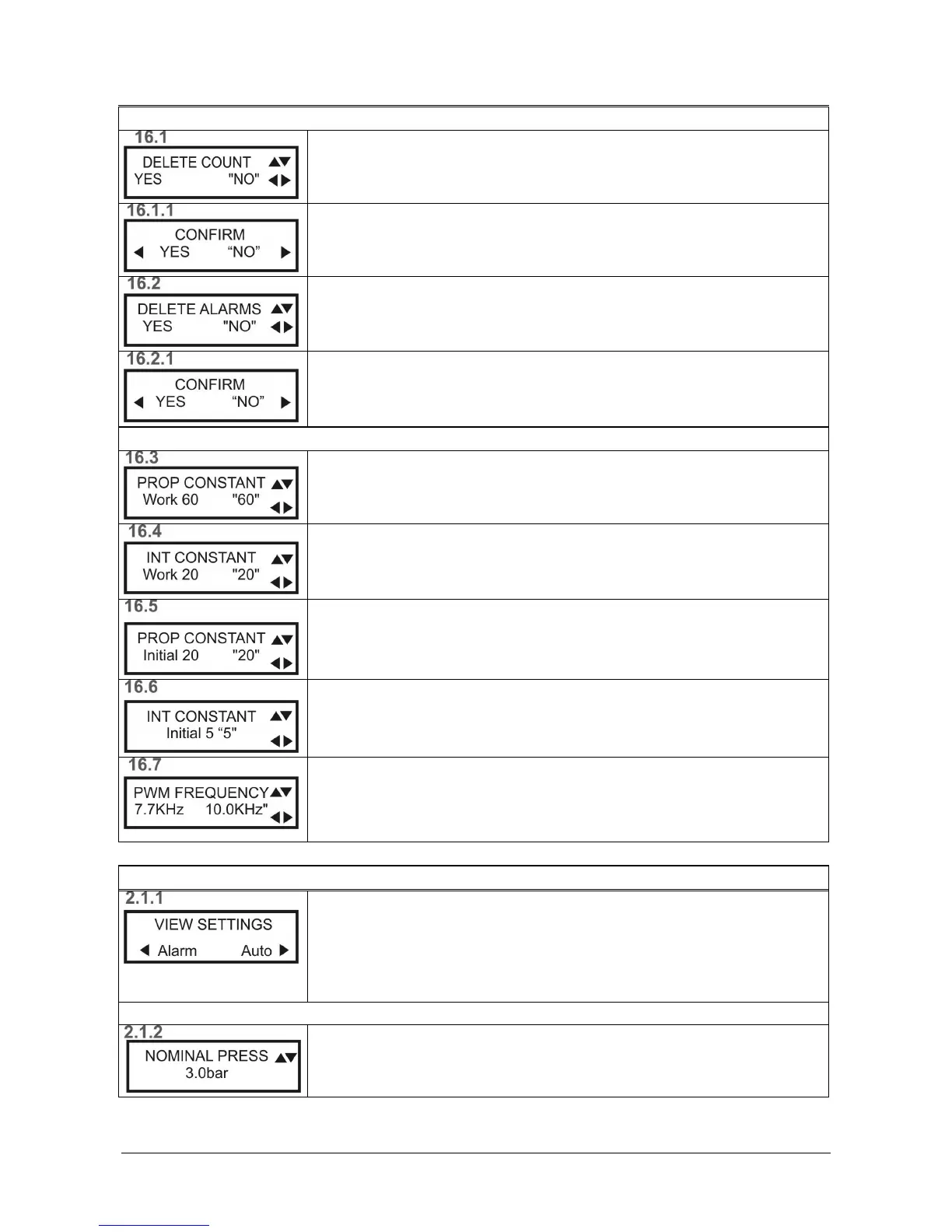
RESET METER
RESET METERRESET METER
RESET METER
Select "Yes" and click OK
OKOK
OK to reset all meters.
Confirm RESET METER.
Select "Yes" and click OK
OKOK
OK to confirm reset all meters.
RESET ALARMS
RESET ALARMSRESET ALARMS
RESET ALARMS
Select "Yes" and click OK
OKOK
OK to reset all alarms.
Confirm RESET ALARMS.
Select "Yes" and click OK
OKOK
OK to confirm reset all alarms.
SUBMENU FOR THE CONFIGURATION OF ADVANCED PARAMETERS (password
SUBMENU FOR THE CONFIGURATION OF ADVANCED PARAMETERS (password SUBMENU FOR THE CONFIGURATION OF ADVANCED PARAMETERS (password
SUBMENU FOR THE CONFIGURATION OF ADVANCED PARAMETERS (password ►►►)
))
)
WORK PROPORTIONAL CONSTANT
WORK PROPORTIONAL CONSTANTWORK PROPORTIONAL CONSTANT
WORK PROPORTIONAL CONSTANT
Allows the variation of the unit's proportional constant after start-up.
WORK INTEGRAL CONSTANT
WORK INTEGRAL CONSTANTWORK INTEGRAL CONSTANT
WORK INTEGRAL CONSTANT
Allows the variation of the unit's integral constant after start-up.
START PROPORTIONAL CONSTANT
START PROPORTIONAL CONSTANTSTART PROPORTIONAL CONSTANT
START PROPORTIONAL CONSTANT
Allows the variation of the unit's proportional constant upon start-up.
STAR INTEGRAL CONSTANT
STAR INTEGRAL CONSTANTSTAR INTEGRAL CONSTANT
STAR INTEGRAL CONSTANT
Allows the variation of the unit's integral constant upon start-up.
PWM FREQUENCY (Pulse Width Modulation)
PWM FREQUENCY (Pulse Width Modulation)PWM FREQUENCY (Pulse Width Modulation)
PWM FREQUENCY (Pulse Width Modulation)
Allows the variation of the internal module switching tasks.
A high-pitched sound will be heard from the motor (depending on the type of
motor) when the switching frequency is varied.
DISPLAY OF PARAMETERS
DISPLAY OF PARAMETERSDISPLAY OF PARAMETERS
DISPLAY OF PARAMETERS
DISPLAY OF PARAMETERS
DISPLAY OF PARAMETERSDISPLAY OF PARAMETERS
DISPLAY OF PARAMETERS
Press OK
OKOK
OK to confirm.
Parameters can only be displayed, not modified.
To display the alarms, press ◄ (Alarm)
To return to the main screen, press ► (Auto)
From any screen, tap OK to return to the main
From any screen, tap OK to return to the mainFrom any screen, tap OK to return to the main
From any screen, tap OK to return to the main screen 2.1
screen 2.1 screen 2.1
screen 2.1
NOMINAL PRESSURE
NOMINAL PRESSURENOMINAL PRESSURE
NOMINAL PRESSURE
Work pressure assigned to the unit.


 To Next Page