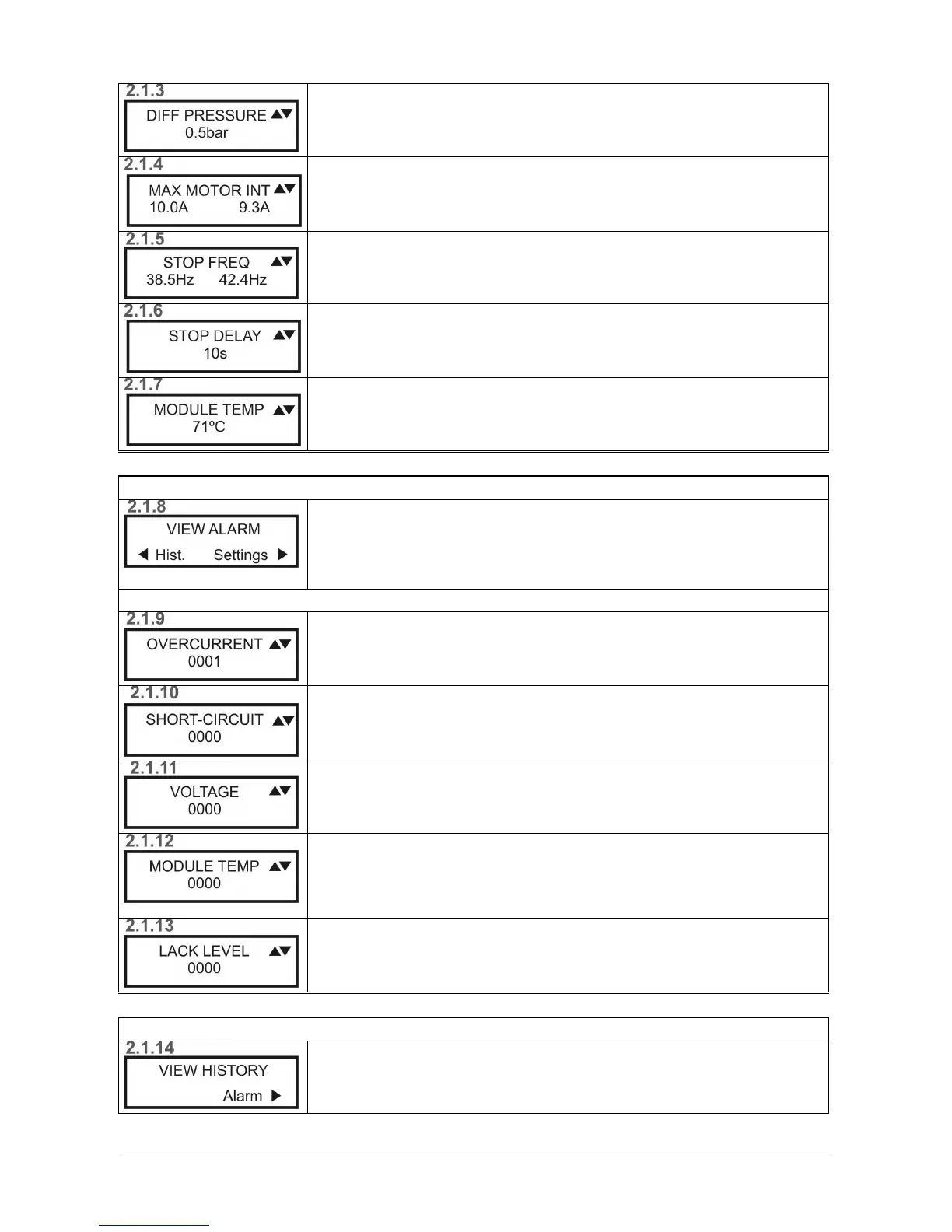
MAXIMUM MOTOR CURRENT
MAXIMUM MOTOR CURRENTMAXIMUM MOTOR CURRENT
MAXIMUM MOTOR CURRENT
Maximum configured current/ Present current
STOP FREQUENCY
STOP FREQUENCYSTOP FREQUENCY
STOP FREQUENCY
Stop frequency of the inverter / Present output frequency
STOP DELAY
STOP DELAYSTOP DELAY
STOP DELAY
Timing before a stop.
MODULE TEMPERATURE
MODULE TEMPERATUREMODULE TEMPERATURE
MODULE TEMPERATURE
Current temperature of the module or circuit.
DISPLAY OF THE ALARM LOG
DISPLAY OF THE ALARM LOGDISPLAY OF THE ALARM LOG
DISPLAY OF THE ALARM LOG
DISPLAY ALARMS
DISPLAY ALARMSDISPLAY ALARMS
DISPLAY ALARMS
Press OK
OKOK
OK to confirm.
To display the log, press ◄ (Hist)
To display the parameters, press ► (Param)
From any screen, tap OK to return to the main screen 2.1
From any screen, tap OK to return to the main screen 2.1From any screen, tap OK to return to the main screen 2.1
From any screen, tap OK to return to the main screen 2.1
OVERCURRENT
OVERCURRENTOVERCURRENT
OVERCURRENT
Number of times an overcurrent is detected.
(see Section 6)
SHORT
SHORTSHORT
SHORT-
--
-CIRCUIT
CIRCUITCIRCUIT
CIRCUIT
Number of times a fault caused by a short-circuit is detected.
(see Section 6)
VOLTAGE
VOLTAGEVOLTAGE
VOLTAGE
Number of times the inverter has stopped due to a voltage fault.
(see Section 6)
MODULE TEMPERATURE
MODULE TEMPERATUREMODULE TEMPERATURE
MODULE TEMPERATURE
Number of times the inverter has stopped due to excess temperature in the
module.
(see Section 6)
LACK OF WATER LEVEL IN TANK
LACK OF WATER LEVEL IN TANKLACK OF WATER LEVEL IN TANK
LACK OF WATER LEVEL IN TANK
Number of times the inverter has stopped by activating the probe level.
(see Section 6)
DISPLAY OF THE OPERATION LOG
DISPLAY OF THE OPERATION LOGDISPLAY OF THE OPERATION LOG
DISPLAY OF THE OPERATION LOG
DISPLAY LOG
DISPLAY LOGDISPLAY LOG
DISPLAY LOG
Press Ok to confirm.
To display the alarms, press ► (Alarm)


 To Next Page