Bench-top type temperature(humidity) chamber Installation guide
22 ESPEC CORP.
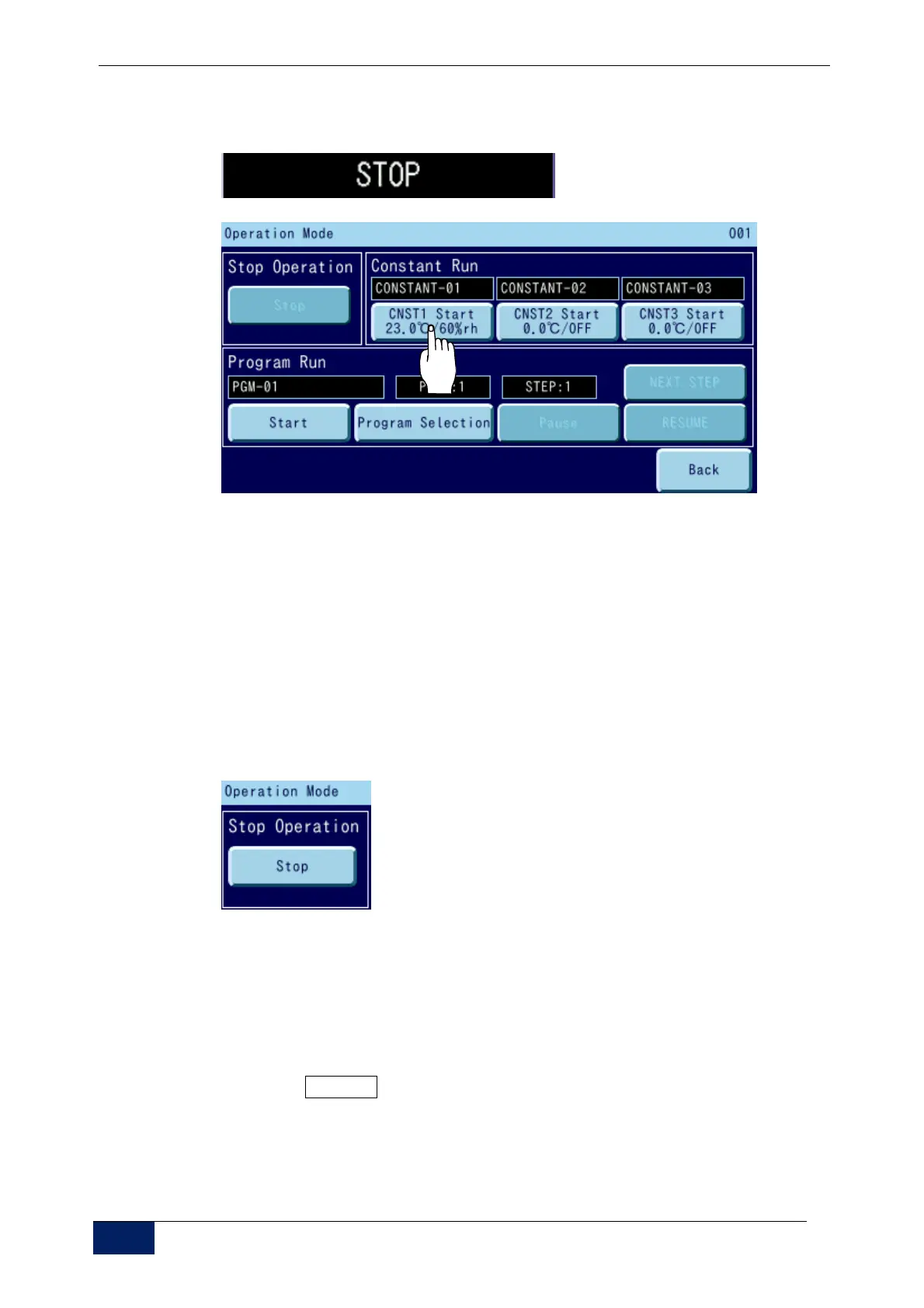
5) Press [STOP](top,left), and [Operation mode]is shown.
Press the [Const No.1]
↓
6) A message to confirm the execution of the operation is displayed.
[YES]: Starts the operation and goes back to the original screen.
“CONSTANT” appears in the operating display area.
7) The chamber starts, and water supply to the humidifying tray will be
completed within about 5 minutes.
8) Make sure it is over 5 minutes. After the water supply is completed, finish
the constant value operation.
Press the [Stop] button below Stop Operation.
9) A message to confirm the execution of the operation is displayed
[YES]: Stops the operation and goes back to the original screen.
[NO]: Goes back to the Operation Mode screen without stopping the
operation.
10) Press the POWER switch on the instrumentation.
For details on the operation method of instrumentation, refer to the
operation manual “Controller guide”



 To Next Page