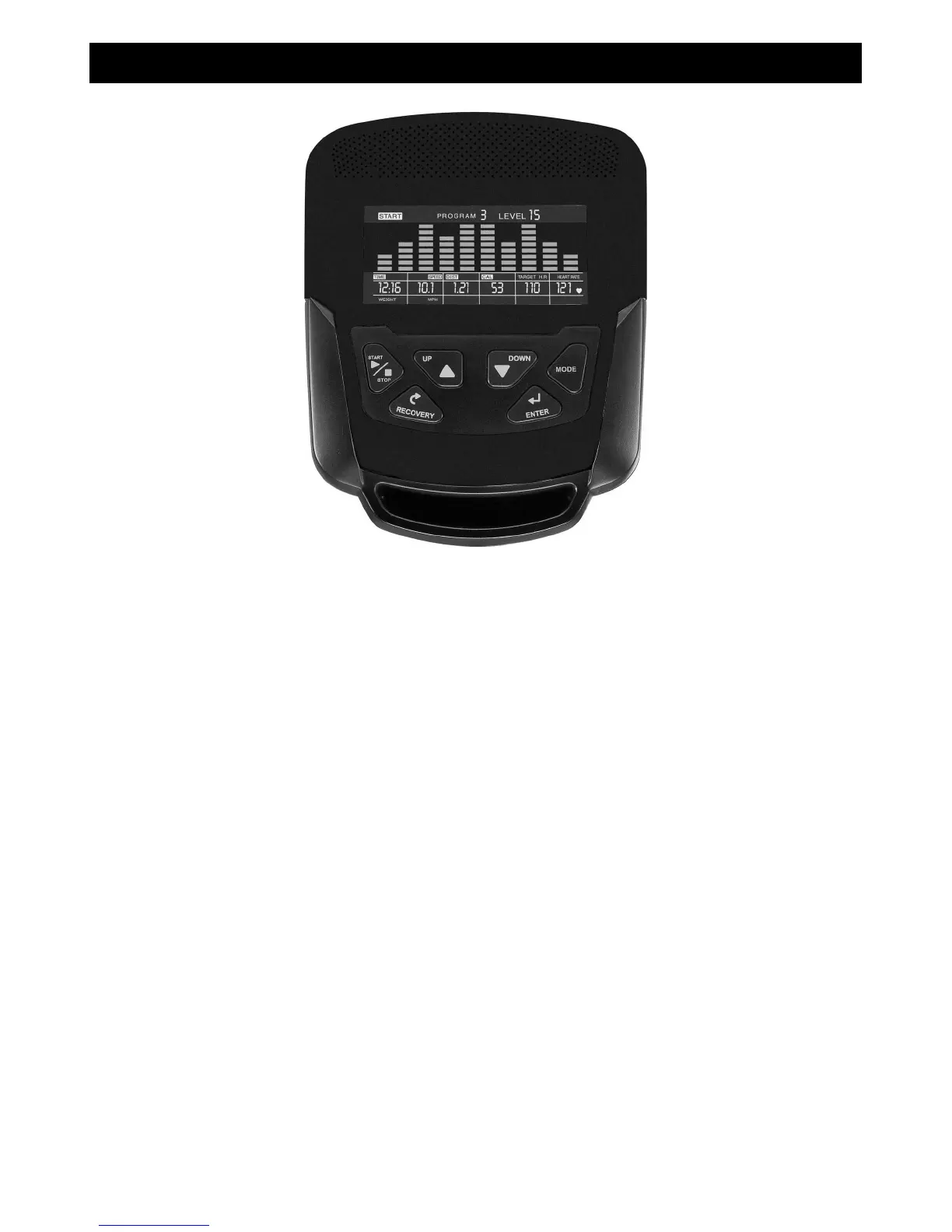
Key Functions
START/STOP: 1. Starts & Pauses workouts.
2. Starts body fat measurement.
3. Holding key for 3 seconds will reset all functions and values to zero.
DOWN: Decreases value of selected workout parameter: TIME, DISTANCE, etc. During the
workout it will decrease the resistance load.
UP: Increases value of selected workout parameter. During the workout it will increase the
resistance load.
ENTER: To input desired value or work out mode.
RECOVERY: Press to enter into heart rate Recovery function. Only works when the computer is
receiving a heart rate value. Recovery is an indication of Fitness Level. It is a one minute
measurement taken immediately after and exercise session and provides a score from1 to 6.
A score of 1 is an indication of a high level of fitness and a score of 6 indicates poor condition.
MODE: Press to switch display from RPM to SPEED, ODO to DIST, WATT to CALORIES.
Workout Selection
After power-up, use the UP or DOWN keys to select a workout program then pressing ENTER.
There are 7 basic workout programs: Manual, Pre- programs, Watt Program, Body Fat
Program, Target Heart Rate program, Heart Rate Control program and User Program.
Console


 To Next Page