EasyManua.ls Logo

EST LSS4 - Page 32

Default Icon
126 pages
Print Icon
To Next Page IconTo Next Page
To Previous Page IconTo Previous Page
Loading...
System
Installation
MBPR
MasterBox
Reverse
Polarity
ModuleRevB
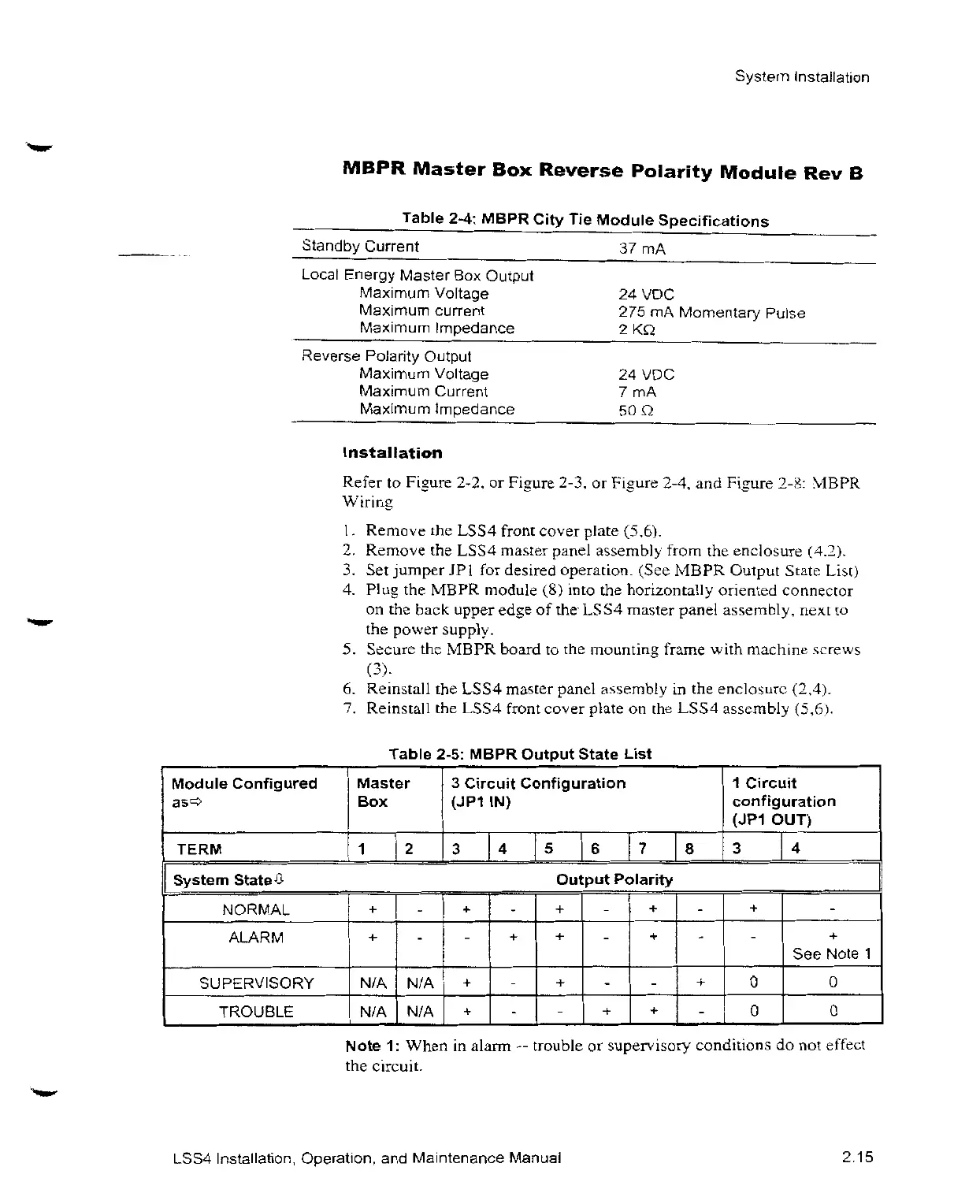
Table26:
MBPR
CityTie
Module
Specifications
Standby
Current 37mA
Local
Energy
MasterBox
Output
Maximum
Voltage
Maximum
current
Maximum
Impedance
Reverse
Polarity
Output
Maximum
Voltage
Maximum
Current
Maximum
Impedance
Insta\lation
24VDC
275mA
Momentary
Pulse
2 K>
24VDC
7 mA
50C
Referto
Fi_•ure
2-2,or Fi
•_ure
2-3,or
Figure
2-4,and
Fiyure2-8
MBPR
1
.
RemovetheLSS4
front
cover
plate
(5.6).
2.
Removethe
LSS4
master
panel
assembly
fromthe
enclosure
(4.2).
3. Set
jumperJP1 for
desired
operation.
(See
MBPR
Output
State
List)
4.
Plu•gthe
MBPR
module(8)
intothe
horizontally
oriented
connector
onthe
back
upper
edg•eof the
LSS4
master
panel
assembly.
nextto
the
power
supply.
5.
Securethe
MBPR
boardtothe
mounting
framew
ith
machine
.screws
6. Re
install the
LSS4
master
panel
assemblyinthe
enclosu iz
(2.4).
7.
Reinstallthe
LSS4
front
cover
plateon the
LSS4
assembly
(5,6d.
Table
2-5:
MBPR
Output
State
List
Module
Configured
Master3
Circuit
Configuration
ass Box
(JP1IN)
TERM
System
State4
NORMAL
ALARM
Output
Polarity
- + . +
. +
1
Circuit
configuration
(JP1
OUT)
1 2 3 4 5 6 7 8 3 4
SUPERVISORYN/AN/A+
- *
-
TROUBLEN/AN/A+
-
0
+ 0
See
Note1
0
0
Hi ote
1:
Whenin
alarm
--
troubleor
superv
isory
conditionsdo not
effect
thec
ircuit.
LSS4
Installation,
Operation,and
Maintenance
Manual
2.15

Related product manuals