EasyManua.ls Logo

EST LSS4 - Page 59

Default Icon
126 pages
Print Icon
To Next Page IconTo Next Page
To Previous Page IconTo Previous Page
Loading...
g
.
5"
(24.
î
cm}
System
lnstallation
TYPICAL
ANnJUNClA*OP
MODULE
I
nstallation
Mechanical
Installation
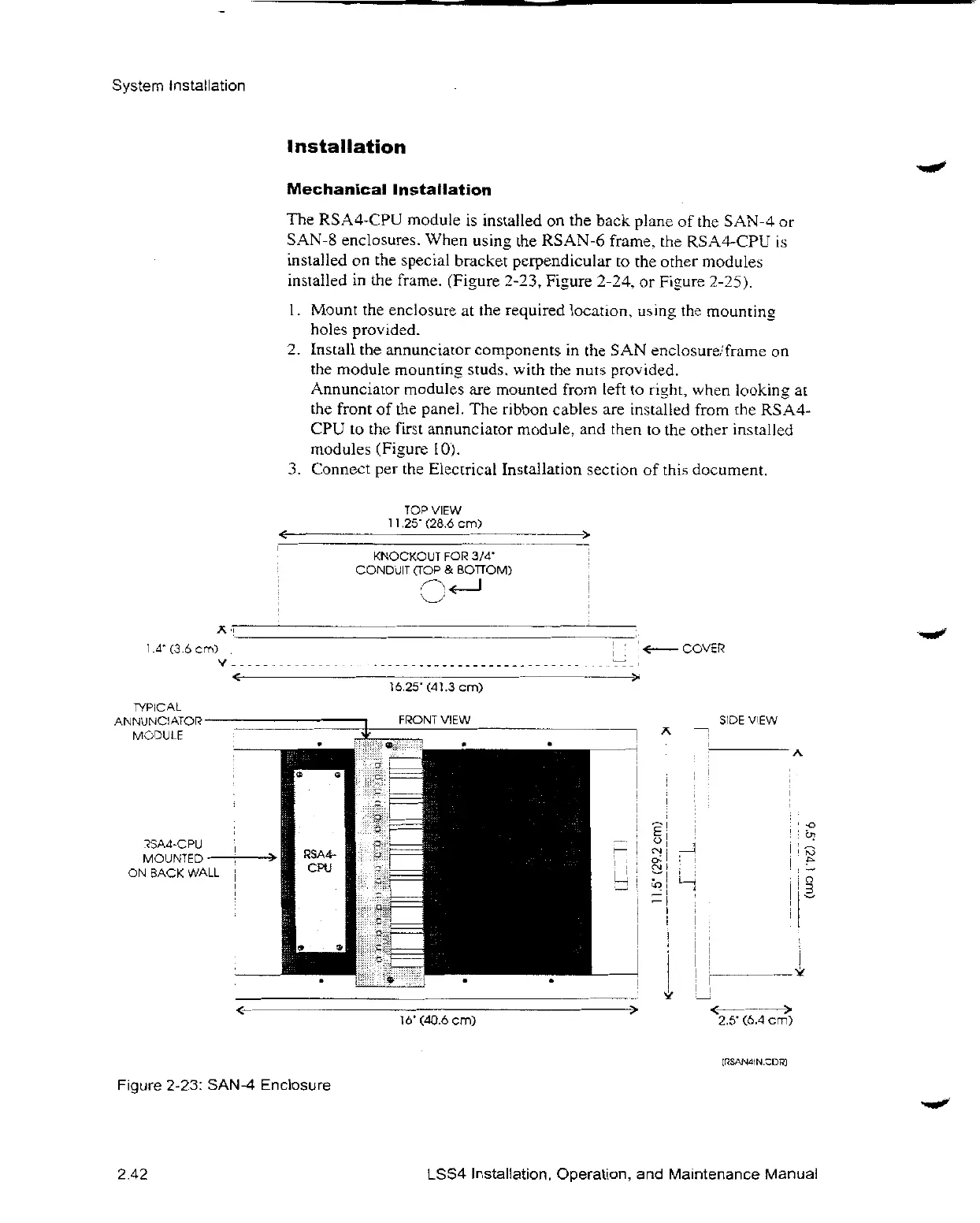
The
RSA4-CPU
module
is
installedon the
back
planeofthe
SAN-4or
SAN-8
enclosures.
When
usingthe
RSAN-6
frame.the
RSA4-CPU
is
installedon the
spec
ial
bracketperpendiculartothe
other
modules
insialledin the
frame.
(Figure
2-23,
Fi3ure
2-24.or
Fi3ure
2-2i).
l.
Mountthe
enclosureatthe
required
location,
usingthe
mounting
holes
provided.
2.
Installthe
annunciator
componentsintheSAN
enc1osure,'frameon
the
module
mountin
•_
studs.
withthe
nuts
prov
ided.
Annunciator
modulesare
mounted
from
left to
ri_ht,
when
lookingaI
the
frontofthepanel.The
ribbon
cablesare
installed
fromthe
RSA4-
CPUtothe
first
annunciator
module,and
thentothe
other
installed
modules
(Fi•urel0L
3.
Connectperthe
Electrical
Installation
sectionof
this
document.
COP
VIEW
1
1,25”
(28.ócm)
KNOCKOUTFOI
3/4’
CONDUITCOP&
BOTTOM)
'
Figure
2-23:
SAN-4
Enclosure
2.42
Ió.25'(d1.3cm}
FÑONT
VIEW
16'
fd0.ócml
SEDE
ViEW
2.5Ӣ6.4cml
LSS4
Installation,
Operation,and
Maintenance
Manual

Related product manuals