EasyManua.ls Logo

EST LSS4 - Page 62

Default Icon
126 pages
Print Icon
To Next Page IconTo Next Page
To Previous Page IconTo Previous Page
Loading...
System
Installation
Table
2-25:
RSA4-CPU
P'olling
Address
SwitCh
Setting
RSA4-CPU
SUb-Address
0
1
2
3
32
16 8 4
z 1
, _
I?SA4-CPU
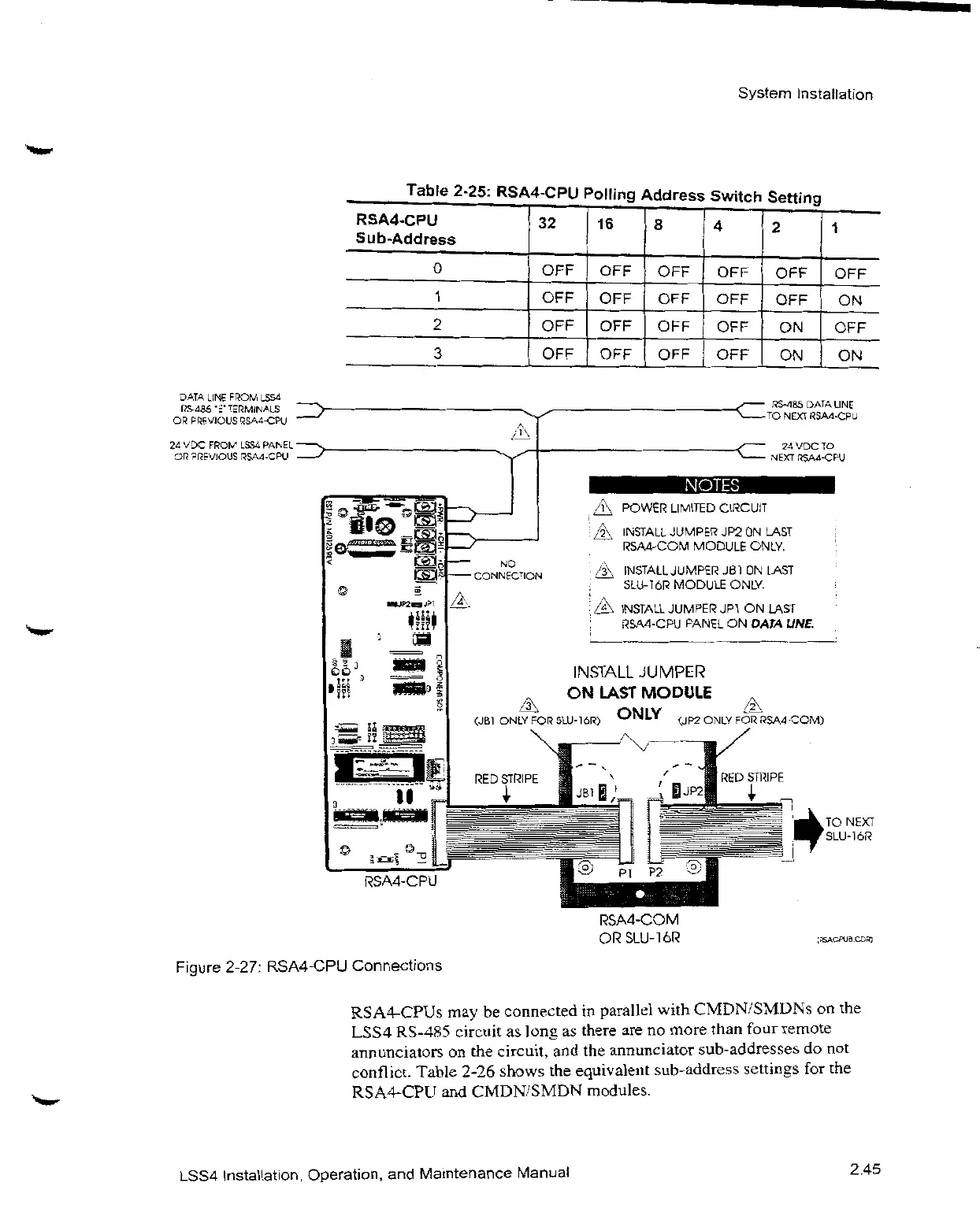
Figure
2-27:
RSA4-CPU
Connections
OFF OFF OFF OFF OFF OFF
OFF OFF OFF OFF OFF ON
OFF OFF OFF OFF ON OFF
OFF OFF OFF OFF ON ON
i
POWER
LIMITED
CIÑCUII
6
DATA
LINE
TO
NEXT
ftSAd-CPU
24MDC TO
2
INSTALL
JUMPEPJP2ON
LAST
I
5A4-COM
MODULE
ONLY.
,‘3'
jN5TALL
JUMPEfJB10N
LAST
SLU-ï
6F'
MODULEONU
INSTALL
JUMPE
Ï2U PI ON
LAST
f2SAd-CPU
FANELON
OAFA
UNE.
INSTALL
JUMPEf2”
£JB1
ONLV
FOIS
SLU-J6
'}
F'ED
STfi2IPE
LAST
MODULE
ONLY
p
j’
P2' ”w
(JP2ONU FOD
LSS4-COMP
RED
3P2
PSA4-COM
ONSLUI6E
Sf[2IPE
îO
NEXT
RSA4-CPUsmaybe
connectedin
parallel
with
CMDN/SMDNsonthe
LSS4
RS-485
circuitas
longas
thereareno
more
than
four
remote
annunciatorsonthe
circuit,and the
annunciator
sub-addressesdonot
confl
ict.
Table
2-26
showsthe
equivalent
sub-address
settingsforthe
RSA4-CPUand
CMDN/SMDN
modules.
LSS4
Installation,
Operation,and
Maintenance
Manuat
2.45

Related product manuals