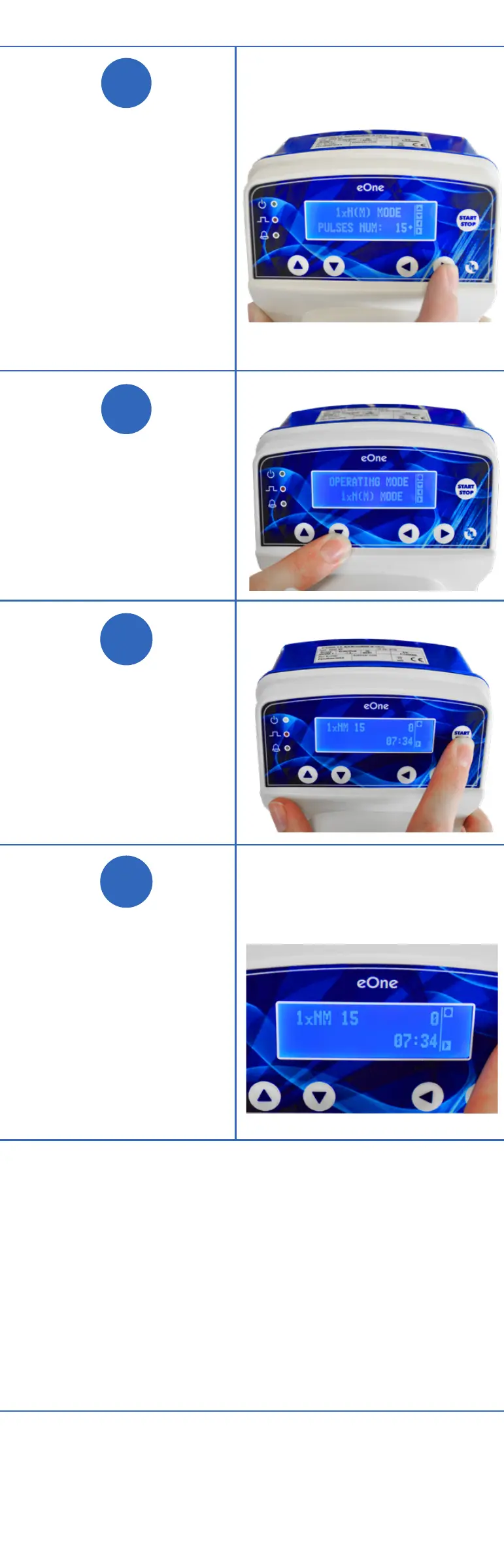
Arrow right to
input number
of pulses.
Example image
shows 15 Pulse/
Strokes has
been entered.
Arrow down.
Click START.
Screen changes
reflecting what
you programmed:
1xNM 15 will
display in upper
left corner.
NOTE: Your pump will run upon
receiving a pulse from the Water
Meter. On the second signal the
pump will dose slower, spacing out
the pulses over time.
NEED HELP?
CALL 1-800-451-6628
Part D: Priming the pump
Plug the pump,
this will put you in
SET UP mode.
Press the arrow to
the right twice and
select MF.
Click START
button twice.
Screen shows
Operating Mode/
Manual Mode.
Pump will begin to
prime.
Part E: Programing the pump 1xN(M)
MODE
Press the right
arrow twice,
display will read
1XN(M). This
means pump
will stroke N
times with every
impulse from the
Water Meter with
memory function.
N = Number
of pulses
Arrow down once
and you have the
option to input
the PULSES
NUM:
eOne Installation
The pump is ready to receive signals from the Water Meter.
Priming Instructions
Water Meter Options
WM34-1PPG One pulse/gallon
WM34-10PPG One pulse/10 gallons
See operating manual for
complete instructions
and safety standards.
When connecting a metering
pump either to a public
water supply or to its own
water source, you must
respect the regulations in
force concerning protection
of the source i.e.
backflow prevention, etc.
!
CAUTION
1
2
3
4
5
6
1
2
3
NOTE: Installation illustrations are to be
used as a reference guide only.


 To Next Page