ETC Installation Guide
ColorSource Linear v1.7
Note:
The ColorSource Linear is not self terminating. You must
terminate the last fixture in line with a 120 Ohm resistor.
XLRterminators are not available from ETC.
To purchase an RJ45 terminator, please contact ETC customer service
and request part number N4086.
Set Up the Fixture
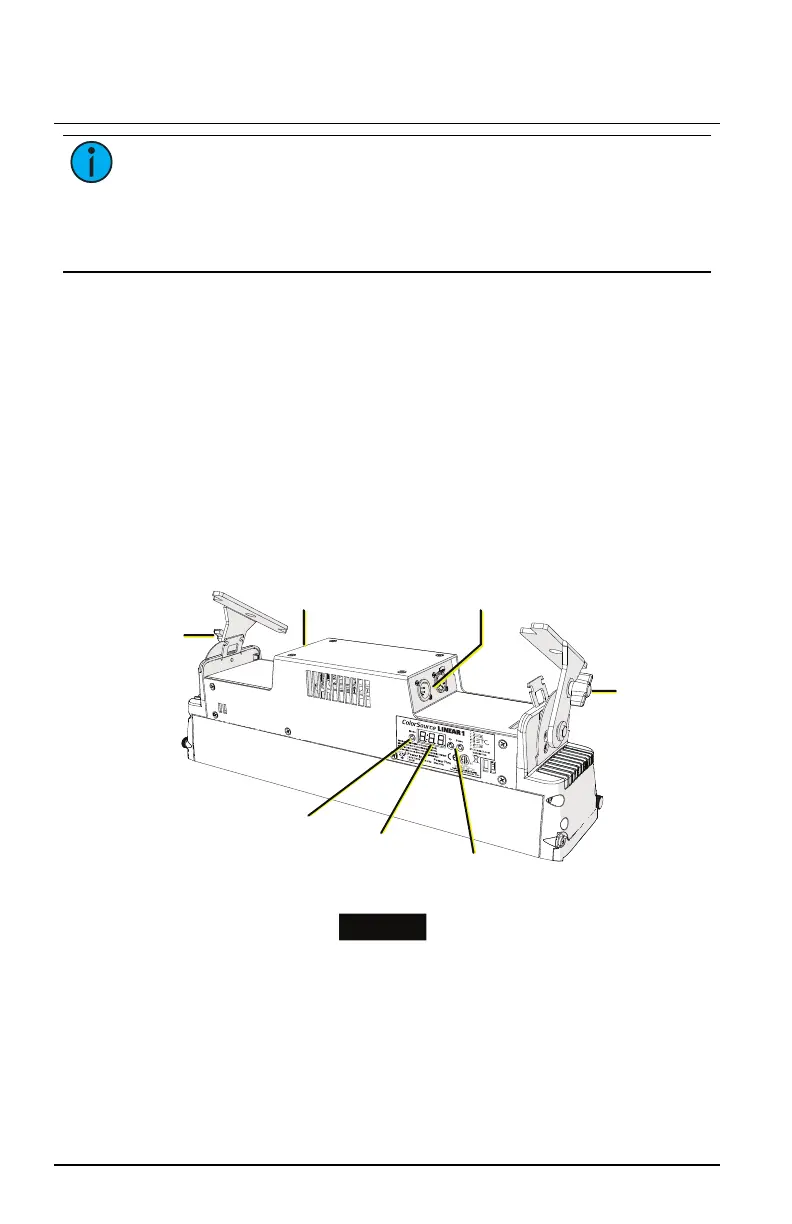
See the fixture illustrations below and on the following page for reference.
1. Plug the power cord into the powerCON In connector on the rear of
the fixture.
2. Make any power-thru cable connections prior to applying a power
source.
3. Make any DMX connections, and if the fixture is the last in a DMX line,
terminate the fixture. See
Connectors on the previous page
.
4. Plug the power cord into the power source.
Trunnion
locking knob
Trunnion
locking
knob
Power in
and thru
connectors
Data in
and thru
connectors
Up and
Down buttons
User
interface
(display)
Mode
button
Linear 1
ColorSource Linear Page 6 of 20 ETC


 To Next Page