ETC Installation Guide
ColorSource Linear v1.7
Set the Grouping Mode
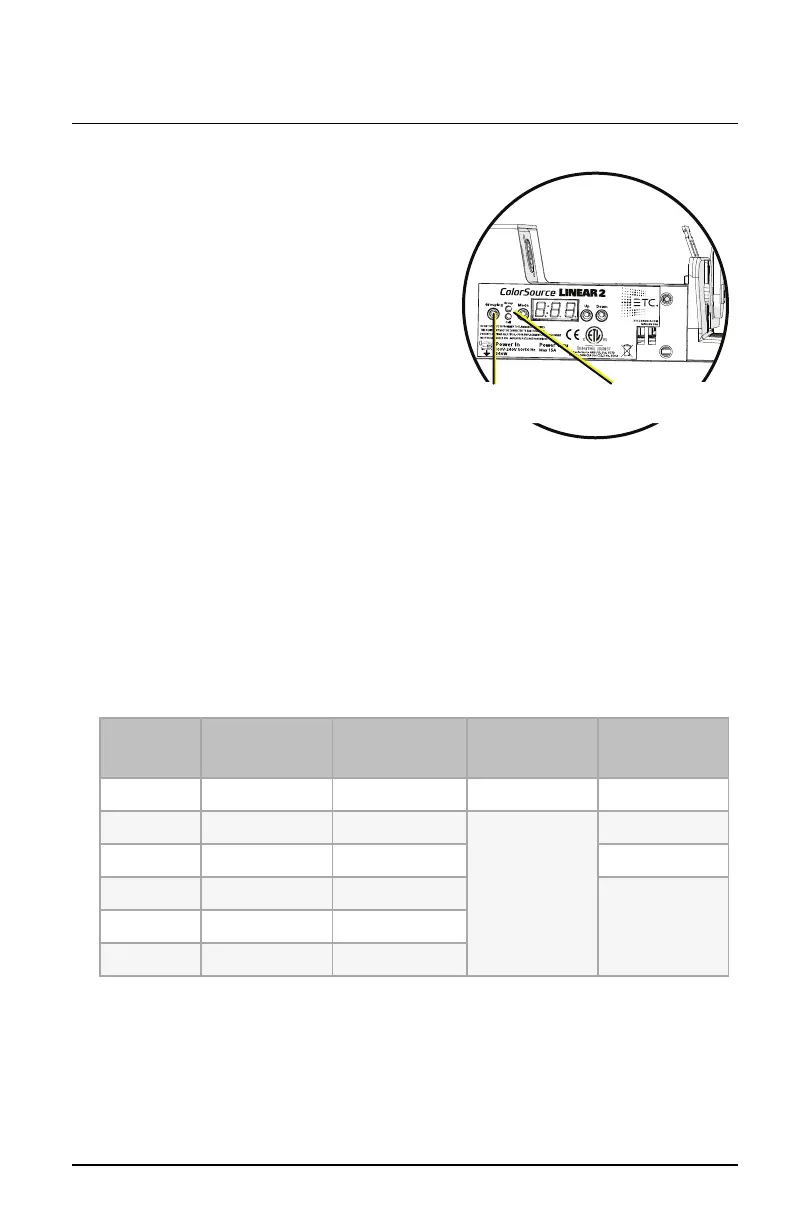
Grouping
button
Group and Cell
LED indicators
The ColorSource Linear 2 and the
ColorSource Linear 4 fixtures have two
Grouping modes:
Group: Entire array functions as a
single fixture.
Cell: Each 0.5 m segment (or
“cell”) of the array functions as a
distinct fixture with a separate DMX
start address.
To set the Grouping mode, press the
Grouping button until the LED indicator
for the chosen mode illuminates.
In Cell mode, each cell is assigned a DMX address based on the DMX address
of the fixture (see
Set the DMXAddress on page7
) and the current DMX
control mode (see
Change the DMXControl Mode on the previous page
). For
example, if you set the DMX address on the fixture to 100, set the DMX mode
to 5-channel, and set the Grouping mode to Cell, the starting DMX address
of the first cell will be 100 and the starting DMX address of the second cell
will be 105.
DMXControl Channels
Linear 1 and Linear 2/Linear 4 in Group Mode
DMX
Channel
5ch
(5 channel)
dir
(Direct)
1ch
(1 Channel)
rgb
(RGB)
1 Intensity Intensity Intensity Red
2 Red Red Green
3 Green Green Blue
4 Blue Blue/Indigo*
5 Strobe** Lime
6 Strobe**
*Original ColorSource Linear fixture uses blue in channel 4; Deep Blue fixture uses indigo in
channel 4.
**Use DMX values of 0 or 255 for no strobe. Use values of 1–254 to increase the strobe rate
from 1 per second up to 33 per second.
ColorSource Linear Page 9 of 20 ETC


 To Next Page