ETC Service Note
Congo™ Power Supply Cable Upgrade Kit
Congo™ Power Supply Upgrade Kit Service Note Page 4 of 6 Electronic Theatre Controls, Inc.
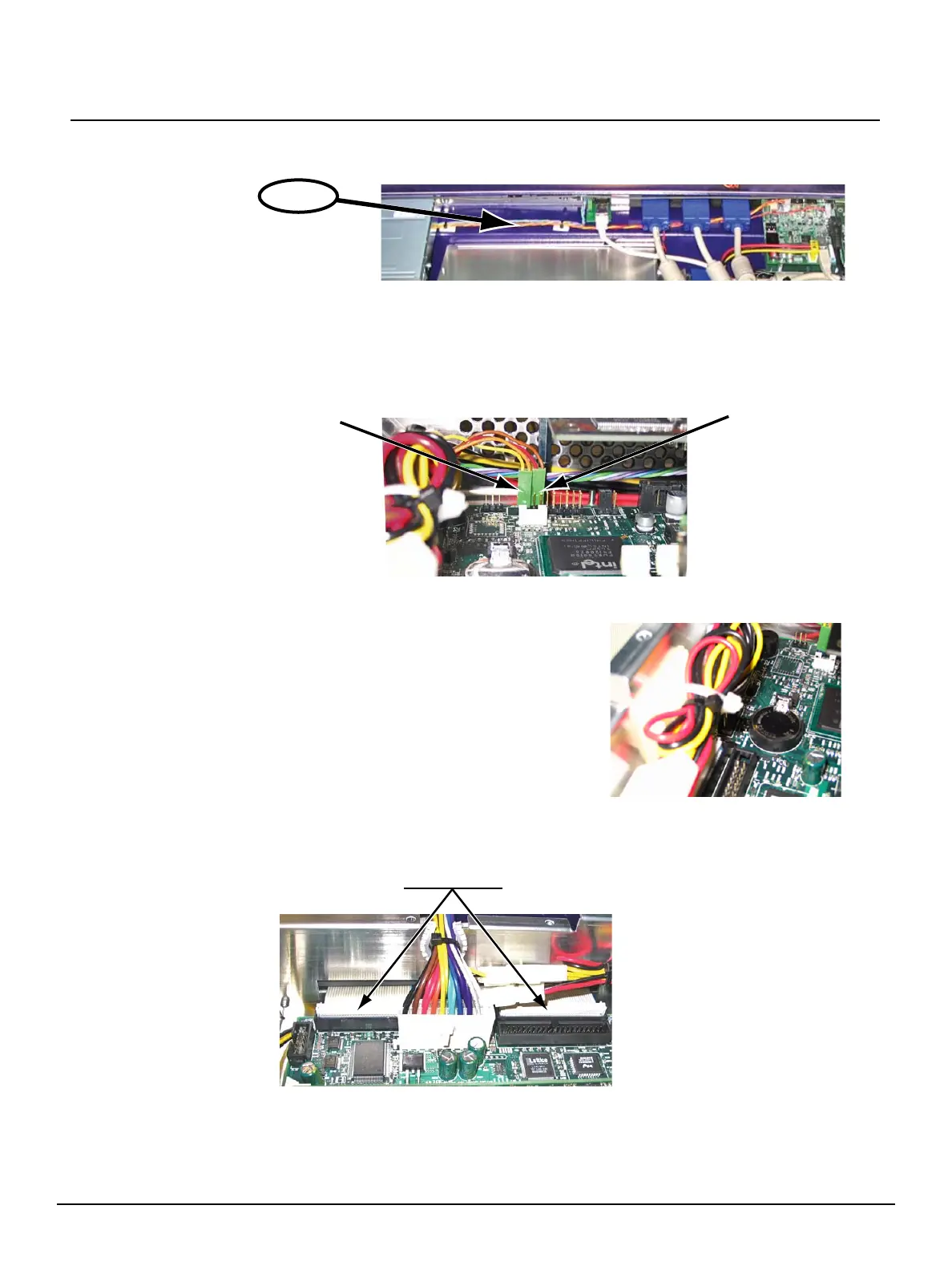
c: Route the Reset / LED cable loom through the back hole of the EMC cage.
d: Mate connector A (yellow and orange cable) to pins 1 and 3 of connector “front
panel”. The yellow cable should be on pin 1 (facing left as shown below).
e: Mate connector B (red and brown cable) to pins 6 and 8 of connector “front panel”.
The red cable should be on Pin 6 (facing left as shown below).
f: Secure connector A and connector B in place with a drop of silicone.
Step 7: Secure the power cable loom.
Step 8: Secure the hard drive and floppy drive cable loom connectors with silicone.
a: Add a strip of silicone on the hard drive and floppy drive cable connectors.
step 6.c
connector A
connector B
a: Add the self adhesive cable tie pad near the
power cable inlet of the EMC cage.
b: Tie down the cable loom to this pad so that
the cable is free of touching the memory
module and all other internal components.
Silicone here



 To Next Page