VM-10 Installation Guide Rev 05.12 Page 17 of 19 Essential Trading Systems Corp.
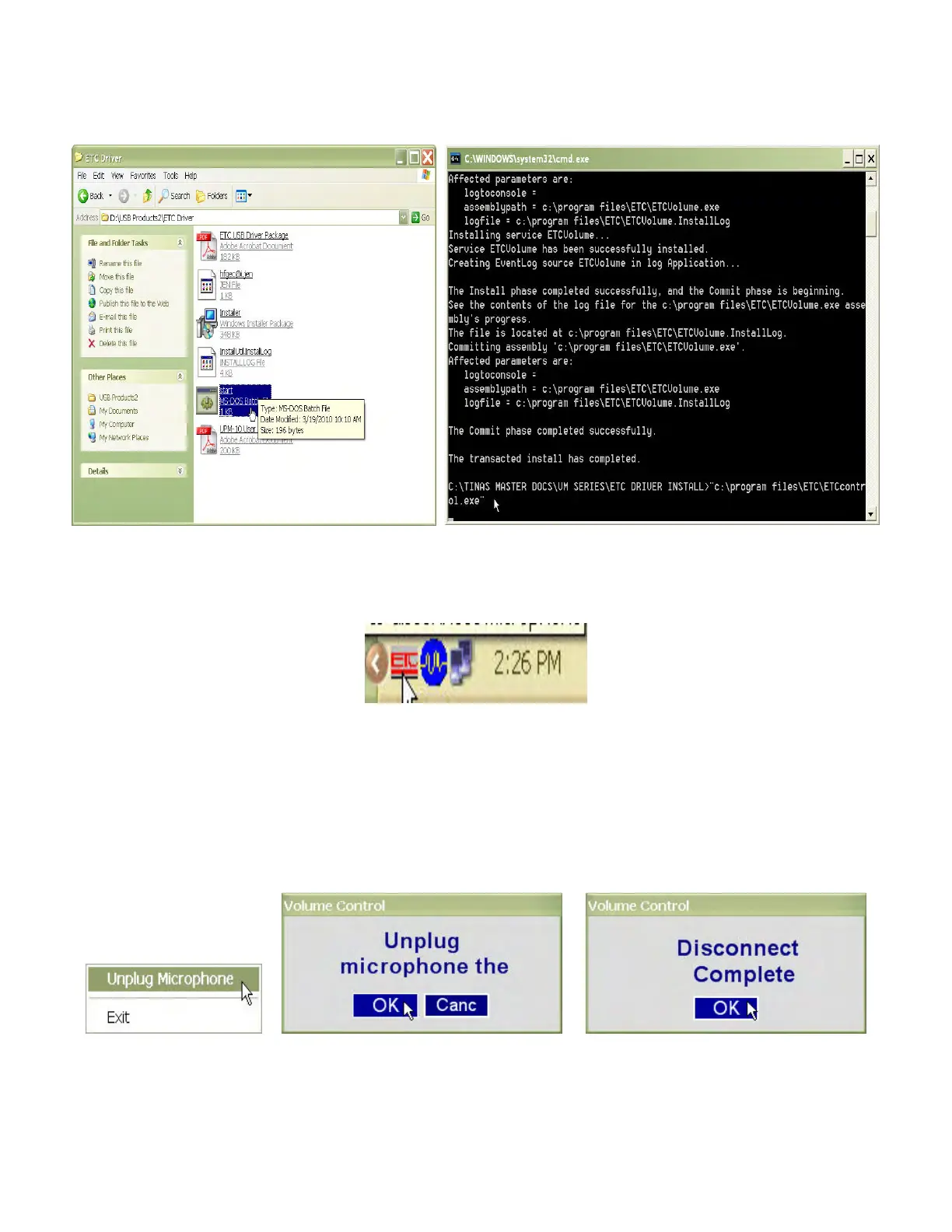
In the
E
E
T
T
C
C
D
D
r
r
i
i
v
v
e
e
r
r window click on the
S
S
t
t
a
a
r
r
t
t MS_DOS Batch file icon (Figure 50). The
C
C
:
:
\
\
W
W
I
I
N
N
D
D
O
O
W
W
S
S
\
\
s
s
y
y
s
s
t
t
e
e
m
m
3
3
2
2
\
\
c
c
m
m
d
d
.
.
e
e
x
x
e
e window will open and run through the process of activating the
volume control service (Figure 51).
Figure 50 Figure 51
When the process stops, close the window. To verify the volume control service is running, check
for the
E
E
T
T
C
C icon in the system tray (the lower right corner of the screen by the clock) (Figure 52).
Figure 52
USB Microphone Removal Procedure (Option)
By right clicking on the
E
E
T
T
C
C
icon in the system tray (Figure 52, pg 22), the
U
U
n
n
p
p
l
l
u
u
g
g
M
M
i
i
c
c
r
r
o
o
p
p
h
h
o
o
n
n
e
e
dialog box opens. Click on
U
U
n
n
p
p
l
l
u
u
g
g
M
M
i
i
c
c
r
r
o
o
p
p
h
h
o
o
n
n
e
e
(Figure 53). The Volume Control window will open.
Click the
O
O
K
K button (Figure 54). A
D
D
i
i
s
s
c
c
o
o
n
n
n
n
e
e
c
c
t
t
C
C
o
o
m
m
p
p
l
l
e
e
t
t
e
e message will appear in the
V
V
o
o
l
l
u
u
m
m
e
e
C
C
o
o
n
n
t
t
r
r
o
o
l
l window (Figure 55).
Figure 53 Figure 54 Figure 55
The Disconnect Complete window will self close as soon as the process is successfully stopped.
The ETC Volume Control service will automatically restart the next time a microphone is plugged
in.


 To Next Page