VM-10 Installation Guide Rev 05.12 Page 5 of 19 Essential Trading Systems Corp.
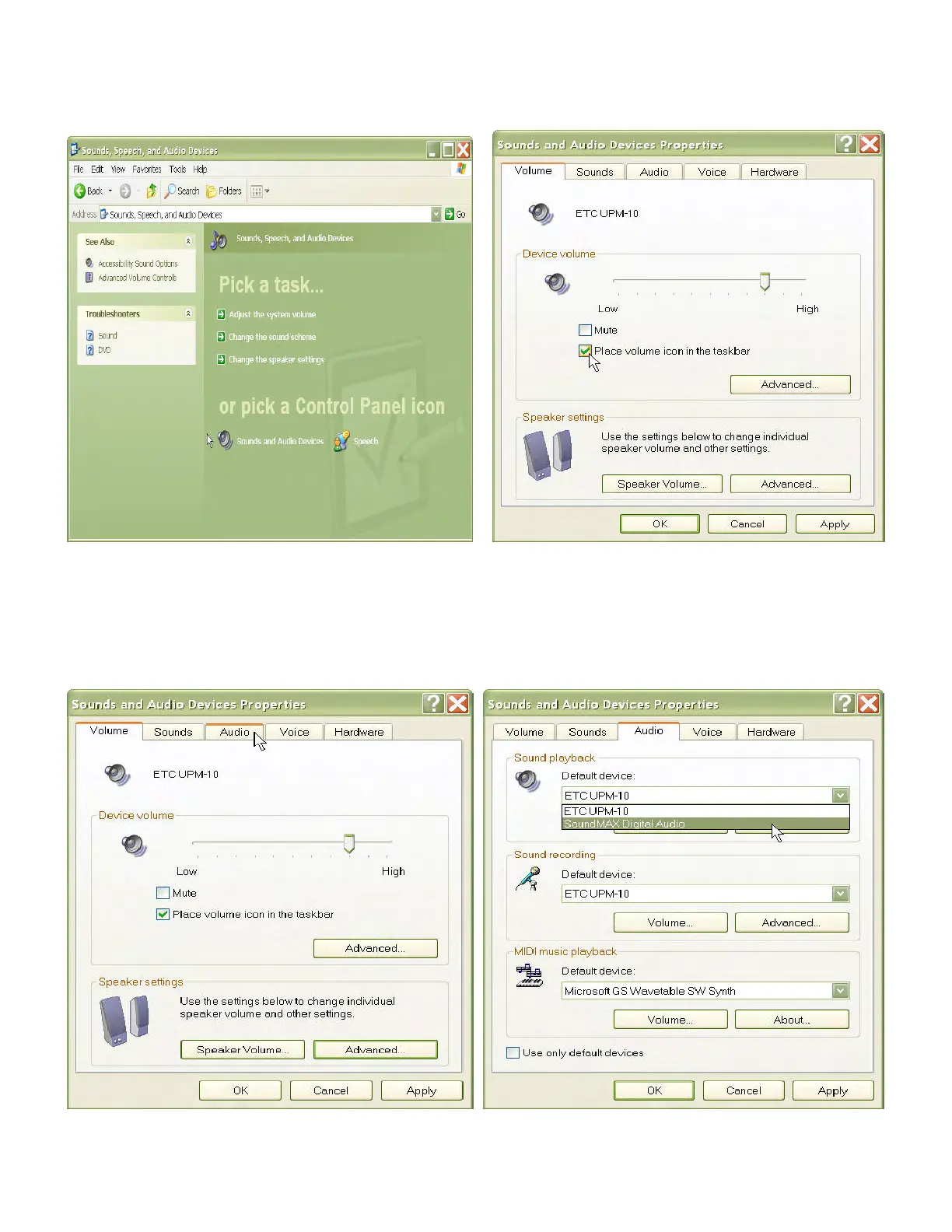
Click on the
S
S
o
o
u
u
n
n
d
d
s
s
a
a
n
n
d
d
A
A
u
u
d
d
i
i
o
o
D
D
e
e
v
v
i
i
c
c
e
e
s
s icon (Figure 2). Check “
P
P
l
l
a
a
c
c
e
e
v
v
o
o
l
l
u
u
m
m
e
e
i
i
c
c
o
o
n
n
i
i
n
n
t
t
h
h
e
e
t
t
a
a
s
s
k
k
b
b
a
a
r
r”
box so you can access these settings quicker in the future if needed (Figure 3).
Figure 2 Figure 3
To ensure proper VM-10 performance, sound card settings must be adjusted after initial device
installation (or sudden disconnect or power loss). Click on the
A
A
u
u
d
d
i
i
o
o tab (Figure 4). Click on the
D
D
e
e
f
f
a
a
u
u
l
l
t
t
d
d
e
e
v
v
i
i
c
c
e
e drop down menu (Figure 5) and choose default speakers (not ETC UPM-10) for
your system. Return to the Volume tab
Figure 4 Figure 5


 To Next Page