VM-10 Installation Guide Rev 05.12 Page 9 of 19 Essential Trading Systems Corp.
In the
P
P
r
r
o
o
p
p
e
e
r
r
t
t
i
i
e
e
s
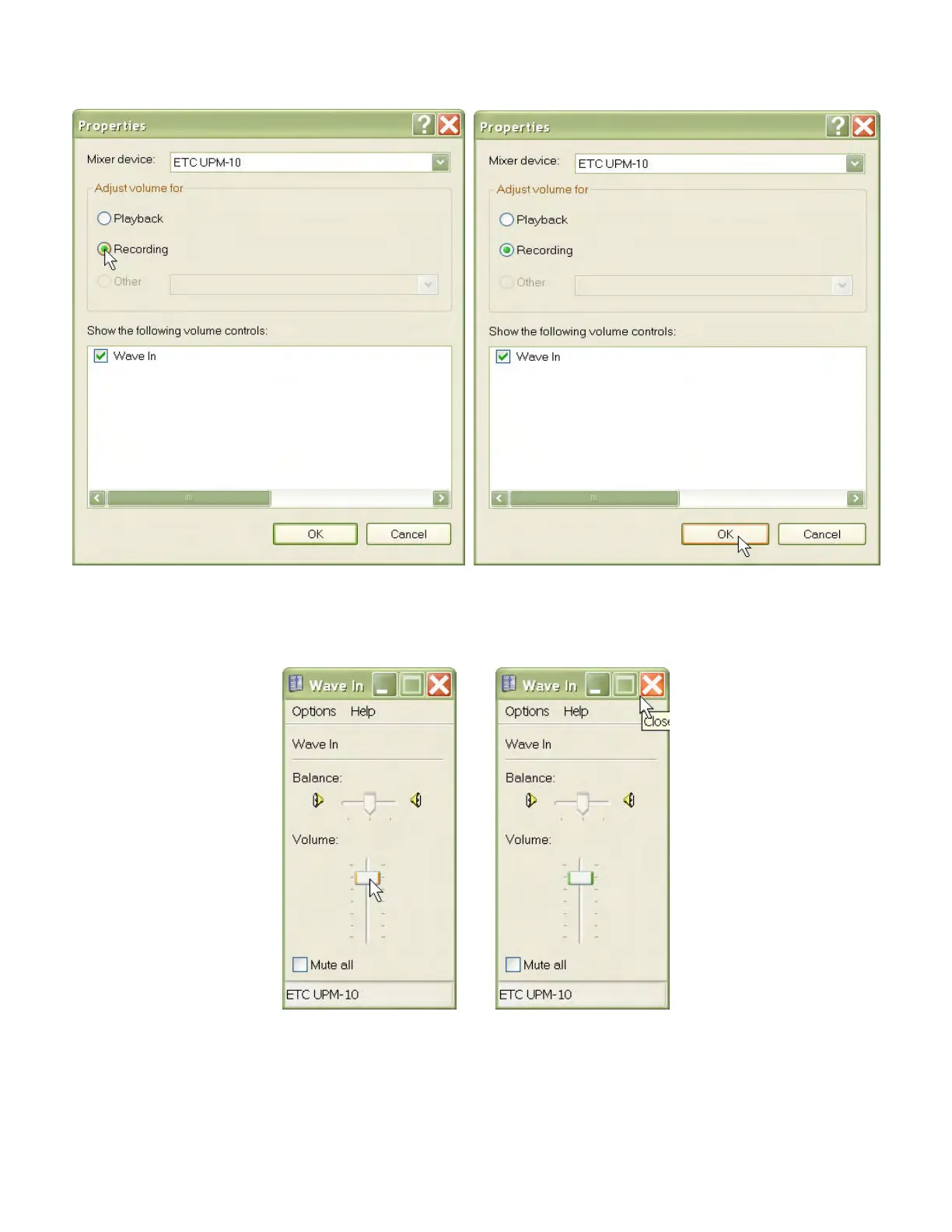
s window click on the
R
R
e
e
c
c
o
o
r
r
d
d
i
i
n
n
g
g circle (Figure 13). Click the
O
O
K
K
button (Figure 14).
.
Figure 13 Figure 14
The
W
W
a
a
v
v
e
e
I
I
n
n (recording level) window will appear. Adjust the volume to the recommended level
(Figure 15). Close out the
W
W
a
a
v
v
e
e
I
I
n
n window (Figure 16), and any other windows left open.
Figure 15 Figure 16
NOTE: The VM-10 utilizes standard Windows/Linux USB audio device drivers. If the unit is
disconnected without using the ETC Utility, the settings may revert to default levels. These levels
should be checked upon reconnection in the event the VM-10 becomes suddenly disconnected or
loses power.


 To Next Page