ETEL Doc. - Operation & Software Manual # DSC2P 903 / Ver. F / 3/6/05 Chapter B: System setup & tuning
Operation & Software Manual
Direct Drives & Systems 45
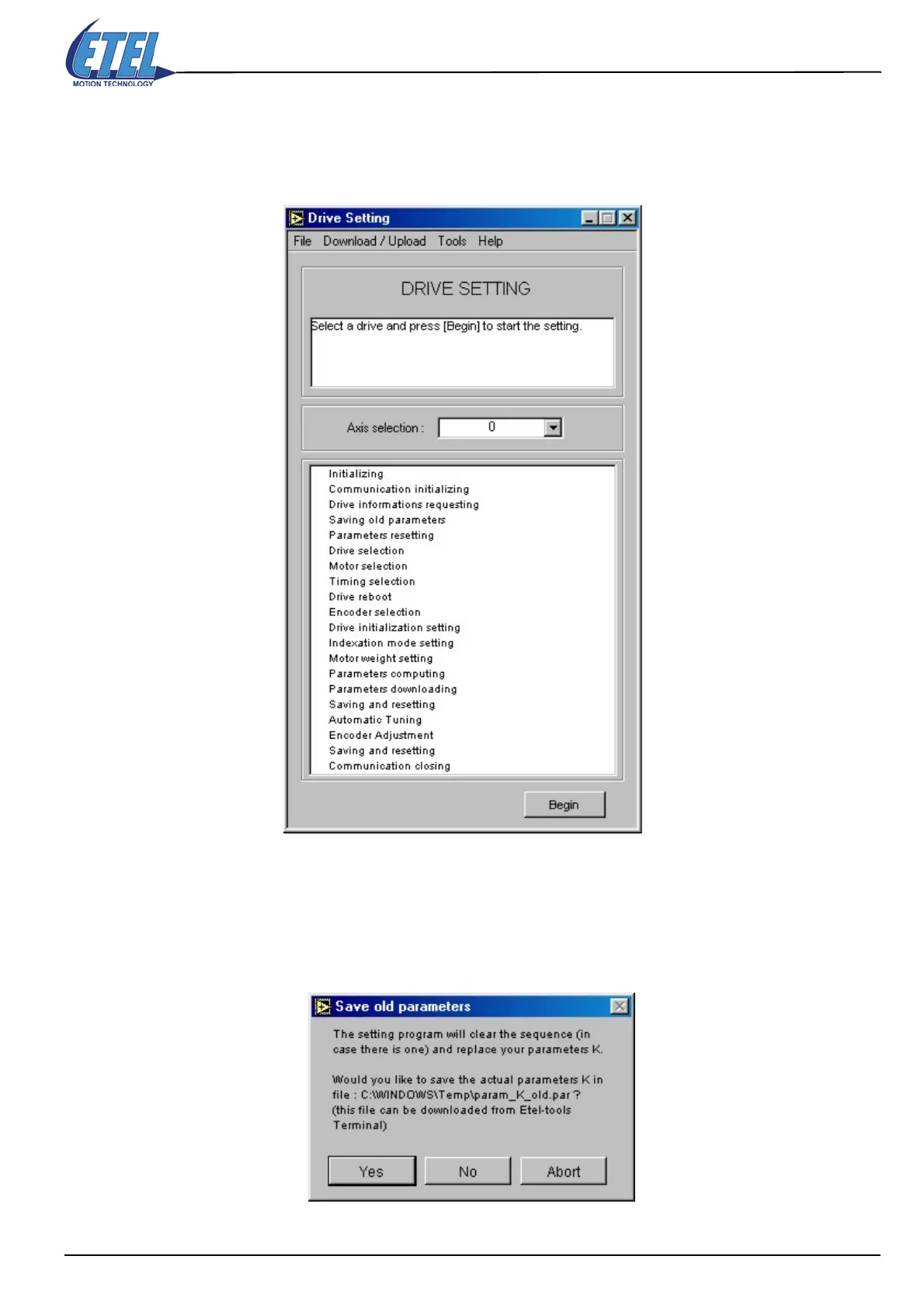
8.3 Drive Setting tool
Remark: Starting with the drive setting process is possible only if the TEB communication is established
between the DSMAX board and the controller(s) or if the EBL2 communication is established
between the PC and the controller.
The Axis selection detects automatically (with EBL2 communication) the axis number; this number cannot be
changed (with TEB communication, the axis number can be selected).
• Click on the Begin button to start the drive setting process.
ETT proposes to save the 'old' parameters stored in your controller; you should click on YES.
Caution: By clicking on NO, you will loose all parameters you were previously using with the controller!
• Click on the YES button and the next window will appear.



 To Next Page