A
H
BCD
IJK
OPQ
RST
UVW
LMN
XYZ
*
#
EFG
1
3
2
4
5
6
7
8
9
0
MAINTENANCE INSTRUCTIONS
Charging Batteries
When battery is low, an Alert beep will sound immediately following system startup.
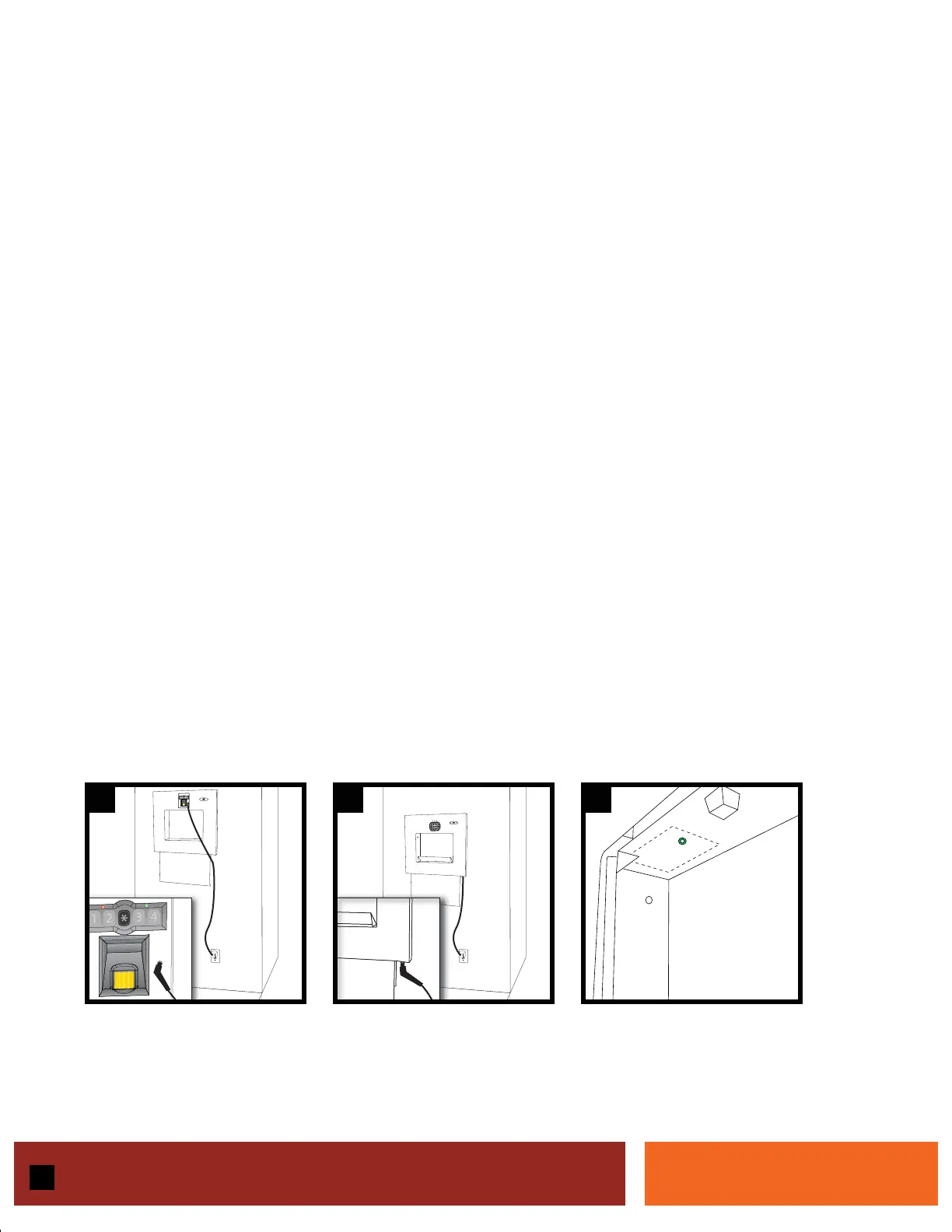
1. Plug AC Adapter into charger port (See Figure 24 for Model 20700 - See Figure 25 for Model 20710)
2. Charge overnight
Replacing the Battery
The Wall Vault™ uses a 12 volt battery. After several years of continuous use, the battery may decrease in
efficiency and need replacing.
1. Open Wall Vault™
2. Locate battery case on the upper left side (See Figure 26)
3. Remove allen bolt on battery case cover
4. Replace with standard 12 volt 4.5 A battery no larger than 3.75” x 4.25” x 3.25”
5. Close Wall Vault™ door
6. Activate system - system will retain user settings
Cleaning Wall Vault™ & Sensor
The face of the Wall Vault™ can be cleaned using approved stainless steel cleaner.
To clean the biometric sensor or touchpad, use a clean cotton cloth and gently wipe clean.
DO NOT SPRAY CLEANING SUBSTANCES NEAR OR ON ELECTRONIC COMPONENTS
15
24 25 26
5.ai 2/14/2005 11:16:51 AM



 To Next Page