53
GB
Memory
This feature allows you to set and execute a frequently used single stage programme. Once the cooking
programme is set, you can use it by pressing the Memory cook key. In the following example I will show
you how to set the cooking programme for 10 minutes 30 seconds at power level 720W(80%).
When MEMORY is set.
The cooking programme is stored in
the memory of your microwave oven.
Your oven will be reset, if you unplug
the microwave oven from the electrical
socket.
If you wish to change your MEMORY,
simply enter a new cooking
programme.
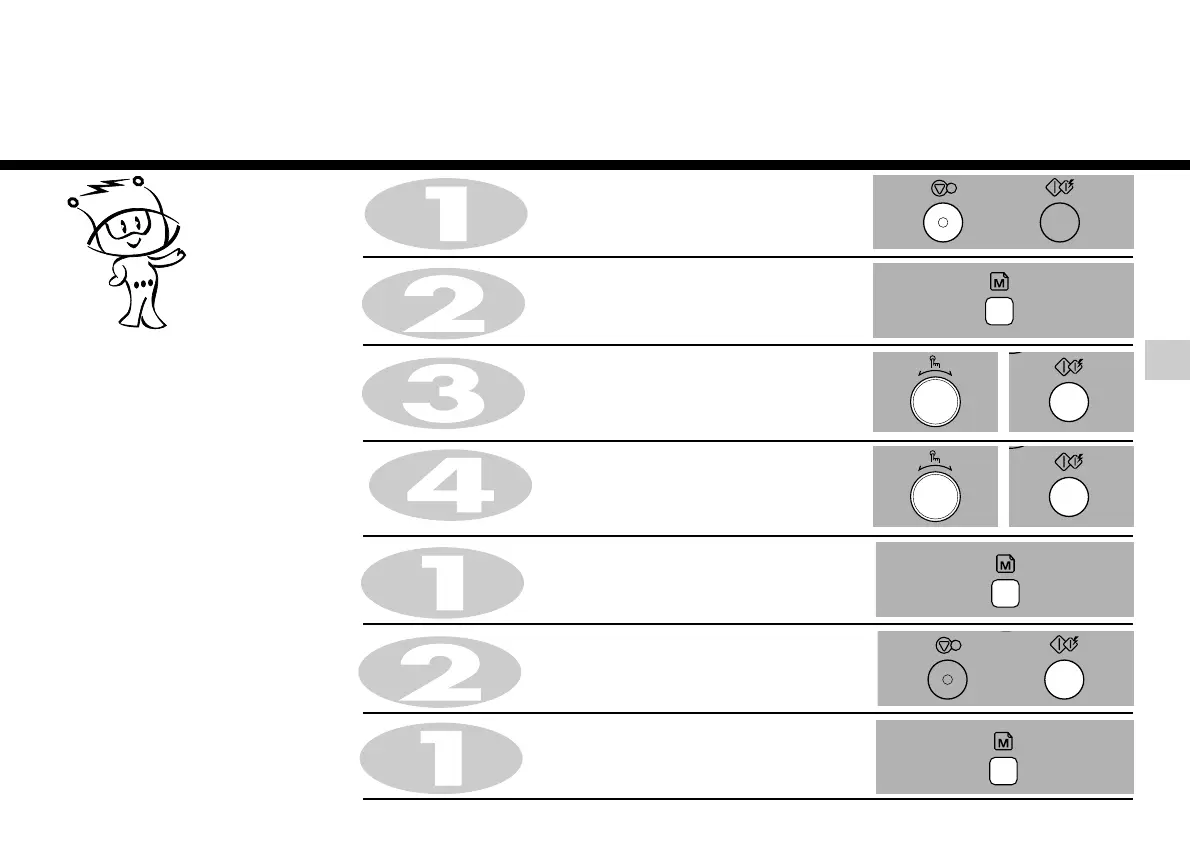
Press STOP/CLEAR.
When you cook, use it by pressing memory key.
Press MEMORY.
Press MEMORY.
“900W” appears on the display window.
Turn DIAL until display shows “MICROWAVE MODE”
press START for confirmation.
Press START.
1. To Set
2. To Cook
3. To Change
memory
Press MEMORY until “900W” appears on the display and beep sounds.
Turn DIAL knob until display shows “720W”.
press START for power confirmation.
Turn DIAL until display shows “10:30”
press START to starting and enter setting.


 To Next Page