EN 41
USING THE AUTOMATIC MENU SETTINGS
Vegetable menu setting
Add 30 - 45ml of cold water for every 250g, unless a dierent amount of water is
recommended (see table). Cover the vegetables for the minimum time (see table). Continue
cooking until you have the desired results. Stir the vegetables during and after cooking. After
cooking the dish, add salt, herbs or butter. Cover the dish and allow this to stand for 3minutes.
Cut fresh vegetables into pieces of equal size. The smaller they are, the faster they will cook.
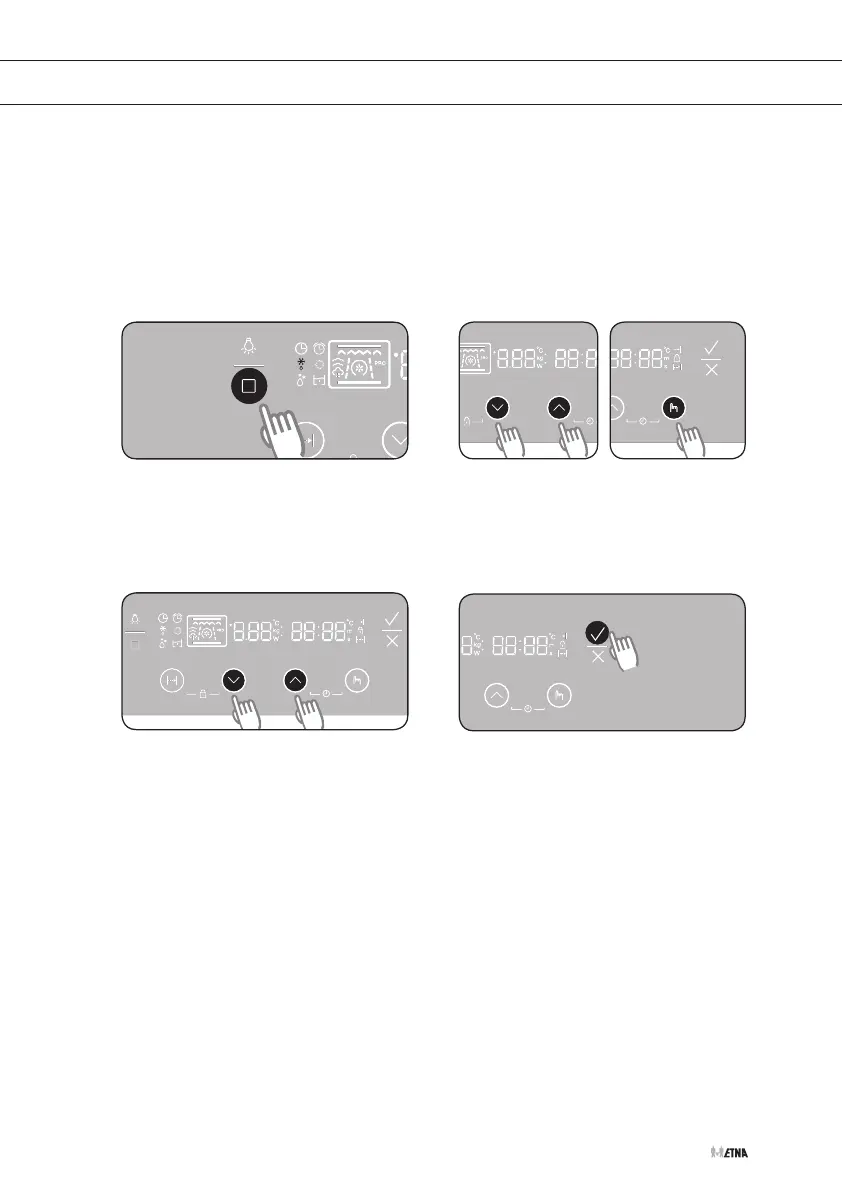
Selecting the vegetable menu function
Press the function selection button ten
times to select the vegetable menu
setting. The ‘vegetable menu setting’
symbol lights up in the display.
Press the settings buttons to set the
desired vegetable menu function.
Press the selection button.
Press the settings buttons to set the
desired weight.
If you do not select a weight, a weight
is set automatically after 5seconds.
Press START to start cooking.
1 2
3 4


 To Next Page