10
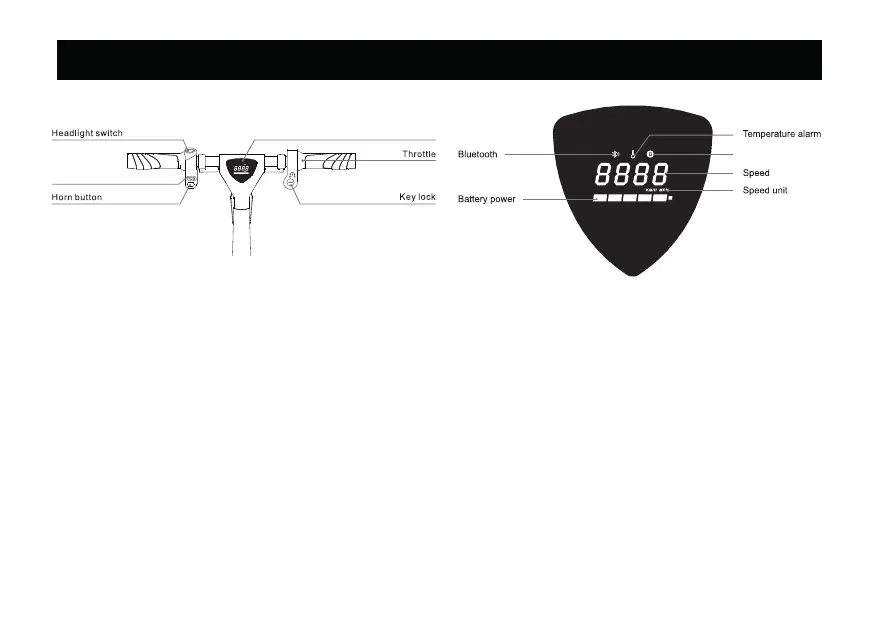
5. Button Instructions & Dashboard
Riding Mode switch
LED Display
Riding Mode
1. Display: Battery power, speeed, riding mode, etc.
2. Key Lock: Insert the key, turn clockwise to the ON position to turn on, and turn counterclockwise to the OFF position
to turn off.
3. Throttle: Move the throttle to ride in pure electric mode.
4. Headlight Switch: Push the switch to the ON position to turn on the front light, push it to the OFF position to turn off
the front light.
5. Photosensitive Switch: When the ambient light becomes dark, the front and rear lights will automatically turn on
when the headlight switch is not turned on.
6. Riding Mode Switch: Toggle the switch to any of the 5 available riding modes.
1) Pedal only mode 2) Pedal assist mode level 1 [ 5mph (7.5 km/h)], 3) Pedal assist mode level 2 [ 10 mph (15km/h)]
4) Pedal assist mode level 3 [ 16 mph (25km/h)], 5) Throttle only mode
7. Horn Button: Press the button to activate the horn sound.
8. Front and Rear Brakes: Gradually apply the brake levers, the e-bike will slow down and come to a complete stop.
NOTE: The throttle will not work while the brake lever/s are engaged.


 To Next Page