EasyManua.ls Logo

EUFY Clean G40 Hybrid+ - User Manual

EUFY Clean G40 Hybrid+
24 pages
Print Icon
To Next Page IconTo Next Page
Loading...
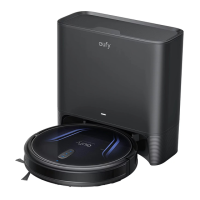
eufy Clean G40 Hybrid+
Owner’s Manual
T2273 51005003474 V01

Questions and Answers

  • J
    Jesus BeckJul 29, 2025
    What to do if EUFY Clean G40 Hybrid+ Vacuum Cleaner RoboVac cannot be charged?
    • M
      Marc WilliamsJul 29, 2025
      If your EUFY RoboVac cannot be charged, first check if the indicator on the auto-empty station lights up. If not, reconnect the power cord with the auto-empty station and try a new power outlet. Dust off the charging contact pins with a dry cloth. Check if you can hear the 'Charging' voice prompt when RoboVac is attached to the auto-empty station.
  • R
    Raymond OrtizAug 3, 2025
    How to turn on EUFY Clean G40 Hybrid+ Vacuum Cleaner RoboVac?
    • O
      orozcojulieAug 4, 2025
      To turn on your EUFY RoboVac, first ensure that the main power switch is turned on. If it still doesn't turn on, make sure the battery is fully charged. If there's still no response, turn the main power switch off and then back on.
  • T
    Todd FrancoAug 10, 2025
    How to improve suction power on EUFY Clean G40 Hybrid+ Vacuum Cleaner?
    • M
      Mr. Benjamin HarperAug 10, 2025
      To improve the suction power on your EUFY Vacuum Cleaner, check if any obstructions are blocking the suction inlet and empty the dust box. Additionally, check if the filter is wet due to water or other liquid on the floor; if it is, air-dry the filter completely before use.
  • M
    michaelcampbellAug 16, 2025
    What to do if my EUFY Clean G40 Hybrid+ RoboVac stops suddenly?
    • K
      Kevin WintersAug 16, 2025
      If your EUFY RoboVac suddenly stops working, first check if it is trapped or stuck on an obstacle. Also, check the battery level to ensure it's not too low. If problems persist, try turning the main power switch off, waiting two seconds, and then turning it back on. Additionally, check for any voice prompts or LED indicators that may provide further information.
  • S
    susangilmoreAug 22, 2025
    Why I cannot schedule cleanings on my EUFY Clean G40 Hybrid+ Vacuum Cleaner?
    • K
      kylethompsonAug 22, 2025
      If you cannot schedule cleanings on your EUFY Vacuum Cleaner, ensure that the main power switch is turned on and that the scheduled time has been set correctly. Also, verify that the time zone in the eufy Clean app is consistent with that on your mobile device and that your RoboVac’s battery is charged. Keep in mind that cleaning schedules are erased when RoboVac is powered off, and if RoboVac is powered on without Internet access, cleaning schedules will not synchronize and must be reset via the app.

Summary

Important Safety Instructions

About Your RoboVac

Whats in the Box

Lists all components included with the RoboVac device.

RoboVac Anatomy

A. Top & Side

Diagram showing the top and side view of the RoboVac with labeled parts.

B. Bottom

Diagram illustrating the bottom view of the RoboVac with labeled components.

C. Dust Box and Water Tank (2-in-1)

Exploded view of the combined dust box and water tank with labeled parts.

D. Mopping Module

Illustration of the mopping module with its attachment areas.

E. Suction Inlet

Diagram showing the suction inlet on the RoboVac and its relation to the dust box.

F. Auto-Empty Station

Detailed illustration of the auto-empty station with labeled parts.

Using Your RoboVac

Important Tips Before Use

Key advice and precautions to take before operating the RoboVac for the first time.

Preparation

Use the Auto-Empty Station

Store Accessories

Use Your RoboVac with the eufy Clean App

Restore Factory Settings

Schedule Cleaning

Start; Pause Cleaning

Select a Cleaning Mode

Spot Cleaning Mode

Select a Suction Power Level

Select BoostIQ Feature

Use Mopping System

Cleaning and Maintenance

Clean the Dust Box, Water Tank, and Filter

Step-by-step guide to cleaning the dust box, water tank, and filter components.

Use RoboVac with Amazon Alexa; The Google Assistant

Clean the Rolling Brush

Clean the Side Brush

Replace the Side Brush

Steps for removing an old side brush and installing a new one.

Clean the Sensors and Charging Pins

How to clean the device's sensors and charging contacts for optimal performance.

Clean the Swivel Wheel

Clean the Mopping Cloth

Instructions for washing and drying the washable mopping cloth after use.

Replace the Dust Bag

Clean the Auto-Empty Station

Troubleshooting

Voice Alert

Explanation of voice prompts and their corresponding causes and solutions.

Specifications

Customer Service

EUFY Clean G40 Hybrid+ Specifications

General IconGeneral
TypeRobot Vacuum Cleaner
Suction Power2500 Pa
App ControlYes
Voice ControlYes
Gyro-navigationYes
Self-EmptyingNo
Charging Time4-5 hours
Noise Level60 dB
Voice Control AssistantsAmazon Alexa, Google Assistant
Suction Power (Pa)2500 Pa
Noise Level (Max)60 dB
Wi-Fi ConnectivityYes
Auto Mode SwitchingYes
Auto Carpet BoostYes
Drop SensingYes
Obstacle AvoidanceYes
Auto RechargeYes
Multi-floor MappingNo
Virtual BoundariesYes
SchedulingYes
Warranty12 months

Related product manuals