eufy Security Video Smart Lock E330 (T8531) USER GUIDE
eufy Security Video Smart Lock E330 with Chime (E8531) USER
GUIDE
ABOUT THE PRODUCT
This guide applies to both T8531 (eufy Security Video Smart Lock E330) and E8531 (eufy Security Video Smart Lock E330 with
Chime).
Video Smart Lock E330 comes with 8 GB of built-in local storage. The chime can extend the storage by recording video clips
on a microSD card (not included) while acting as a digital indoor chime. To buy a chime, visit eufy.com.
AT A GLANCE
Video Smart Lock
Model: T8531
Ensure Tight Seal
⑥
⑤
⑦
②
③
④
⑨
⑩
⑧
Fingerprint Scanner
• Use to lock and unlock the door.
Battery Indicator
• Turns red when the battery is low.
Camera Lens
Ambient Light Sensor
• Detects the amount of light in the area.
Keypad
Status Light and Lock / Unlock Button
• Blue: Door Unlocked
• Orange: Door Locked
• Red: Abnormal State
Lock Cylinder
Doorbell Button
• The light automatically turns on when someone
approaches the door.
USB-C Port
• Charges the lock in emergency situations. To stop lock
tampering, this port is solely for charging purposes and
can not transfer any data.
10
Speaker
ABOUT THE PRODUCT
AT A GLANCE
WHAT'S IN THE BOX
CHARGING THE BATTERY
INSTALLING VIDEO SMART LOCK
OPENING AND CLOSING THE LOCK CYLINDER COVER
USING DOORBELL CHIME (OPTIONAL)
SETTING UP THE SYSTEM

 Need help?
 General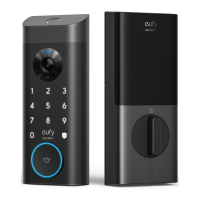

 To Next Page