Step 1. Prepare the Door
1. Remove the existing lock.
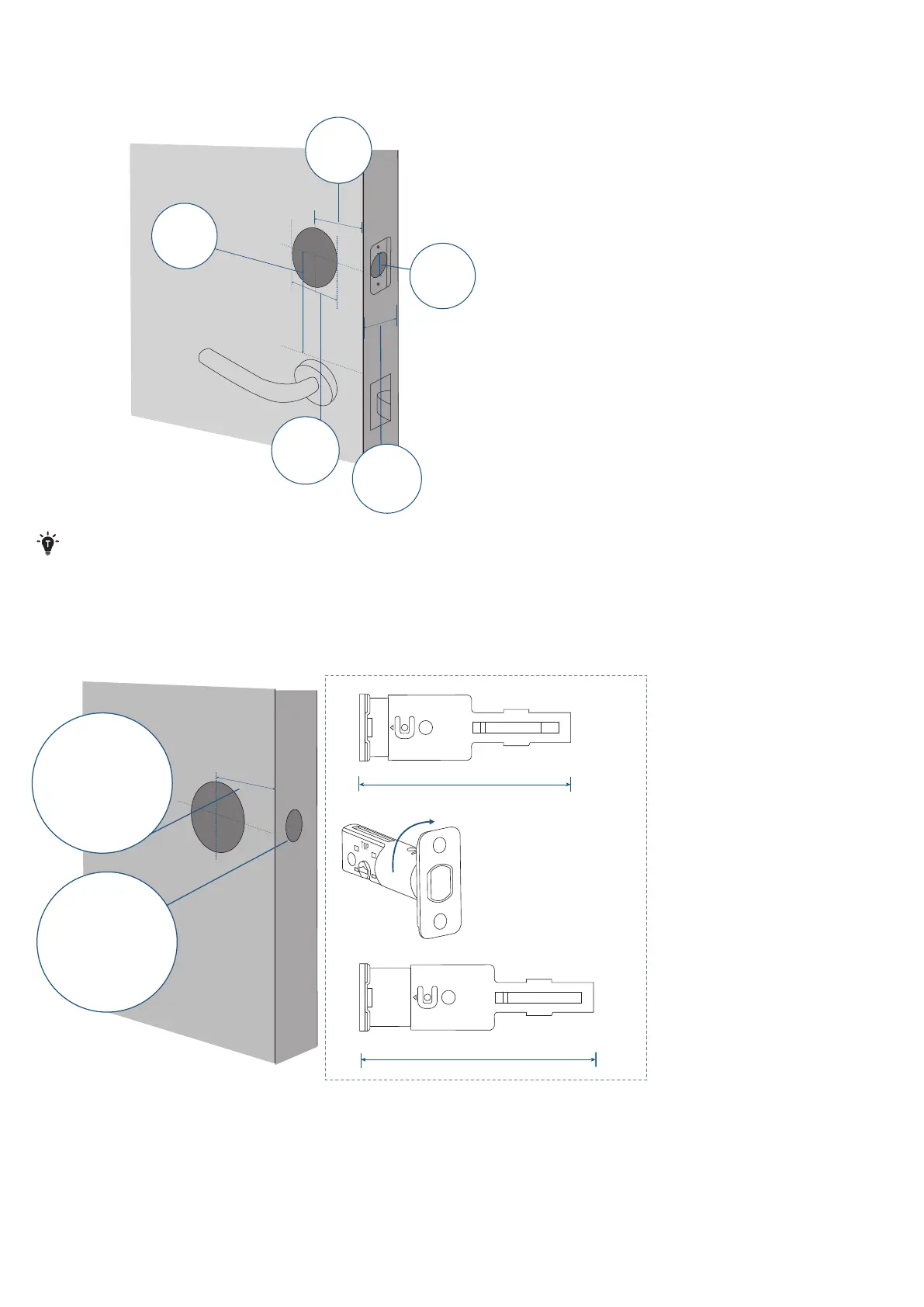
2. Check if your door has holes as illustrated below. If not, use the template and drill holes in your door.
Minimum
Distance
1
3
/
4
in / 45 mm
Backset
2⅜ in / 60 mm or
2¾ in / 70 mm
Door Hole
Diameter
1 in / 25.4 mm
Door
Thickness
1⅜ in - 2¹¹/
₆₄
in
35 mm - 55 mm
Cross Bore
Diameter
1 ½ in / 38 mm
2 ⅛ in / 54 mm
Be advised that Video Smart Lock E330 is not compatible with storm doors and may not be suitable for the standard
entry doors behind them, as the storm door may block the camera.
We recommend ensuring your door is a standard entry door, without a storm door, before considering this product.
Step 2. Install the Deadbolt
1. Check your door to see if the deadbolt requires adjustment.
2-3/8
2-3/4
180°
2⅜ in / 60 mm
2¾ in / 70 mm
If the backset is 60 mm,
insert the deadbolt
directly. If the backset
is 70 mm, rotate the
faceplate of the deadbolt
180° to extend the
length.
Backset
Latch Hole


 To Next Page